Apple today released watchOS 26, the newest version of the watchOS operating system that runs on the Apple Watch. watchOS 26 is compatible with the Apple Watch Series 6, all Apple Watch Ultra models, and the Apple Watch SE 2 and later. You'll also need an iPhone 11 or later with iOS 26.
watchOS 26 can be downloaded for free on an iPhone running iOS 26 by opening up the Apple Watch app and going to General > Software Update, or initiating an update in the Settings app on the watch. To install the new software, the Apple Watch needs to have at least 50 percent battery and it needs to be placed on a charger.
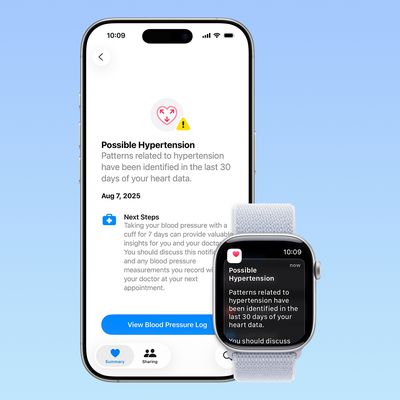
watchOS 26 uses Apple's Liquid Glass design language that is also available across iOS, iPadOS, and macOS. It brings Hypertension alerts to the Series 9 and later and the Ultra 2 and later, plus it introduces a new Sleep Score feature that's designed to help you better understand your sleep quality.
Workout Buddy provides a personalized workout experience that motivates you during exercise. There's also a new layout for the workout app and better integration with music. The Smart Stack features configurable widgets, and the Control Center is more customizable so you can add third-party app controls. Notes is available on the Apple Watch, and Messages supports Live Translation.
Apple added new watch faces, including Exactograph, Flow, and Waypoint (Ultra only), with new features also available for the Photos face. There's also a new Wrist Flick gesture to dismiss notifications one-handed, and it works on the Series 9 and later and the Ultra 2 and later. Apple's release notes for watchOS 26 are below:
Liquid Glass
- A new design delivers a more expressive and seamless experience while maintaining the instant familiarity of watchOS and bringing more focus to your content
- Liquid Glass introduces more vitality to interactions across watchOS, refracts and reflects content in real time, and brings even more clarity to Smart Stack, Control Center, navigation, in-app controls, and moreHypertension Notifications
- Hypertension notifications can alert you if consistent signs of chronic high blood pressure are observed over 30 day periods (Available on Apple Watch Series 9 and later, Apple Watch Ultra 2 and later)
- Hypertension notifications feature is intended for users 22 years or older, without a previous diagnosis of hypertension, and who are not pregnantSleep Score
- Sleep score provides a nightly score and classification of your sleep, based on sleep duration, bedtime consistency, and sleep interruptions to help you better understand the quality of your sleep and how to make it more restorative
- Sleep score can be viewed in the Sleep app, in the Smart Stack or as a watch face complicationWorkout Buddy
- Personalized fitness experience with Apple Intelligence incorporates your workout data and fitness history for generative audible motivational insights during your workout
- Personalized insights are generated during key moments - like a pep talk to kick it off, your workout for splits and major milestones, and a summary of your effort once you finish - by rapidly analyzing and comparing your fitness history to your current workout
- Choose from three voices developed using a text-to-speech model with voice data from Apple Fitness+ trainers
- Your fitness data is processed privately and securely using your nearby Apple Intelligence-enabled iPhone and Private Cloud ComputeSmart Stack
- Smart Stack has an improved prediction algorithm that deploys a Smart Stack hint when there is a suggestion that is immediately useful - for example, if you are in a remote location, you'll see a hint to start recording Backtrack
- Configurable widgets let you customize how widgets appear in the Smart Stack so you can see what's most important for you - for example, select a home accessory you'd like quick access to in the Home widgetMessages
- Live Translation in Messages uses Apple Intelligence and automatically translates incoming texts, including group messages, and sends a response in your preferred language -- it'll be translated when it's delivered (Available on Apple Watch Series 9 and later and Apple Watch Ultra 2 and later when paired with an Apple Intelligence-enabled iPhone)
- Smart actions will be suggested in Messages using the context of a conversation, like starting a Check In when a friend asks a user to share when they arrive home
- Smart Replies get even more precise with an improved on-device language model that can generate relevant responses based on the content of a conversationWatch Faces
- Exactograph is a modern re-imagination of a traditional regulator watch which separates out hours, minutes and seconds for more precise time keeping
- Flow uses Liquid Glass numerals that refract a fluid orb of color that responds to your wrist movements
- Waypoint acts as a live compass that will show where you are in relation to places you've saved in Maps or points of interest (Available on Apple Watch Ultra)
- Hermès Faubourg Party features animated shorts that appear based on the time of day or movements with a series of characters (Available on Apple Watch Hermès)
- The Photos face is enhanced by the new design with Liquid Glass, elevating numerals so you can see even more of your photos
- The Photos face will now shuffle images based on Featured content from Photos, so you can see images of your most meaningful moments every time you raise your wrist or tap the display
- Explore and discover watch faces more easily with the redesigned watch face gallery, with faces grouped into collectionsOther features
- New layout of the Workout app makes it easier to use your favorite features - tap the icons in the four corners for quick access to metrics and views, experiences like Custom Workout and Pacer, media, Workout Buddy, and alerts
- Media experience in the Workout app is more integrated and intelligent, as Apple Music can now select the best playlist based on the workout type and your personal tastes, or you can see suggestions for playlists or podcasts based on what you've recently listened to during that particular workout type
- Notes app comes to Apple Watch, allowing you to access your notes right on your wrist, pin and unlock notes, complete checklist items, and create new notes with Siri, dictation, and the keyboard
- Wrist Flick is a new one-handed gesture you can use to dismiss a notification, mute incoming calls, silence timers and alarms, or return to your watch face (Available on Apple Watch Series 9 and later and Apple Watch Ultra 2 and later)
- Over 20 watch faces including Exactograph, Activity Digital, Reflections as well as Stopwatch and Timer apps, get 1Hz support that show seconds ticking in always-on mode (Available on Apple Watch Series 10 and later)
- Apple Watch can automatically adjust the volume of your notifications, incoming calls, timers, alarms, and Siri, based on the ambient noise in your environment
- Hold Assist and Call Screening come to the Phone app, when an iPhone is nearby. Hold Assist keeps your spot in line while you wait to speak to a live agent, and rings you to return to the call when the live agent is there. Call Screening lets you screen incoming calls from unknown numbers, getting you the caller's name and reason for the call before the phone rings
More information on all of the new features available in watchOS 26 can be found in our watchOS 26 roundup.