

iPadOS 26 to Bring These Mac-Like Features to Your iPad

The lines between iPad and Mac have never been blurrier – and with iPadOS 26, currently in beta and expected later this month, Apple is leaning further into that overlap than ever before. The update brings a suite of powerful new features that elevate the iPad's utility, bridging the gap between touch-first tablet and full-fledged desktop machine.
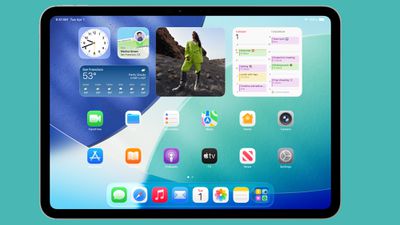
ipados 26 home screen
From enhanced multitasking to advanced file management, iPadOS 26 pushes Apple's tablet deeper into Mac territory, without sacrificing the unique strengths that make the iPad so versatile. Here are just some of the ways iPadOS 26 makes the iPad feel more like a Mac than ever – coming soon to a device near you.

Menu Bar
ipados 26 menu bar
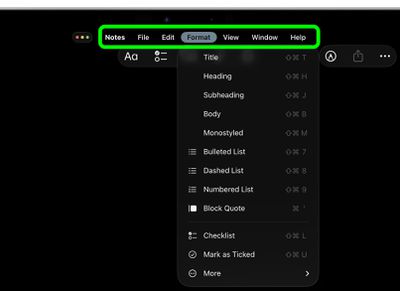
Within any active app, swipe down from the top of the screen and you will see a new, fully functioning macOS-style menu bar. With the foremost dropdown menu being the app's name (where app settings are typically accessed), other standard menus can include File, Edit, Format, View, Window, and Help. As you'd expect, the menu bar is dynamic, and will display menus specific to the app. In Safari you get Bookmarks and History, for instance.

Windowed Apps
iPadOS 26 App Windowing
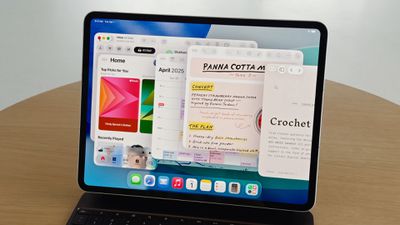
In Settings ➝ Multitasking & Gestures, there's a new Windowed Apps mode that essentially lets you arrange and resize multiple windows in a single space, just like on a Mac. The new mode can also be invoked from Control Center, thanks to a new button that with a long press lets you switch between Windowed Apps and Stage Manager.

You can move multiple app windows and stack them on top of each other by dragging each window from the top, and you can individually resize them by dragging the bottom-right corner. And if you quickly drag an app window to a corner of the screen, it will automatically expand to fill that half of the screen. Tapping a space on the Home Screen will also scatter all open windows to the sides of the screen, giving you space to open other apps.

Traffic Lights
ipados 26 traffic lights
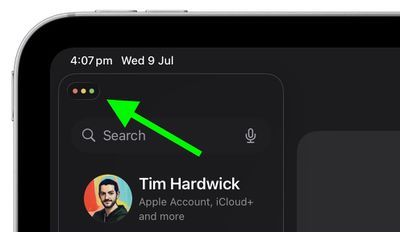
In the top-left corner of every window you'll now see three familiar traffic lights, straight out of macOS. Tapping the symbol expands it into red, amber, and green buttons for closing, minimizing, and expanding the window to fullscreen.
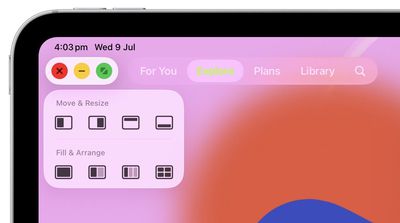
traffic light options ipados
Long-pressing the buttons also reveals the Mac-style Move & Resize and Fill & Arrange options, as well as an option to park the app off-screen to Add a New Window (if the app supports it).

App Exposé
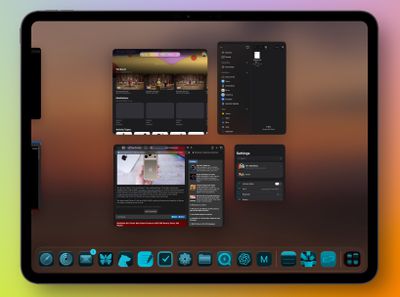
expose ipados
In the new Windowed Apps mode, iPadOS 26 also includes an App Exposé-style view that's similar to the App Switcher. Swipe up from the bottom of the screen to invoke the view, which shows all the open apps in the current space. You can also scroll the new interface to see your other open apps, whether they're sharing spaces or open in full-screen mode.

Preview
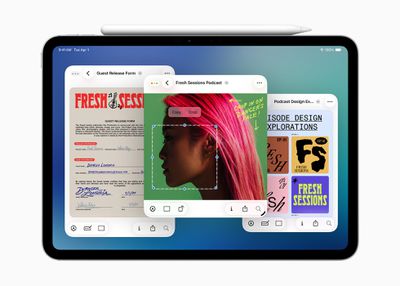
iPadOS 26 Preview App
The iPad finally includes the Mac's long-standing Preview app, only now with Apple Pencil support, enabling you to easily open, edit, and mark up a range of images, documents, and file types. The Preview app's browsing menu is a lot like the Files interface, where you can browse your files and check out recent and shared items. You can also scan documents from right within the app.

Trackpad Pointer
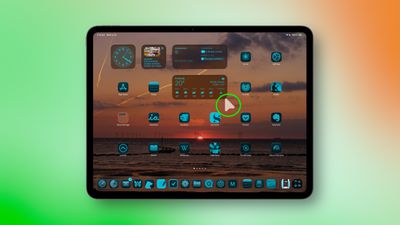
ipados 26 pointer
If you have a Magic Keyboard trackpad or a Bluetooth mouse connected to your iPad, the cursor is now a Mac-like pointer rather than a circle. And if you shake it, the pointer will get bigger so that you can easily locate it on the screen.

Advanced File Management
ipados 26 files app
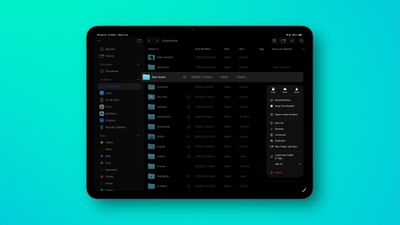
In iPadOS 26, the iPad's Files app is enhanced with a new List view that features resizable columns and collapsible folders, and new filters, allowing users to see more document details at a glance and organize their files. To help you identify folders more easily, the app now supports folder customization with custom colors, icons, and emoji, all of which sync across devices.

In Files, iPadOS 26‌ also allows you to set a default app for opening specific files or file types, thanks to a new Open With... option in the contextual dropdown menu. You can also change the default app in the new Get Info panel.

Folders in Dock
folder dock ipados
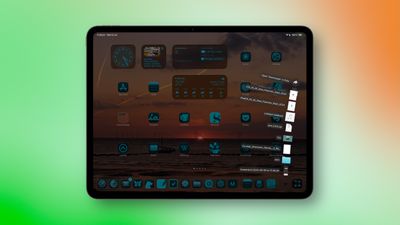
In the Files app, long press on a folder and you'll see a new Add to Dock option in the contextual dropdown menu. So you can now park any folder in your Dock, and if you long press on its icon, you'll see Mac-style display options to view the content as a Grid or a Fan, as well as the typical sorting preferences.

In iPadOS 26, you can now fit up to 23 icons in the Dock, so there's nothing stopping you from adding multiple folders. In Settings ➝ Multitasking & Gestures, there's also a new option to Automatically Show and Hide the Dock, just like in macOS.


Popular Stories

Aston Martin CarPlay Ultra Screen

Apple's CarPlay Ultra to Expand to These Vehicle Brands Later This Year

Sunday February 1, 2026 10:08 am PST by
Last year, Apple launched CarPlay Ultra, the long-awaited next-generation version of its CarPlay software system for vehicles. Nearly nine months later, CarPlay Ultra is still limited to Aston Martin's latest luxury vehicles, but that should change fairly soon. In May 2025, Apple said many other vehicle brands planned to offer CarPlay Ultra, including Hyundai, Kia, and Genesis. In his Powe...
Apple Logo Black

Apple Just Made Its Second-Biggest Acquisition Ever After Beats

Thursday January 29, 2026 10:07 am PST by
Apple today confirmed to Reuters that it has acquired Q.ai, an Israeli startup that is working on artificial intelligence technology for audio. Apple paid close to $2 billion for Q.ai, according to sources cited by the Financial Times. That would make this Apple's second-biggest acquisition ever, after it paid $3 billion for the popular headphone and audio brand Beats in 2014. Q.ai has...
Apple Logo Black

Apple's Next Launch is 'Imminent'

Sunday February 1, 2026 12:31 pm PST by
The calendar has turned to February, and a new report indicates that Apple's next product launch is "imminent," in the form of new MacBook Pro models. "All signs point to an imminent launch of next-generation MacBook Pros that retain the current form factor but deliver faster chips," Bloomberg's Mark Gurman said on Sunday. "I'm told the new models — code-named J714 and J716 — are slated...
14 inch MacBook Pro Keyboard

Apple Changes How You Order a Mac

Saturday January 31, 2026 10:51 am PST by
Apple recently updated its online store with a new ordering process for Macs, including the MacBook Air, MacBook Pro, iMac, Mac mini, Mac Studio, and Mac Pro. There used to be a handful of standard configurations available for each Mac, but now you must configure a Mac entirely from scratch on a feature-by-feature basis. In other words, ordering a new Mac now works much like ordering an...
Apple MacBook Pro M4 hero

New MacBook Pros Reportedly Launching Alongside macOS 26.3

Sunday February 1, 2026 5:42 am PST by
Apple is planning to launch new MacBook Pro models with M5 Pro and M5 Max chips alongside macOS 26.3, according to Bloomberg's Mark Gurman. "Apple's faster MacBook Pros are planned for the macOS 26.3 release cycle," wrote Gurman, in his Power On newsletter today. "I'm told the new models — code-named J714 and J716 — are slated for the macOS 26.3 software cycle, which runs from...

Top Rated Comments

justanotherdave Avatar
22 weeks ago

There are software products that are so full-featured that people go oooh and aaah.

Then there is Apple. Take a well established software, strip out of the advanced stuff, and release it. Yes, we have Notes on the iPhone, yes, a Calendar, yes, a Calculator.

And then with each iteration, each new version they add in stuff, and the users go: Oh, that's nice.

Notes got formatting and lists, version...whatever.
Calendar got week numbers, 10 years after launch.
Calculator got scientific mode by using it landscape, iPhoneOS2

All the while they could've just released a full-featured product to start with.

This is Apple TradeMark.
This is Their Way.
If Apple doesn’t significantly update their Apps they get criticized.

If they add a slew of features other software has they get criticized for sherlocking.

Basically people will whine about Apple no matter what they do. It’s the only constant here at MR.
Score: 12 Votes (Like | Disagree)
joeblow7777 Avatar
22 weeks ago
Might be an unpopular opinion, but I don’t want my iPad to be more like a Mac.
Score: 10 Votes (Like | Disagree)
phuklok1 Avatar
22 weeks ago
not software related but i wish they would keep the usbc port but add the mac magsafe power connector on ipads…at least higher models.

it’s very convenient, more efficient than qi charging (which ipad doesn't have anyway) and saves wear and tear on the single usbc port. my usbc port still works but is definitely looser than it used to be regardless of how careful i am.
Score: 8 Votes (Like | Disagree)
MacCheetah3 Avatar
22 weeks ago
It’s nice, I guess, for those who want it. For me…. Eh… I’d rather have a MacBook as it would seem you’d need to purchase the Magic Keyboard ('https://www.apple.com/ipad-keyboards/'), etc to make this work fluently anyway.


Can you format a hard drive in the files app?
iPadOS 18 added/includes:


[HEADING=1]Change the formatting of an external storage device[/HEADING]
You can use the Files app to quickly change an external drive to APFS (Apple File System), ExFAT, or MS-DOS (FAT) file formats on iPad models that have a USB-C port.
[LIST=1]
* Go to the Files app ipados 26 mac like features for ipad image on your iPad.
* Tap ipados 26 mac like features for ipad image at the top of the screen.
* Touch and hold the name of the storage device below Locations, then tap Erase.
* Select a format for the device—for example, APFS, ExFAT, or MS-DOS (FAT)—then tap Erase again.

https://support.apple.com/guide/ipad/transfer-files-ipad-a-storage-device-server-ipad8139864c/18.0/ipados/18.0#iPad3e992b0c
Score: 8 Votes (Like | Disagree)
sledgehammer89 Avatar
22 weeks ago
This is the correct description, like. I don't need like, I need a Terminal, real Firefox, Chrome, vscode, configurable keyboard shortcuts and so on. I don't need a Mac-like, a looklike. I even start Mac apps in fullscreen on my 27".
Score: 8 Votes (Like | Disagree)
Nyx1 Avatar
22 weeks ago
Just make detachable 2 in 1 mac
Score: 6 Votes (Like | Disagree)













