

Parallels Desktop 26 Adds Support for macOS Tahoe and Windows 11 2025 Update - MacRumorsOpen MenuShow RoundupsShow Forums menuVisit ForumsOpen Sidebar
Skip to Content

Parallels Desktop 26 Adds Support for macOS Tahoe and Windows 11 2025 Update

Parallels Desktop 26 for Mac has just been released, bringing new features and performance enhancements to the virtualization software, including full support for Apple's forthcoming macOS Tahoe operating system.
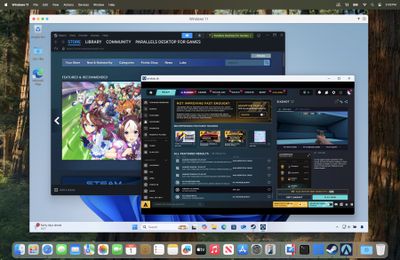
Parallels Desktop 26 for Mac Steam running in Windows 11 VM
In an effort to reduce user confusion, Parallels Desktop 26 now follows the same new versioning practice that Apple's operating systems have adopted this year. This release also provides full support for background process changes Apple has made in macOS 26 Tahoe, ensuring setup routines and Coherence mode run smoothly.

As well as full macOS Tahoe support, this version provides full compatibility with Windows 11 25H2. Windows VMs can now also view the actual available disk space on the Mac host, giving users better control over storage and helping to prevent freezes, slowdowns, and crashes during large installations or disk-heavy operations.

For businesses and IT teams, there are new centralized controls via the Parallels Desktop Enterprise Management Portal that allow IT admins to enforce settings like shared folders, USB access, clipboard sharing, and network modes across all users, ensuring virtual machines comply with organization security requirements.

Meanwhile, IT admins can now monitor and manage Windows OS updates inside VMs using Jamf Pro or other mobile device management (MDM) platforms. Scripts available from Parallels' GitHub also enable IT admins to check update status and initiate scans or installations directly from the management console.

This latest update builds on new features steadily introduced over the past year, including support for Apple Intelligence's Writing Tools, x86 emulation preview to support legacy apps, OBS Camera integration for enhanced video workflows, and support for applications like Dragon Medical One to meet specialized industry needs.

Parallels Desktop 26 for Mac is available in Standard, Pro, Business, and Enterprise editions, and can be purchased or upgraded to at parallels.com/desktop or from authorized resellers. For more information, including the option to download a free trial, see the Parallels website.


Popular Stories

Four iPhone 18 Pro Colors Mock Feature

iPhone 18 Pro and iPhone Ultra: Pre-Orders and Release Date

Thursday July 30, 2026 6:12 am PDT by
Apple has yet to reveal when the iPhone 18 Pro and iPhone Ultra will be announced and released, but the dates usually follow a familiar pattern. Labor Day is September 7 this year. The last time the holiday fell on that day was in 2020, but the iPhone event that year was delayed until October due to the COVID-19 pandemic. So, the last time Labor Day was on September 7 in a normal year was in ...
Apple Event Logo

Apple Working on All-New Operating System

Wednesday July 29, 2026 11:39 am PDT by
Apple is developing an all-new operating system that is essentially a mix of tvOS, watchOS, and iOS, according to Bloomberg's Mark Gurman. In a report this week, he said the operating system will feature a grid of icons, widgets, and apps, along with customizable clock faces. The new software platform is intended for Apple's long-rumored smart home hub. With built-in facial recognition,...
Dynamic Island iPhone 18 Pro Feature

iPhone 18 Pro: Twelve Changes Coming to Apple's Next Flagship

Thursday July 30, 2026 3:43 am PDT by
We're less than two months out from the launch of Apple's premium next-generation smartphone lineup, and while we're not expecting a dramatic change in terms of functionality, there are still several enhancements rumored to be coming to the iPhone 18 Pro and iPhone 18 Pro Max. One thing worth noting is that Apple is reportedly planning a major change to its iPhone release cycle this year,...

Top Rated Comments

Kylo83 Avatar
12 months ago
Every year they milk it when a new macOS comes out, let the updates be free. I wish we had bootcamp back like the old days
Score: 41 Votes (Like | Disagree)
Newfiebill Avatar
12 months ago
Last year I said I had enough of this company. Every year they want more money to update a crippled system. I went to my friends at Amazon and picked up a mini Intel computer with 256gb HD and 16gb Ram pre-installed Windows 11 for 235CAN tax in. I am good now for at least 5/6 years. Stick it Parallels.
Score: 27 Votes (Like | Disagree)
Valen1 Avatar
12 months ago

Last year I said I had enough of this company. Every year they want more money to update a crippled system. I went to my friends at Amazon and picked up a mini Intel computer with 256gb HD and 16gb Ram pre-installed Windows 11 for 235CAN tax in. I am good now for at least 5/6 years. Stick it Parallels.
OR you could just use VMware Fusion, which is free for personal use, and Windows 11 arm.
Score: 17 Votes (Like | Disagree)
Valen1 Avatar
12 months ago
Tired of the annual payment from Parallels, try VMware Fusion which is free for personal use. I've been running Fusion for 10 years with any issues and not having to pay the annual fee that keeps getting jacked each year.
Score: 13 Votes (Like | Disagree)
12 months ago
Cool! So they can charge 50$ again for practically no update. As if the old one wouldn't (technically) work on Tahoe...Their businessmodell is just sad.

Score: 13 Votes (Like | Disagree)
AgeOfSpiracles Avatar
12 months ago

Just use VMware Fusion for free.

For the low price of free, VMWare is pretty good. But it's not as good as Parallels in terms of smoothness and stability, in my experience. Not sure I would pay for it for personal use, but for work Parallels is the easy choice. And that's before you get into the abomination that VMWare the company has become under Broadcom's management.

Score: 11 Votes (Like | Disagree)

🔗 Related Apple News & Rumors

Stay updated with the latest Apple ecosystem news and verified rumors








































