

Everything New in iOS 26 Beta 5 - MacRumorsOpen MenuShow RoundupsShow Forums menuVisit ForumsOpen Sidebar
Skip to Content

Everything New in iOS 26 Beta 5

Apple seeded the fifth developer beta of iOS 26 today, and while the number of significant changes has dropped, there are quite a few smaller tweaks. Apple is continuing to refine button placement, animations, and design in preparation for launching ‌iOS 26‌ in September.

iOS 26 Feature

Camera

Apple added a toggle in the Camera app to allow users to toggle on Classic Mode, a setting that reverses the scroll direction when you swap from mode to mode.
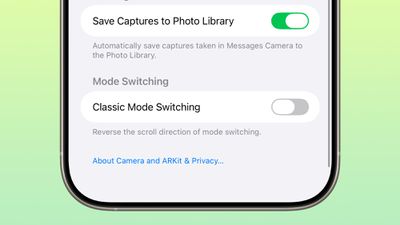
ios 26 classic mode beta 5

Mail

There is now a dedicated Select button in the Mail app, instead of the button being tucked away inside of the "..." menu.
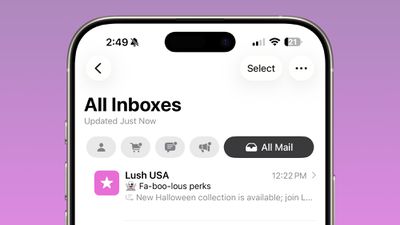
ios 26 mail app select

AirDrop Icon

There is a new AirDrop icon in the Share Sheet.
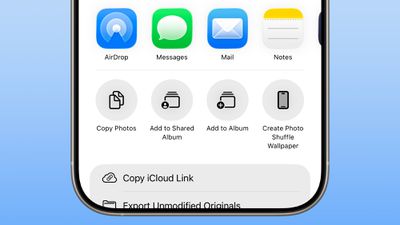
ios 26 beta 5 airdrop icon

Lock Screen

There is an animation when entering your passcode on the Lock Screen, with the numbers jumping in to place. There's also a new animation when locking the iPhone when playing music.


Control Center

There's a new bouncy animation when swiping through Control Center pages.

Control Center Wi-Fi

The Wi-Fi button in Control Center now shows whether a Wi-Fi network is private or public when long pressing on the Wi-Fi icon. If a Wi-Fi network is password protected, it has a lock next to the Wi-Fi symbol.

ios 26 beta 5 wifi

Traveling Features

Apple is adding a predictive Siri feature that can determine when you are about to travel, showing suggestions for cellular connectivity while you are out of your home country.

Wallet

In the Wallet app, the "Payments" button for Apple Card is now labeled "Preauthorized Payments" to make it more clear what the button is for.

ios 26 beta 5 wallet app

Splash Screens

There are ‌iOS 26‌ Splash Screens for more apps, giving people a preview of what's new.
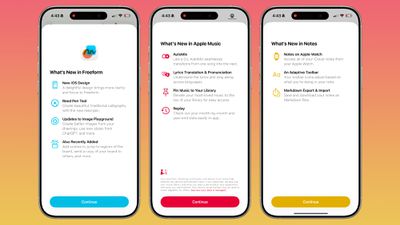
ios 26 splash screens

Battery

There is a Dynamic Island low battery warning when the battery hits 20 percent on an iPhone.

ios 26 beta 5 battery icon

Dock

The Liquid Glass surrounding the Home Screen dock is wider
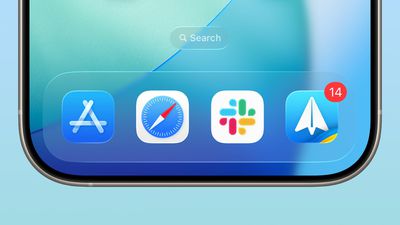
ios 26 beta 5 dock

Fitness

There is a new icon for Fitness+ in the Fitness app.
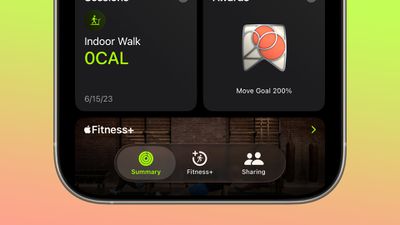
ios 26 beta 5 fitness app

Read More

We have additional info on all of the new features in ‌iOS 26‌ in our roundup.

Related Roundups: iOS 26, iPadOS 26
Related Forum: iOS 26

Popular Stories

Jon Prosser Rainbow

YouTuber Jon Prosser Responds to Apple's Lawsuit Over iOS 26 Leaks

Thursday July 2, 2026 6:42 pm PDT by
Jon Prosser today responded to Apple's lawsuit over iOS 26 leaks, with the YouTuber placing much of the blame on his acquaintance Michael Ramacciotti. As a refresher, Apple sued Prosser and Ramacciotti in July 2025 over alleged theft of the company's trade secrets. Apple alleged that the duo coordinated to break into former Apple software engineer Ethan Lipnik's development iPhone, in order ...
iOS 26

Apple Seeds Fourth iOS 26.6 and iPadOS 26.6 Betas to Developers

Monday July 6, 2026 10:17 am PDT by
Apple today seeded the fourth betas of upcoming iOS 26.6 and iPadOS 26.6 updates to developers for testing purposes, with the software coming a week after Apple seeded the third betas. Registered developers can download the betas from the Settings app on the iPhone or iPad by going to the General section and selecting Software Update. With iOS 27 set to launch in September, Apple is...
iOS 26

Apple Seeds Fourth Public Betas of iOS 26.6, macOS Tahoe 26.6 and More

Tuesday July 7, 2026 1:16 pm PDT by
Apple today provided public beta testers with the fourth betas of iOS 26.6, iPadOS 26.6, macOS Tahoe 26.6, watchOS 26.6, and tvOS 26.6, with the software coming a day after Apple seeded the betas to developers. After signing up to beta test the software updates on Apple's beta site, public beta testers can download the new software using the Software Update section in the Settings app on...

Top Rated Comments

sniffies Avatar
13 months ago
That low battery indicator looks like a condom.

Attachment Image
Score: 41 Votes (Like | Disagree)

13 months ago
All these options to revert UI changes really show a lack of confidence on Apple's part.
Score: 22 Votes (Like | Disagree)
kirky29 Avatar
13 months ago
A freaking number row on the keyboard would be better than slightly tweaked animations and forever changing icons.
Score: 20 Votes (Like | Disagree)
RichTF Avatar
13 months ago

That low battery indicator looks like a condom.
“Tap here if you need something to help you last a bit longer…”
Score: 20 Votes (Like | Disagree)
13 months ago
“Classic mode” sounds like users hate all the new features 💀
I wonder what iOS 26 will end up be comparing to the WWDC variant
Score: 12 Votes (Like | Disagree)
Octavius8 Avatar
13 months ago
How many really new things, beyond glossy look?.
1 year or more of development wasted in this… apple R&D budget should at its minimal end years.
How about better auto predict keyboard?, customizable keyboard size?. Apple does not need to innovate, just copy Android vendors features.
Score: 11 Votes (Like | Disagree)

🔗 Related Apple News & Rumors

Stay updated with the latest Apple ecosystem news and verified rumors













































