

Everything New in iOS 26 Beta 4

Apple released the fourth beta of iOS 26 today, and the company has continued making changes to the way that Liquid Glass looks. There are also new features, including the return of Apple Intelligence Notification Summaries for news. This beta is of particular interest because it's likely the beta that public beta testers will get in the not too distant future.

iOS 26 Feature

Liquid Glass Changes

Liquid Glass is more translucent in beta 4, with Apple walking back some of the opacity changes that it introduced in beta 3.
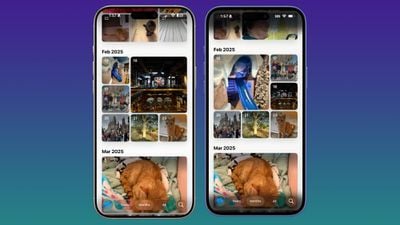
ios 26 beta 4 photosBeta 4 on left, beta 3 on right

Menu bars in apps like Photos, Music, and the App Store are now feature more transparency, allowing more of the background color to show through.
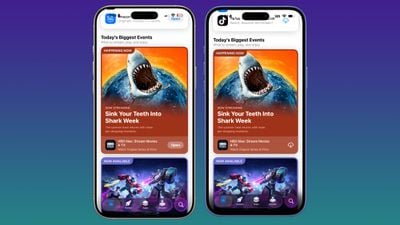
ios 26 beta 4 app storeBeta 4 on left, beta 3 on right

On the Lock Screen, when you scroll through notifications, the background gets darker. The darker tone improves the readability of text.
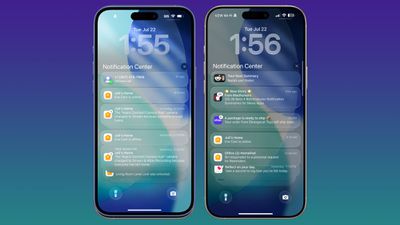
ios 26 b4 lock screenBeta 4 on right, beta 3 on left

Notification Summaries

‌Apple Intelligence‌ Notification Summaries are available for News and Entertainment apps again. Apple removed summaries for news articles back in January to improve the feature, and now it's ready for testing again.
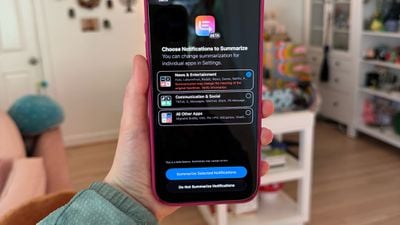
ios 26 beta 4 news summaries
At the time, Notification Summaries were producing misleading news headlines by picking up and combining the wrong information in articles. Apple says the feature should work better now, and that testing will continue throughout the ‌iOS 26‌ beta.

After updating to ‌iOS 26‌, you'll see a pop up for enabling the summary feature for different app categories. You can choose to get news summaries or opt out. All notification summaries for News and Entertainment apps that are generated with ‌‌Apple Intelligence‌‌ will be italicized and will be annotated with a "Summarized by ‌‌Apple Intelligence‌‌" notice.

Camera App

When you swipe between modes in the Camera app, the button behavior has changed slightly. Before, the button seemed to be fixed with the background sliding back and forth, but now the button moves freely in both directions.
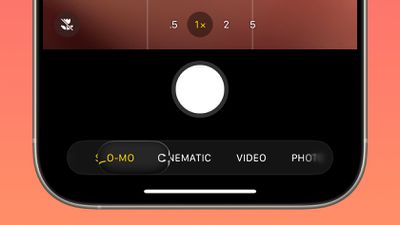
ios 26 beta 4 photos app
Apple also changed the icon of the Camera app on the Home Screen.
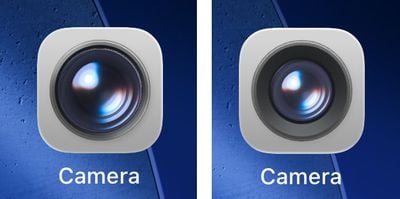
ios 26 camera app 1Beta 4 camera app icon on left, beta 3 icon on right

CarPlay Wallpapers

There are new CarPlay wallpapers available that match the new ‌iOS 26‌ wallpaper design. The ‌CarPlay‌ wallpapers come in a range of colors, including blue, brown, gray, green, purple, and red. The wallpapers support both light mode and dark mode.


Apple has also removed some older ‌CarPlay‌ wallpapers that were introduced with earlier versions of iOS.

Passcode Changes

When you tap on Face ID & Passcode in the Settings app, there's an updated interface and wording that reminds you to enter the passcode you use to unlock the iPhone.
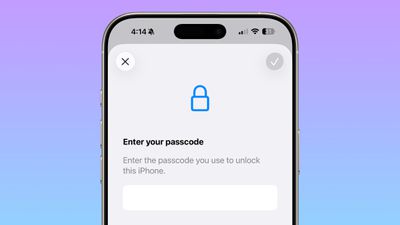
ios 26 beta 4 passcode

Passwords

The Passwords app has an Allow Contacting Websites option, which allows the app to contact websites to show names and icons for apps and websites and to let you know when a website supports passkeys.
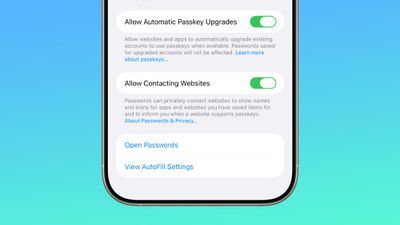
ios 26 beta 4 website passwords
With this feature, Passwords now shows custom icons for websites automatically.

Weather

There's a new toggle in the Weather app settings that allows it to access Significant Locations. With the feature enabled, the Weather app is able to provide weather information for places that you are likely to visit.
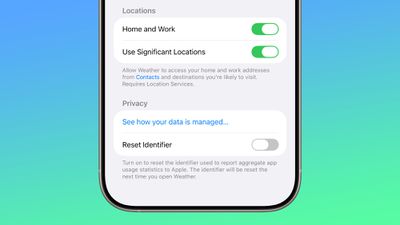
ios 26 beta 4 weather locations

Reduce Loud Sounds

The "Late Night Mode" option in the Sounds and Haptics section of the Settings app has been renamed to Reduce Loud Sounds, and Apple added a description.
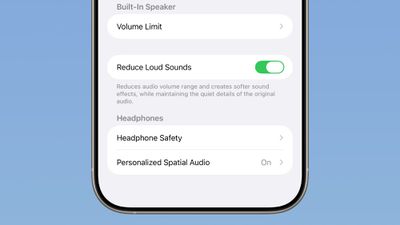
ios 26 beta 4 reduce loud sounds

Reduces audio volume range and creates softer sound effects while maintaining the quiet details of the original audio.

Call Screening

Apple updated the Screen Unknown Callers option to add new options. You can turn the feature off, ask unknown callers the reason why they are calling, or silence calls from unknown numbers automatically, sending them to voicemail.
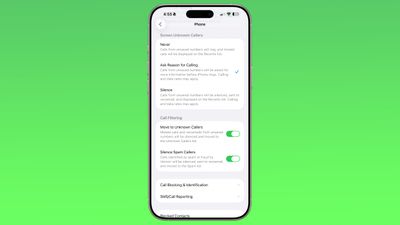
ios 26 beta 4 call screening

Mail

There are very subtle changes to the design of the Mail app icon.
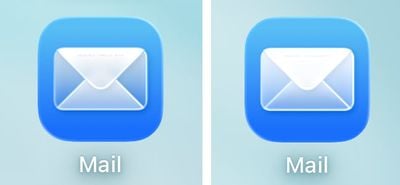
ios 26 beta 4 mail app‌iOS 26‌ beta 3 Mail app icon on left, beta 4 icon on right

Wallpaper

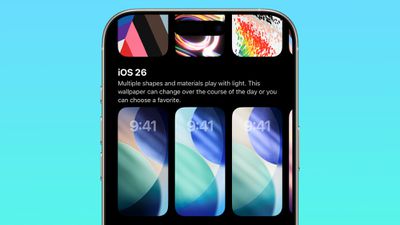
The wallpapers introduced with ‌iOS 26‌ are now dynamic and will change color over the course of the day.
ios 26 beta 4 wallpaper

Read More

We have additional info on all of the new features in ‌iOS 26‌ in our roundup.

Related Roundups: iOS 26, iPadOS 26
Related Forum: iOS 26

Popular Stories

Aston Martin CarPlay Ultra Screen

Apple's CarPlay Ultra to Expand to These Vehicle Brands Later This Year

Sunday February 1, 2026 10:08 am PST by
Last year, Apple launched CarPlay Ultra, the long-awaited next-generation version of its CarPlay software system for vehicles. Nearly nine months later, CarPlay Ultra is still limited to Aston Martin's latest luxury vehicles, but that should change fairly soon. In May 2025, Apple said many other vehicle brands planned to offer CarPlay Ultra, including Hyundai, Kia, and Genesis. In his Powe...
Apple Logo Black

Apple's Next Launch is 'Imminent'

Sunday February 1, 2026 12:31 pm PST by
The calendar has turned to February, and a new report indicates that Apple's next product launch is "imminent," in the form of new MacBook Pro models. "All signs point to an imminent launch of next-generation MacBook Pros that retain the current form factor but deliver faster chips," Bloomberg's Mark Gurman said on Sunday. "I'm told the new models — code-named J714 and J716 — are slated...
Apple MacBook Pro M4 hero

New MacBook Pros Reportedly Launching Alongside macOS 26.3

Sunday February 1, 2026 5:42 am PST by
Apple is planning to launch new MacBook Pro models with M5 Pro and M5 Max chips alongside macOS 26.3, according to Bloomberg's Mark Gurman. "Apple's faster MacBook Pros are planned for the macOS 26.3 release cycle," wrote Gurman, in his Power On newsletter today. "I'm told the new models — code-named J714 and J716 — are slated for the macOS 26.3 software cycle, which runs from...
iOS 26

iOS 26.3 and iOS 26.4 Will Add These New Features to Your iPhone

Tuesday February 3, 2026 7:47 am PST by
We are still waiting for the iOS 26.3 Release Candidate to come out, so the first iOS 26.4 beta is likely still at least a week or two away. Following beta testing, iOS 26.4 will likely be released to the general public in March or April. Below, we have recapped known or rumored iOS 26.3 and iOS 26.4 features so far. iOS 26.3 iPhone to Android Transfer Tool iOS 26.3 makes it easier...
14 inch MacBook Pro Keyboard

Apple Changes How You Order a Mac

Saturday January 31, 2026 10:51 am PST by
Apple recently updated its online store with a new ordering process for Macs, including the MacBook Air, MacBook Pro, iMac, Mac mini, Mac Studio, and Mac Pro. There used to be a handful of standard configurations available for each Mac, but now you must configure a Mac entirely from scratch on a feature-by-feature basis. In other words, ordering a new Mac now works much like ordering an...

Top Rated Comments

firewire9000 Avatar
7 months ago
Seriously, MacRumors, ALWAYS, I mean, ALWAYS, the before image goes on the left! Not on the right, it doesn’t make any sense! And also, at least be consistent because in the last comparison image, they are swapped.
Score: 91 Votes (Like | Disagree)
spishack Avatar
7 months ago
Juli, I'm begging you, pick one left/right layout and use it for the whole post ?. Beta 4 right, Beta 3 left. Beta 3 left, Beta 4 right. Beta 4 right of left, Beta 3 right of right. ?‍?
Score: 36 Votes (Like | Disagree)
CrysisDeu Avatar
7 months ago
The new slider for camera modes selection in b4 is a UX disaster.

The button slides, the selections also slides at the same time.
When you drag the button to the left, the button moves, the background selections also scrolls to the left. But usually, if you drag to the left, the scrollable content should slide in reverse to the right.

This is so confusing and impossible to use. Just try it out.

And who tf thought it’s a good idea to hide the function toggles behind the mode selection? No one expects clicking on the mode selection again will expand shooting options.

I know I am on beta, but beta testers are only responsible for finding unintended bugs for Apple. The design itself is so horrible and wrong in the first place. That’s skill issue
Score: 22 Votes (Like | Disagree)
klasma Avatar
7 months ago

Seriously, MacRumors, ALWAYS, I mean, ALWAYS, the before image goes on the left! Not on the right, it doesn’t make any sense! And also, at least be consistent because in the last comparison image, they are swapped.
My conspiracy theory is they are trying to drive engagement. ;)
Score: 22 Votes (Like | Disagree)
purplefox Avatar
7 months ago

Seriously, MacRumors, ALWAYS, I mean, ALWAYS, the before image goes on the left! Not on the right, it doesn’t make any sense! And also, at least be consistent because in the last comparison image, they are swapped.
ikr? And you always need to read the caption to know which one is beta 3 or 4. ?
Score: 19 Votes (Like | Disagree)
TuffLuffJimmy Avatar
7 months ago
I might be in the minority, but I really enjoy the strong transparency. I didn’t think it would last though. Same as with the Mac OSX Leopard betas that re-introduced menu bar transparency, but Apple heavily toned it down before release. Too many complaints from the chorus — and I would bet most of those complaints were from people who didn’t actually have issues with it but they love to echo whatever niche complaint getting amplified online.
Score: 13 Votes (Like | Disagree)
















