6 visionOS-Inspired Design Elements Coming to iOS 26

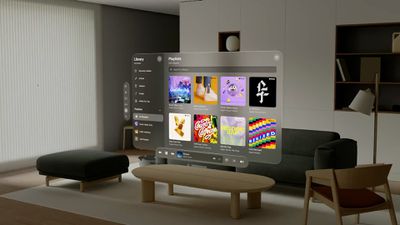
With iOS 26, macOS 26, tvOS 26, and watchOS 26, Apple is planning to debut a new design that's been described as taking inspiration from visionOS, the newest operating system. With WWDC coming up soon, we thought we'd take a closer look at visionOS and some of the design details that Apple might adopt based on current rumors and leaked information.
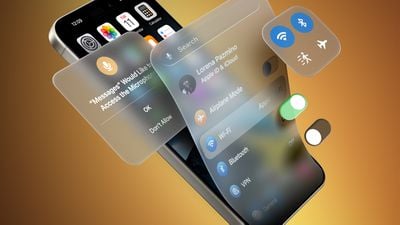
iOS 19 visionOS UI Elements

1. Translucency

Inside Apple, the ‌iOS 26‌ redesign project is known as "Solarium," which gives us some insight into Apple's focus. A solarium is basically an all-glass room that's designed to let in a lot of light.
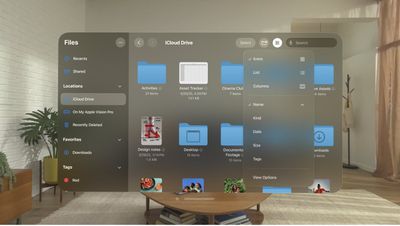
visionos files app translucency
Since launch, visionOS has had menus and interface elements that are translucent because in an AR/VR environment, people need to be able to see their surroundings as much as possible to feel immersed.

The translucent design elements in visionOS better blend into the background for an unobtrusive look, letting color and light from the real world blend through. It's not hard to picture how this sort of translucent design would work well in apps like Photos, which we've already seen a mockup of.

2. Floating Navigation Bars and Menus

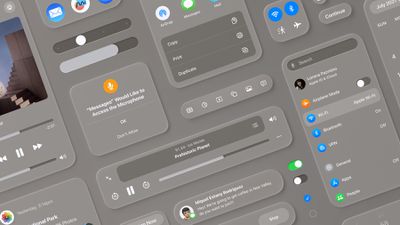
Floating menus and navigation bars go right along with translucency. In visionOS, everything is essentially floating in the open space around you, whether you're looking at your surroundings through the passthrough camera, or a virtual reality background.
visionOS design
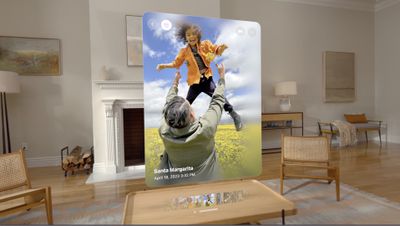
In ‌iOS 26‌, Apple could replicate this effect with shading and shadowing that makes interface elements look slightly raised over the content in the background, for a soft, blurred depth effect.
spatial photo visionos 2
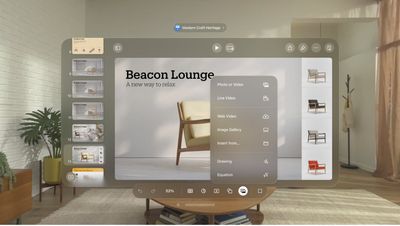
visionOS has a lot of top-aligned toolbars rather than bottom bars, so it's possible we'll see iOS shifting that way too.

3. Rounded Buttons and Interface Elements

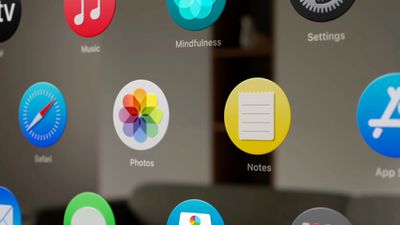
iOS already has rounded squares and rounded rectangles for icons, notifications, menus within apps, search bars, and all of the card-style interfaces that we're used to, but visionOS is even rounder. The floating navigation bars in iOS could be pill-shaped with more starkly rounded edges.
visionos app icons
visionOS also has more dramatic rounding at the corners, and the app icons are fully round. ‌iOS 26‌ could be rounder in general, more closely matching some of the shapes in visionOS. Leaker Jon Prosser has claimed that there will be an option for round app icons, but it's not clear if Apple would want to go in that direction for iOS because Android has long used round app icons. The iconic squircle has been one of many design features distinguishing iOS from Android.
visionos keynote app

4. Glassy Look

With its translucency, the visionOS interface can look almost like frosted glass. Apple's WWDC 2025 design features a frosted glass rainbow with shifting pastel colors, which is perhaps a hint at plans to adopt a frosted, sea-glass-style look that's not too far off from what we've already got in visionOS.
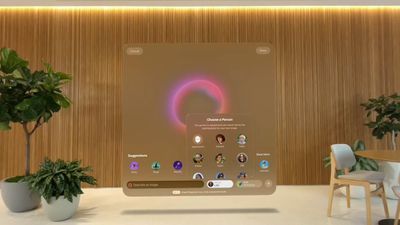
visionos image playground
visionOS actually uses a system-designed material that Apple calls glass for app windows. It lets light, virtual content, and objects in the surroundings show through menus and windows. Glass adapts to background color and provides contrast for app content while also taking into account people's physical surroundings. Apple could use a similar material design in ‌iOS 26‌.

visionos glassy look

5. Subtle Lighting Changes

In visionOS, the translucent interface elements can interact with lighting conditions of the room the user is in. That doesn't translate to the iPhone, but iOS is apparently going to have some subtle light effects that will emphasize the translucency and glass-like design.
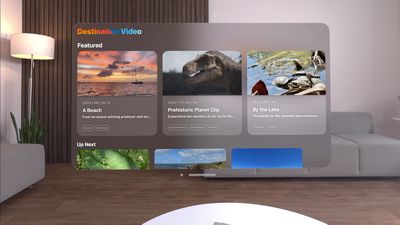
visionos app preview
In visionOS, the windows also cast shadows that are responsive to head movements. That's not something that translates to iOS, but lighting and shadow effects that shift when you move your ‌iPhone‌ is a possibility. In fact, Prosser claims there's a glint on the Lock Screen's Flashlight and Camera (or customized) buttons when moving the ‌iPhone‌.

visionos glass
Apple could use dynamic shadowing in apps and for widgets, and adaptive color could further the effect by allowing interface elements to blend with wallpaper and shift with ambient light.

6. Simplicity

For the most part, visionOS has a simplified design in Apple apps, with an airier feel due to the spacing that's needed to ensure people have enough room to look at a button to interact with it. ‌iOS 26‌ could adopt streamlined navigation and menu elements for a less cluttered look.
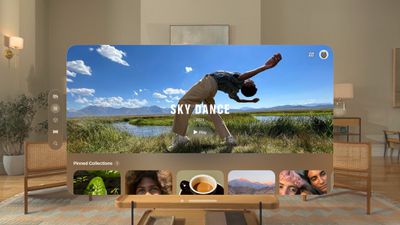
visionos 2 photos app design
visionOS uses cleaner fonts, bolder text, and increased line height, which may or may not translate to iOS.
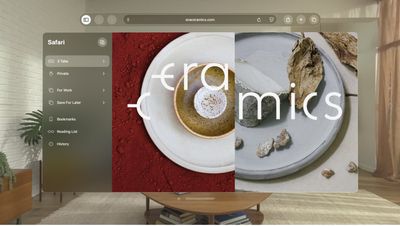
visionos safari
Apple is likely taking a good look at navigation, menu options, and layout, because one of the main aspects of the redesign is more cross-platform cohesion, according to Bloomberg's Mark Gurman. He says that ‌iOS 26‌ will be "simpler to use, faster to navigate, and easier to learn."

Design Consistency

It's not just ‌iOS 26‌ that's being overhauled. The visual changes and tweaks to menus, buttons, and navigation will also extend to macOS 26, and of course, iPadOS 26. ‌watchOS 26‌ and tvOS 26 will see design refreshes, too.

Apple will undoubtedly provide developers with new design guidelines and resources to extend the updated look to third-party apps.

WWDC Debut

The new design that we've been hearing so much about is set to be unveiled at the WWDC keynote event on Monday, June 9. It starts at 10:00 a.m. and while Apple will livestream it, if you can't watch, you can follow along here on MacRumors.com or on our MacRumorsLive X account. Apple will provide developers with the new operating system updates complete with redesign after the keynote event, and a public beta will follow in July. ‌iOS 26‌ and its sister updates will launch to the public in September.

Related Roundups: iOS 26, iPadOS 26
Related Forum: iOS 26

Popular Stories

Aston Martin CarPlay Ultra Screen

Apple's CarPlay Ultra to Expand to These Vehicle Brands Later This Year

Sunday February 1, 2026 10:08 am PST by
Last year, Apple launched CarPlay Ultra, the long-awaited next-generation version of its CarPlay software system for vehicles. Nearly nine months later, CarPlay Ultra is still limited to Aston Martin's latest luxury vehicles, but that should change fairly soon. In May 2025, Apple said many other vehicle brands planned to offer CarPlay Ultra, including Hyundai, Kia, and Genesis. In his Powe...
Apple Logo Black

Apple's Next Launch is 'Imminent'

Sunday February 1, 2026 12:31 pm PST by
The calendar has turned to February, and a new report indicates that Apple's next product launch is "imminent," in the form of new MacBook Pro models. "All signs point to an imminent launch of next-generation MacBook Pros that retain the current form factor but deliver faster chips," Bloomberg's Mark Gurman said on Sunday. "I'm told the new models — code-named J714 and J716 — are slated...
Apple MacBook Pro M4 hero

New MacBook Pros Reportedly Launching Alongside macOS 26.3

Sunday February 1, 2026 5:42 am PST by
Apple is planning to launch new MacBook Pro models with M5 Pro and M5 Max chips alongside macOS 26.3, according to Bloomberg's Mark Gurman. "Apple's faster MacBook Pros are planned for the macOS 26.3 release cycle," wrote Gurman, in his Power On newsletter today. "I'm told the new models — code-named J714 and J716 — are slated for the macOS 26.3 software cycle, which runs from...
iOS 26

iOS 26.3 and iOS 26.4 Will Add These New Features to Your iPhone

Tuesday February 3, 2026 7:47 am PST by
We are still waiting for the iOS 26.3 Release Candidate to come out, so the first iOS 26.4 beta is likely still at least a week or two away. Following beta testing, iOS 26.4 will likely be released to the general public in March or April. Below, we have recapped known or rumored iOS 26.3 and iOS 26.4 features so far. iOS 26.3 iPhone to Android Transfer Tool iOS 26.3 makes it easier...
iOS 26 Home Feature

Apple Gives Final Warning to Home App Users

Tuesday February 3, 2026 8:55 am PST by
In 2022, Apple introduced a new Apple Home architecture that is "more reliable and efficient," and the deadline to upgrade and avoid issues is fast approaching. In an email this week, Apple gave customers a final reminder to upgrade their Home app by February 10, 2026. Apple says users who do not upgrade may experience issues with accessories and automations, or lose access to their smart...

Top Rated Comments

bradman83 Avatar
9 months ago

I'm pumped for the interface lift. I'm looking forward to a new generation of thinking on interface elements. Some things are tired like the traffic light elements, the way the dock works, and Finder. Those could use some reimagining for the modern era.
Some basic UI elements shouldn't be messed with though. For all of the massive UI changes that Windows has gone through since Windows 95 the basic arrangement of window controls hasn't changed. I would argue a huge part of the appeal of macOS is that core aspects of the UI have been consistent over the past 25 years. That's not to say change isn't warranted, but things shouldn't change simply for the sake of change, there should be a meaningful improvement to functionality.
Score: 40 Votes (Like | Disagree)
ifxf Avatar
9 months ago
Hopefully under Accessibility they will include checkboxes to disable Translucent and Glassy.
Score: 39 Votes (Like | Disagree)
ignatius345 Avatar
9 months ago

I'm pumped for the interface lift. I'm looking forward to a new generation of thinking on interface elements. Some things are tired like the traffic light elements, the way the dock works, and Finder. Those could use some reimagining for the modern era.
Devil is in the details, my friend. Those things you call "tired" have specific UI functions and if they aren't replicated in a usable way, it will suck to use a Mac.

It's really easy to throw around cheap fluff like "reimagining for the modern era" but I've been through enough of that done poorly to be very skeptical.
Score: 36 Votes (Like | Disagree)
trusso Avatar
9 months ago

I'm pumped for the interface lift. I'm looking forward to a new generation of thinking on interface elements. Some things are tired like the traffic light elements, the way the dock works, and Finder. Those could use some reimagining for the modern era.
Absolutely not. Apple needs to stop breaking paradigms that have existed for decades because they work.
Score: 30 Votes (Like | Disagree)
MacMediaNet Avatar
9 months ago
I am afraid that this iOS redesign will be even worse than redeisign from iOS 6 to iOS 7.
Score: 26 Votes (Like | Disagree)
Siliconguy Avatar
9 months ago

I already hate 1, 4, and 5. They have the effect of reducing contrast and clarity of the UI
Ditto. My first impression of that was 'eye strain city'. Low contrast, soft edges, not really sure where to focus. I certainly hope that can all be turned off. Does Tim Cook actually use his products? He's not that young, he wears glasses that have to be either bifocal or progressive, What Is He Doing!

As for round vs square icons, why not go all the way to the hexagonal war-gaming grid. Think of all the icons you can pack in that way.
Score: 20 Votes (Like | Disagree)