

How to Use iOS 18.4's New Ambient Music Feature in Control Center - MacRumorsOpen MenuShow RoundupsShow Forums menuVisit ForumsOpen Sidebar
Skip to Content

How to Use iOS 18.4's New Ambient Music Feature in Control Center

The upcoming iOS 18.4 update for the iPhone adds an Ambient Music feature to Control Center. Below, we take a closer look at how it works.
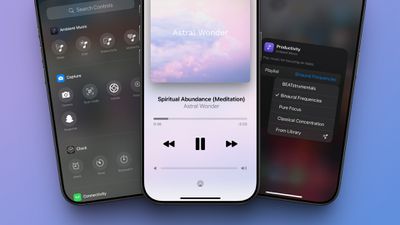
iOS 18 4 Ambient Music Control Center
iOS 18.4 is currently in beta, so the Ambient Music feature is not widely available yet. The update will likely be released to the general public next week.

To use the feature on iOS 18.4, open Control Center and tap on the plus sign in the top-left corner. Then, tap on "Add a Control" at the bottom of the screen, scroll down to the Ambient Music section, and add one or more of the controls.

Here is how Apple describes the four Ambient Music themes:

  • Sleep: Music for a restful sleep.
  • Chill: Music for relaxation.
  • Productivity: Music for focusing on tasks.
  • Wellbeing: Music for meditation and self-care.

You can add any of the four Ambient Music controls to your Control Center, and then tap on one to start a playlist of songs that matches the theme. The feature is free and easy to use, with no Apple Music subscription or app download required.

While the Ambient Music feature is turned on, music controls will appear on the screen, and there is also Dynamic Island integration on newer iPhones.

There are four playlists available for each theme, or you can set your own. To change the playlist, open Control Center, and then tap on the plus sign in the top-left corner of the screen. Next, tap on an Ambient Music control that you added to Control Center, and tap on the playlist name. A drop-down menu will show additional playlist options.

  • Sleep: Sleep Sounds, Bedtime Beats, Sound Bath, and Piano Sleep.
  • Chill: Piano Chill, Ambient Chill, Lo-Fi Jazz, and Pure Chill.
  • Productivity: BEATstrumentals, Binaural Frequencies, Pure Focus, and Classical Concentration.
  • Wellbeing: Pure Meditation, Spa, Beats & Breath, and Pure Calm.

To update your iPhone to iOS 18.4, once the update is released, open the Settings app and select General → Software Update.


Related Forums: iOS 18, iPadOS 18

Popular Stories

Apple MacBook Pro with PROLED XDR Display family lineup feature

Apple Announces OLED MacBook Pro With Touch Display

Wednesday October 28, 2026 10:11 am PDT by
Apple today announced a new high-end MacBook Pro, which is available in 14-inch and 16-inch sizes. The new device has a PROLED XDR display that supports touch gestures, and a glowing rear Apple logo. Pricing on the MacBook Pro starts at $2,899 for the 14-inch model and $3,399 for the 16-inch model. Apple says the MacBook Pro has the "world's best display in a pro laptop." The PROLED...
iPad mini OLED feature 1

Apple Executive Comments on New iPad Mini Lacking 120Hz Display

Thursday October 29, 2026 1:47 pm PDT by
While the new iPad mini has an OLED display, the device does not support ProMotion, meaning the display's refresh rate is limited to 60Hz instead of 120Hz. ProMotion support would have allowed for the iPad mini's refresh rate to automatically adjust from 10Hz to 120Hz depending on the content being displayed, but evidently Apple has kept the feature exclusive to the iPad Pro among iPad...
apple pro tell logo

Apple Opened Pre-Orders for Five New Products This Week

Wednesday October 28, 2026 2:49 am PDT by
Apple opened pre-orders for five new products on Wednesday, October 28, including its first touchscreen MacBook Pro models. Pre-orders opened for the following new products: iPad mini with OLED display and A20 Pro chip iMac with M6 chip 14-inch MacBook Pro with M6 chip 14-inch MacBook Pro with OLED touchscreen 16-inch MacBook Pro with OLED touchscreen Pre-orders for the iPad mini,...

Top Rated Comments

21 months ago
I had no idea you can change the playlists. Awesome, that's why I enjoy MacRumors. 👍 But this is pretty hidden, isn't it? :D

However, are these playlists updated because I was listening to Chill and it was pretty repetitive.


Does this require an Apple Music subscription to work?
No, it does not.

Score: 9 Votes (Like | Disagree)
blodyholy Avatar
21 months ago
I’m confused as to why this feature was relegated to the control center only? Seems like a stand alone or Music app integration as well makes sense.
Score: 7 Votes (Like | Disagree)
21 months ago

As someone else pointed out, I see no option to set a timer. Please inform us how?
You need to use the Timer app in the clock app and instead of a sound you can select „stop playing“ „when the timer ends“.

It’s rather convoluted and not at all intuitive.
Score: 4 Votes (Like | Disagree)
tennisproha Avatar
21 months ago
This is nice but Apple Music needs a Sleep Timer like the Podcasts app. Can't really use any of the sleep or meditation playlists on Apple Music because otherwise they play all night.

Also can't use the Timer app as a workaround because then you have to change the timer sound every time you need to set an actual timer.
Score: 4 Votes (Like | Disagree)
neotint Avatar
21 months ago

I’m confused as to why this feature was relegated to the control center only? Seems like a stand alone or Music app integration as well makes sense.
Because the control center allows 2 touch access if it's placed higher on the page. It's for common regular daily work or personal wellness needs. Verses accessing your Music app, where these stations exist along with dozens of other options that only trigger more ADHD content choice overload that you can't change the menu order of.

e.g. I've saved the Pure Focus playlist in Apple Music, and I use it many times a week, but it's never/rarely shown on my inital Apple Music load home screen, unless it's in recently played and I haven't listened to more than 3 other items. I have to search for it or click and scroll across many playlists just to find it.

Apple is making a user friendly iOS UI surfacing of several of its existing ambient Apple Music playlists, free for all iOS users regardless of Apple Music subscription. This is a great example of Apple doing human-centered design aligned with digital wellness.
Score: 4 Votes (Like | Disagree)
21 months ago

This is nice but Apple Music needs a Sleep Timer like the Podcasts app. Can't really use any of the sleep or meditation playlists on Apple Music because otherwise they play all night.

Also can't use the Timer app as a workaround because then you have to change the timer sound every time you need to set an actual timer.
Yes! This has always been so stupid. Let's get a sleep timer within the music app please! (And also for this new feature.)
Score: 3 Votes (Like | Disagree)
Latest Stories
Apple Reveals New iPad Mini's Battery Capacity
2 minutes ago
Top Stories: Apple's Big MacBook Pro, iPad mini and iMac Updates
1 hour ago
'Pluribus' Season 2 Reportedly Starts Production Today
8 hours ago
iPhone 18 Pro Sales Surge in China, Offsetting Decline in U.S. and Japan
9 hours ago
HomeView Software 27.2: Wallpapers, Control Center, and More
15 hours ago
Apple Alerts Stores to iPhone Duo's Display Cracking Issue
16 hours ago
iOS 27.3 Will Enable These Apple Intelligence Features in China
17 hours ago
Apple Says iOS 27.3 Beta Coming Next Week
17 hours ago
Apple's Flash Storage Suppliers Are Finally 'Getting Their Revenge'
18 hours ago
14 New Things Your iPhone Can Do in iOS 27.2
19 hours ago
iPhone Duo Review: One Week Later
20 hours ago
Samsung Mocks iPhone Duo Display Cracks in New Ad Campaign
21 hours ago
The MacRumors Show: OLED MacBook Pro, iPad Mini 8, and More
22 hours ago
MacBook Pro With Touch Display: 15 More Details Revealed
22 hours ago
Russia Places Apple on State Surveillance Registry
23 hours ago
Halloween Weekend Brings Discounts on Apple Accessories and Pre-Orders
1 day ago
Apple Has Released More Than 25 New Products in the Past Two Months
1 day ago
Local Code Launches as Free, Private AI Assistant Tool for Mac
1 day ago
Apple Acquires Ascend.io
1 day ago
HomePod Mini 2 Launches Today: All the New Features
1 day ago
AirTag 2 4-Pack Drops to New Low Price of $69.99
1 day ago
Rian Johnson's iPhone Camera App Goes Viral
1 day ago
Where Did All the iPhone Duos Go? Mostly to Apple's Stores
1 day ago
Apple's Touchscreen MacBook Pro Could Ship 1.5M Units in 2027
1 day ago
New Apple TV 4K and iPad Mini: RAM Amounts Revealed
2 days ago
Apple Executive Comments on New iPad Mini Lacking 120Hz Display
2 days ago
Here's a Hands-On Look at HomePod Mini 2's New Two-Tone Colors
2 days ago
Apple Lowers App Store Fees in Taiwan Starting October 31
2 days ago
HomeView Pre-Order Returns to $289.99 on Amazon
2 days ago
Apple Avoids Showing Pinched Fingers on iPad Mini Page in South Korea
2 days ago

🔗 Related Apple News & Rumors

Stay updated with the latest Apple ecosystem news and verified rumors










































