Apple's Latest Updates Re-Enable Apple Intelligence on Some Devices - MacRumorsOpen MenuShow RoundupsShow Forums menuVisit ForumsOpen Sidebar
Skip to Content

Apple's Latest Updates Re-Enable Apple Intelligence on Some Devices

Some users are reporting that Apple's latest software updates are quietly re-enabling Apple Intelligence features, even after they had explicitly disabled them in the previous update.

apple intelligence black
If you're catching up, Apple on Monday pushed out new macOS Sequoia 15.3.1 and iOS/iPadOS 18.3.1 point releases that include important security fixes and are recommended for all users. Shortly after the rollout, software developer Jeff Johnson collated some early reports complaining about the apparent behavior, noting that devices displaying a Welcome screen after updating were particularly susceptible to having Apple Intelligence automatically re-enabled.

Indeed, MacRumors testing confirms this behavior on certain devices. In our tests using an M4 Pro Mac mini, iPhone 16 Pro, iPhone 15 Pro, and M4 iPad Pro – all with Apple Intelligence previously disabled in iOS/iPadOS 18.3 and macOS 15.3 – we found that while the iPhones and iPad maintained their disabled status after updating to iOS/iPadOS 18.3.1, the Mac mini automatically re-enabled the feature after updating.

The key trigger does seem to be the appearance of a Welcome screen announcing Apple Intelligence features. We saw it on the M4 Pro Mac mini after updating to macOS 15.3.1, but not on the iPhones or iPad Pro. Notably, unlike typical setup screens, this one lacks the usual "Set Up Later" option, effectively forcing you to proceed with enabling the feature.
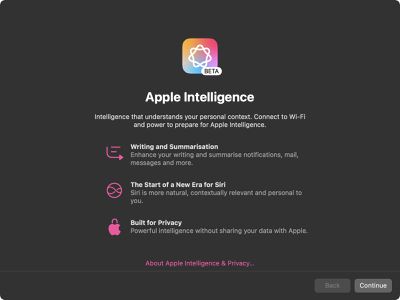
apple intelligence

Apple Intelligence splash screen on macOS Sequoia 15.3.1

This automatic re-enabling obviously raises concerns about user choice, particularly given that Apple Intelligence requires up to 7GB of storage space on each device where it's activated. The storage requirement stems from the need to download and maintain local AI models for Apple's privacy-focused processing. Apple in macOS Sequoia 15.3 and iOS/iPadOS 18.3 controversially made Apple Intelligence an opt-out feature, meaning it is turned on automatically on compatible devices.

Users who prefer to keep Apple Intelligence disabled should verify their settings after updating. On iPhone and iPad, check that the Apple Intelligence toggle is off in Settings → Apple Intelligence & Siri. Mac users can find the toggle in System Settings → Apple Intelligence & Siri. Did you update to iOS/iPadOS 18.3.1 or macOS Sequoia 15.3.1 overnight? Let us know in the comments what your experience was.


Popular Stories

Apple Intelligence Comes Under Fire Feature

Mac Users Reclaim 12GB+ of Storage With Apple Intelligence Removal Tool

Monday October 5, 2026 4:12 am PDT by
A new open-source tool is making waves in the Mac community by helping users reclaim valuable storage space taken up by Apple's AI models. Called "RemoveMacAI," the command line tool disables Apple Intelligence on macOS 27, removes its downloaded models, and prevents them from being downloaded again. In macOS 27, Apple removed the toggle to disable Apple Intelligence wholesale, and simply...


Apple TV Sans Remote Feature

tvOS 27.2 Code Hints at Apple Intelligence for New Apple TV

Monday October 5, 2026 1:45 pm PDT by
Apple's latest tvOS 27.2 beta adds weight to rumors that the next Apple TV will have Siri AI and Apple Intelligence support. Code suggests Apple is adding an Improve Siri & Apple Intelligence toggle to the tvOS Settings app. "Help improve foundation models and Siri by allowing Apple to collect and use your text and audio interactions with Siri, Dictation, and Translate," the text reads....
apple tv siri ai

Older Apple TV 4K Models to Gain Apple Intelligence and Siri AI Support

Tuesday October 13, 2026 8:16 am PDT by
Apple today said that second- and third-generation Apple TV 4K models will gain Siri AI in beta with tvOS 27.2. Siri AI on the Apple TV adds conversational entertainment searches, follow-up questions, and personal context through a paired compatible device. Setup requires the Home app's home owner to have an Apple Intelligence-enabled iPhone or iPad running the latest software, with Siri AI...

Top Rated Comments

Mr_Ed Avatar
23 months ago

Could be incompetence. I've caught them reenabling icloud features I don't want on updates before, but it hasn't happened at least for the last 2 major OS versions.

We'll never know if they fixed it or they got scared and removed the intentional feature though.
Yeah, but what seems different here is the “introduction” screen after update lacking the option to leave it off. This is deliberate, and I think coming from Apple, it’s a real shame they decided to go down this path.
Score: 28 Votes (Like | Disagree)
cjsuk Avatar
23 months ago
Yeah mine did this. Bloody annoying.

This is how I end up on a Pixel with LineageOS out of spite!
Score: 17 Votes (Like | Disagree)
contacos Avatar
23 months ago
I guess if no one uses it, you gotta force it. I still think the name is unfortunate. "Intelligence" sounds like spyware by some rogue government entity if you watched too many action movies or listened to one too many "Pegasus" podcasts
Score: 16 Votes (Like | Disagree)
thefrost Avatar
23 months ago
Deliberate behaviour?
Score: 15 Votes (Like | Disagree)
23 months ago

Just their typical lack of testing and not thinking about how everyone operates.

They pushed out this update because of an edge case where physical access was needed and assumed everyone already was using their AI tools so never tested if they weren't.
Makes you question their privacy marketing when they can't even respect the settings on a device you supposedly own....
Score: 12 Votes (Like | Disagree)
turbineseaplane Avatar
23 months ago

I like the features of apple intelligence
Noted
👍

Whether one "likes Apple Intelligence", or doesn't like it, isn't the actual point

Not respecting the preferences of those who've turned it off is indeed "ramming it down their throat"

If you already had it on ... and it's still "on", nothing has changed for you anyhow
This particular discussion simply doesn't apply to you
Score: 11 Votes (Like | Disagree)
Latest Stories
Apple Watch Ultra 4 Hits All-Time Low Price With Amazon's $99 Discount
11 hours ago
Reminder: Apple's Big Discount on Beats 360 Ear Cushions Ends Today
11 hours ago
Here's a New Tour of Apple's HomeView Software
11 hours ago
Apple Reveals New iPad Mini's Battery Capacity
12 hours ago
Top Stories: Apple's Big MacBook Pro, iPad mini and iMac Updates
14 hours ago
'Pluribus' Season 2 Reportedly Starts Production Today
20 hours ago
iPhone 18 Pro Sales Surge in China, Offsetting Decline in U.S. and Japan
21 hours ago
HomeView Software 27.2: Wallpapers, Control Center, and More
1 day ago
Apple Alerts Stores to iPhone Duo's Display Cracking Issue
1 day ago
iOS 27.3 Will Enable These Apple Intelligence Features in China
1 day ago
Apple Says iOS 27.3 Beta Coming Next Week
1 day ago
Apple's Flash Storage Suppliers Are Finally 'Getting Their Revenge'
1 day ago
14 New Things Your iPhone Can Do in iOS 27.2
1 day ago
iPhone Duo Review: One Week Later
1 day ago
Samsung Mocks iPhone Duo Display Cracks in New Ad Campaign
1 day ago
The MacRumors Show: OLED MacBook Pro, iPad Mini 8, and More
1 day ago
MacBook Pro With Touch Display: 15 More Details Revealed
1 day ago
Russia Places Apple on State Surveillance Registry
2 days ago
Halloween Weekend Brings Discounts on Apple Accessories and Pre-Orders
2 days ago
Apple Has Released More Than 25 New Products in the Past Two Months
2 days ago
Local Code Launches as Free, Private AI Assistant Tool for Mac
2 days ago
Apple Acquires Ascend.io
2 days ago
HomePod Mini 2 Launches Today: All the New Features
2 days ago
AirTag 2 4-Pack Drops to New Low Price of $69.99
2 days ago
Rian Johnson's iPhone Camera App Goes Viral
2 days ago
Where Did All the iPhone Duos Go? Mostly to Apple's Stores
2 days ago
Apple's Touchscreen MacBook Pro Could Ship 1.5M Units in 2027
2 days ago
New Apple TV 4K and iPad Mini: RAM Amounts Revealed
2 days ago
Apple Executive Comments on New iPad Mini Lacking 120Hz Display
2 days ago
Here's a Hands-On Look at HomePod Mini 2's New Two-Tone Colors
2 days ago

🔗 Related Apple News & Rumors

Stay updated with the latest Apple ecosystem news and verified rumors