Hands On With Apple's New M4 Mac Mini - MacRumorsOpen MenuShow RoundupsShow Forums menuVisit ForumsOpen Sidebar
Skip to Content

Hands On With Apple's New M4 Mac Mini

Apple launched the new Mac mini, iMac, and MacBook Pro models with M4 chips today, and because the ‌Mac mini‌ is the only one of the machines that got a design update, we thought we'd check it out to see how it compares to the prior version.


The 2024 version of the ‌Mac mini‌ is much smaller than the previous M2 model, so it takes up less space on a desktop. It's 5 by 5 inches, down from 7.75 by 7.75 inches, and you can really see a difference when they're side-by-side. There were rumors that the ‌Mac mini‌ could be as small as the Apple TV, but it's not that small.

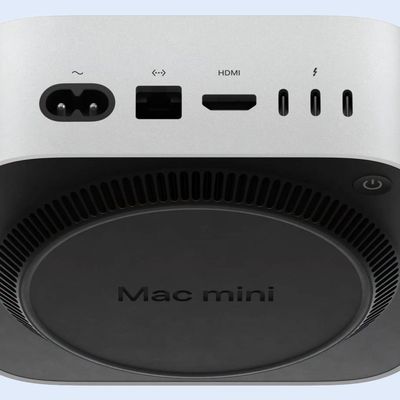
It's impressive to have a powerful M4 computer in such a small enclosure, and with so many available ports. There are two ports on the front and three on the back, all USB-C or Thunderbolt. If you have USB-A accessories, you'll need an adapter. There's also an HDMI port, a 3.5mm headphone jack, an Ethernet port, and a port for the power cable.

You can get the ‌Mac mini‌ with an M4 or an M4 Pro chip, and the M4 version has three Thunderbolt 4 ports at the back while the M4 Pro version has three Thunderbolt 5 ports that support faster transfer speeds. The M4 and the M4 Pro offer notable speed improvements over the prior ‌M2‌ and ‌M2‌ Pro chips. We've got the full array of benchmarks in the video, but CPU performance is up to 55 percent faster in the M4 Pro compared to the ‌M2‌ Pro. GPU performance is up significantly, and even the SSD is faster.

Apple is also selling the M4 Macs with 16GB RAM at a minimum, which is a major upgrade over the previous 8GB starting RAM for the base model.

The ‌Mac mini‌ is priced starting at $599, but that's because it doesn't come with a display or peripherals. You'll need to supply your own. It's a solid machine for home or work, and because it's so small, you can take it from one place to another if you have two setups with displays and accessories.

There is one downside to the ‌Mac mini‌. If you often turn your Mac off and on, you might be annoyed to find that the power button is on the bottom of the device. To access it, you'll need to lift the ‌Mac mini‌ up a bit. That's no big deal if you don't turn your computer off regularly, but if you do, just note there's a little bit of an extra hassle to deal with.

Did you get a new M4 Mac mini, or do you plan to? Let us know in the comments below.

Related Roundup: Mac mini
Buyer's Guide: Mac Mini (Don't Buy)

Related Forum: Mac mini

Popular Stories

apple silicon feature joeblue

Apple Silicon Exec Explains Mac Mini AI Demand and On-Device Future

Monday July 6, 2026 5:10 am PDT by
Apple's Mac mini and Mac Studio have become the machines of choice for running AI agents, according to Doug Brooks, Apple's senior product manager of Apple silicon. Brooks made the claim while discussing Apple's chip strategy in a newly published interview with The Deep View conducted just prior to WWDC 2026 in June. Brooks says that the company has seen "incredible demand" for the two...
apple silicon mac lineup 2024 feature purple

Apple to Overhaul Mac Lineup With 11 New Models

Wednesday July 22, 2026 8:13 am PDT by
Apple is preparing to refresh every Mac it sells over the next two years, according to Bloomberg's Mark Gurman. The plans come amid a Mac resurgence, with sales projected to climb for a third consecutive year, partly thanks to a growing following among users who lean on the machines for demanding, agent-based AI workloads. The wave of new Macs will begin this fall with a refreshed...
Apple Event Logo

Apple Working on All-New Operating System

Wednesday July 29, 2026 11:39 am PDT by
Apple is developing an all-new operating system that is essentially a mix of tvOS, watchOS, and iOS, according to Bloomberg's Mark Gurman. In a report this week, he said the operating system will feature a grid of icons, widgets, and apps, along with customizable clock faces. The new software platform is intended for Apple's long-rumored smart home hub. With built-in facial recognition,...

Top Rated Comments

WarmWinterHat Avatar
23 months ago
I have zero use for a mini, but I really, really want one!
Score: 22 Votes (Like | Disagree)
cjsuk Avatar
23 months ago
Got mine. So so so happy.
Score: 13 Votes (Like | Disagree)
23 months ago

Don't be fooled, those from USB "3" ports on the front are the old 5.0 Gb/s variety. Not 10Gb/s like the 3.1 and 3.2 ones.
Wrong?

Attachment Image
Score: 10 Votes (Like | Disagree)
Chuckeee Avatar
23 months ago

So apparently the SSD is removable and upgradeable!
Well the SSD is removable and replaceable, it is not really more upgradable. It is a unique Apple design that allows the replacement of the SSD memory chips [with a unique Apple supplied replacement], not the entire SSD. To upgrade the SSD storage, you still need the skill and equipment to remove the surface mounted chips and to solder in new chips. Simialr to the SSD configuration found on the Mac Studio, allowing for repairs but not a simple means to increase SSD capacity.
Score: 9 Votes (Like | Disagree)
23 months ago
Apple knocked it out of the park with this one. The base model is such a great deal. Weird power button placement but no biggie for my particular use, I never turn off the mini anyways.
Score: 9 Votes (Like | Disagree)
23 months ago
Set up my new mini this afternoon with no issues migrating data from my 2019 MacBook Air. The only thing I don't like is the external speaker jack on the front of the machine. The install would look much cleaner if it was on the back so the speaker cable was hidden....
Score: 7 Votes (Like | Disagree)

🔗 Related Apple News & Rumors

Stay updated with the latest Apple ecosystem news and verified rumors