

Hands-On With the New iPhone 16

Happy iPhone 16 launch day! Apple's latest ‌iPhone 16‌ and ‌iPhone 16‌ Pro models are now in the hands of consumers, and we thought we'd do a quick first impressions overview for those of you who are waiting for a delivery or who are still on the fence about upgrading.


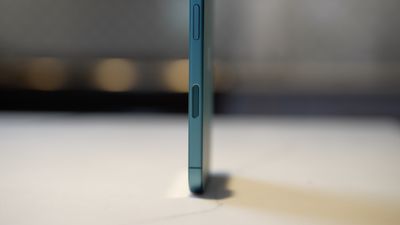
This year's ‌iPhone 16‌ is the biggest upgrade for a standard model that we've seen in some time. Performance is not too far off from the Pro models, the Action Button is no longer Pro exclusive, and Apple brought the fun new Camera Control button to all ‌iPhone 16‌ models, not just the 16 Pro and Pro Max.

The Action Button is more useful than ever before with iOS 18 because you can assign Control Center actions and even third-party app functionality. It can turn on the flashlight, open the Translate app, toggle on Dark Mode, open your favorite app, and so much more.
iphone 16 hands on camera control
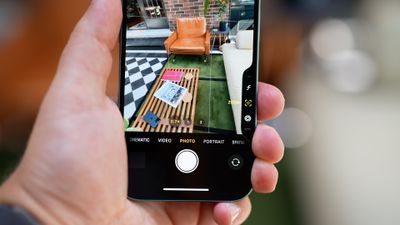
Apple has talked up the new Camera Control button, which is meant to be used for taking photos in either landscape or portrait mode. It is a little confusing at first, because it's a button, but it also supports pressure sensitivity touch gestures like swipes. The placement is not super convenient in portrait mode and can be a little awkward to use, and it takes some time to adjust to how the button works.

The button does do a lot, though, and you can press twice to snap a photo, press once and then press and hold to take a video, or use gestures to swap different tools to adjust photo parameters.
iphone 16 hands on camera
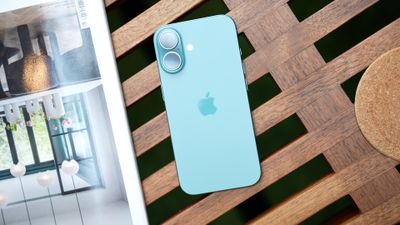
If you're holding your camera in landscape orientation, the button placement makes more sense, but a lot of iPhone photography is done in portrait mode rather than landscape mode. Apple moved the camera lenses from a diagonal position to a vertical position, and the ‌iPhone 16‌ models now support spatial photo and videos for the Vision Pro, but it's not clear how many people are actually using that functionality.

Apple added new Photographic Styles and a handy little adjustment pad for editing the intensity and look of those styles, so it's overall a much more useful feature than before. You can set up a favorite style and then apply it to all of your images for a custom look.
iphone 16 hands on front
For video, there's an Audio Mix feature that changes the way that audio sounds in your video recordings. You can pull out the voice of the subject of a video while muting the background noise, or direct all sound forward like in a movie.

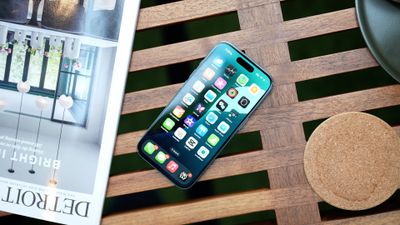
There are new color options this year, and the teal ‌iPhone‌ that we tested was a bright, vibrant shade of blue. You can also get ultramarine (a dark purple blue), pink, white, and black.
iphone 16 hands on back
As for the A18 chip, depending on which ‌iPhone‌ you're upgrading from, you might not see any speed improvements because most ‌iPhone‌ apps don't stress the CPU or GPU of modern processors, but the A18 does support Apple Intelligence. All ‌iPhone 16‌ models get the ‌Apple Intelligence‌ features coming in iOS 18.1 and later updates.

For a smartphone starting at $799, the ‌iPhone 16‌ is a surprisingly good value this year, and it's a worthwhile upgrade if you're coming from anything older than an ‌iPhone‌ 14. With the ‌iPhone‌ 14 and beyond, it's a less obvious upgrade, but there are still some great features to look forward to.


Related Roundup: iPhone 16
Related Forum: iPhone

Popular Stories

Aston Martin CarPlay Ultra Screen

Apple's CarPlay Ultra to Expand to These Vehicle Brands Later This Year

Sunday February 1, 2026 10:08 am PST by
Last year, Apple launched CarPlay Ultra, the long-awaited next-generation version of its CarPlay software system for vehicles. Nearly nine months later, CarPlay Ultra is still limited to Aston Martin's latest luxury vehicles, but that should change fairly soon. In May 2025, Apple said many other vehicle brands planned to offer CarPlay Ultra, including Hyundai, Kia, and Genesis. In his Powe...
Apple Logo Black

Apple's Next Launch is 'Imminent'

Sunday February 1, 2026 12:31 pm PST by
The calendar has turned to February, and a new report indicates that Apple's next product launch is "imminent," in the form of new MacBook Pro models. "All signs point to an imminent launch of next-generation MacBook Pros that retain the current form factor but deliver faster chips," Bloomberg's Mark Gurman said on Sunday. "I'm told the new models — code-named J714 and J716 — are slated...
Apple MacBook Pro M4 hero

New MacBook Pros Reportedly Launching Alongside macOS 26.3

Sunday February 1, 2026 5:42 am PST by
Apple is planning to launch new MacBook Pro models with M5 Pro and M5 Max chips alongside macOS 26.3, according to Bloomberg's Mark Gurman. "Apple's faster MacBook Pros are planned for the macOS 26.3 release cycle," wrote Gurman, in his Power On newsletter today. "I'm told the new models — code-named J714 and J716 — are slated for the macOS 26.3 software cycle, which runs from...
iOS 26

iOS 26.3 and iOS 26.4 Will Add These New Features to Your iPhone

Tuesday February 3, 2026 7:47 am PST by
We are still waiting for the iOS 26.3 Release Candidate to come out, so the first iOS 26.4 beta is likely still at least a week or two away. Following beta testing, iOS 26.4 will likely be released to the general public in March or April. Below, we have recapped known or rumored iOS 26.3 and iOS 26.4 features so far. iOS 26.3 iPhone to Android Transfer Tool iOS 26.3 makes it easier...
iOS 26 Home Feature

Apple Gives Final Warning to Home App Users

Tuesday February 3, 2026 8:55 am PST by
In 2022, Apple introduced a new Apple Home architecture that is "more reliable and efficient," and the deadline to upgrade and avoid issues is fast approaching. In an email this week, Apple gave customers a final reminder to upgrade their Home app by February 10, 2026. Apple says users who do not upgrade may experience issues with accessories and automations, or lose access to their smart...

Top Rated Comments

slippery-pete Avatar
18 months ago

60hz. Need I say more?
Large majority of people buying the 16 won't notice or care about 60Hz.
Score: 18 Votes (Like | Disagree)
MacTwick Avatar
18 months ago
Picking up a 16 pro today upgrading from a 13 pro. So excited!
Score: 9 Votes (Like | Disagree)
WarmWinterHat Avatar
18 months ago

The Camera Control button is confusing because it's a button? Every camera I've ever owned has a button for taking the picture (it is called a shutter button" for a reason)!
It's confusing because it's not a shutter button, though it can be used as one. It's a touchpad that allows swiping from side to side to change settings with a regular touch, lite press and full press all doing different things.

My brother and his wife have a 16 pro and 16 regular as of this morning, and they both say it's weird. She has been using DSLR and mirrorless cameras for years, so I take her word for it.
Score: 7 Votes (Like | Disagree)
citysnaps Avatar
18 months ago
So much negativity here. Everyday. I wonder if it disappoints MR writers who put a ton of time into every story they create/write?

Hat-tip and thanks to all of them!
Score: 7 Votes (Like | Disagree)
Devyn89 Avatar
18 months ago
This is the first time since the iPhone 13 where the base models feel like a complete thought and the Pro models just add something a little extra. You get all the iPhone 16 experiences with the base model and just a nice increase in display size and quality and cameras on the pro models.
Score: 6 Votes (Like | Disagree)
Cirillo Gherardo Avatar
18 months ago
This video is so weird. The button is clearly meant to be used when holding the phone in landscape. It never even occurred to me to use in portrait before watching this video, which oddly seems to be obsessed with taking portrait photos. The only time I take portrait photos is a relatively close up picture of a human subject. Otherwise it is all landscape, as photography should be. I'll be using the Camera Control in landscape 98% of the time, and stick to the on screen control for portrait, which is more comfortable.
Score: 5 Votes (Like | Disagree)














