

Apple today released macOS 15 Sequoia, the latest version of the operating system designed to run on the Mac. macOS Sequoia is a free update that can be downloaded on the 2018 and later MacBook Pro, 2020 and later MacBook Air, 2018 and later Mac mini, all Mac Studio models, 2019 and later iMac, and the iMac Pro.

Mac users can download the macOS Sequoia update by using the Software Update section of System Settings. While you're installing macOS Sequoia, take a look at our macOS Sequoia roundup to get an in-depth overview of all of the new features. Apple has also released macOS 13.7 and 14.7 updates for those unable to upgrade to Sequoia.
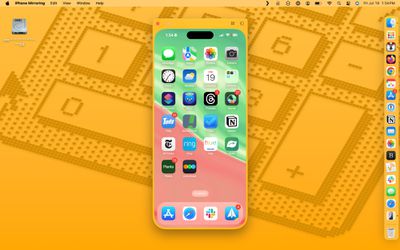
macOS Sequoia features iPhone Mirroring, which allows you to control and monitor your iPhone right from your Mac. You can use your iPhone's apps and get your iPhone's notifications all while your iPhone is tucked away and locked.
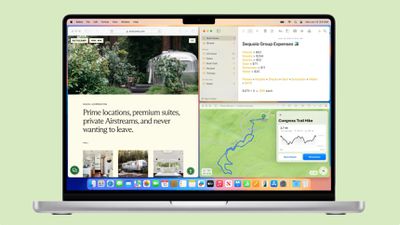
Window tiling has been improved to make it easier to arrange multiple windows on your Mac's display, and there are new keyboard and menu shortcuts for organizing your windows. In Safari, Highlights will now show you the information you want most from websites, and there's a new Viewer mode for watching videos without distractions.
The Messages app supports new text effects, scheduling, and Tapbacks with any emoji, while the Notes app has Math Notes integration for solving equations automatically. Apple Maps supports hiking trails and lets you create your own custom routes, there are new features for the AirPods Pro 2, and Apple added a dedicated Passwords app for managing your iCloud passwords and logins.

There are Apple Intelligence features like Writing Tools, Image Playground, Genmoji, and more coming to macOS Sequoia, but these updates are not included in the first release of the new software and be rolled out starting later this year. Apple's full release notes for macOS 15 Sequoia are below.
macOS Sequoia introduces new features to help you be more productive and creative on Mac. With the latest Continuity feature, iPhone Mirroring, you can access your entire iPhone on Mac. It's easy to tile windows to quickly create your ideal workspace, and you can even see what you're about to share while presenting with Presenter Overlay. A big update to Safari features Distraction Control, Highlights, and a redesigned Reader, making it easy to get things done while you browse the web. macOS Sequoia also brings text effects and emoji Tapbacks to Messages, Math Notes to Calculator, the ability to plan a hike in Maps, and so much more.
iPhone Mirroring
- iPhone Mirroring lets you access and control your iPhone on Mac, giving you a convenient way to browse your Home Screen, launch iPhone apps, and interact with them on Mac
- Keyboard and trackpad support enables you to type and use Multi-Touch gestures to swipe through apps on your Home Screen, pinch to zoom, and scroll in apps
- iPhone Notifications on Mac allow you to view and take action on notifications from iPhone right on your MacEasier window tiling
- Tiled window enhancements make it easier to arrange windows by dragging them to the screen's edge to place them side-by-side or in corners on your desktop
- Keyboard and menu shortcuts can be used to arrange windows into tiled positions even fasterSafari
- Distraction Control helps you hide items on a webpage that you find disruptive to your browsing
- Highlights surface key information from the webpage you're visiting with summaries, locations, and more
- Redesigned Reader offers even more ways to enjoy articles with a streamlined view of the article you're reading, a summary, and a table of contents for longer articles
- Viewer lets you watch videos without distractions, and automatically moves videos into Picture-in-Picture when you click away from the pagePasswords
- Passwords app lets you see all your credentials for websites and apps in one place, making it even easier to access your passwords, passkeys, Wi-Fi passwords, and verification codes
- Verification codes can be set up right in Passwords so you can easily copy them or autofill them into Safari without even having to open the app
- Secure syncing ensures your accounts saved in Passwords sync seamlessly with iCloud with end-to-end encryption so you can access them on your other devices
- Windows support through the iCloud Passwords app so you can access your passwords on Windows devicesVideo Conferencing
- Presenter Overlay lets you preview your screen before sharing it in video calls
- Play preview gives you a preview of where your content and presenter notes will be when you click Play in Keynote
- Background replacement allows you to upload your own photo or choose from several built-in options to use as your video call backgroundMessages
- Text effects bring your conversations to life by visually amplifying any letter, word, phrase, or emoji in iMessage with dynamic, animated effects like explode, ripple, and nod
- Text formatting lets you add bold, underline, italics, and strikethrough to any letter, word, or phrase in iMessage
- Emoji and sticker Tapbacks let you react to a message using any emoji or sticker, giving you access to the Tapbacks you and your friends send the most with just a swipe
- Send Later lets you compose a message now and schedule it to send laterMaps
- Topographic maps display features like trails, contour lines, elevation, and points of interest
- Hikes are available across all U.S. national parks and can be saved to your device to access while offline
- Custom walking and hiking routes can be created for hikes in the park, regular exercise routines in your neighborhood, walking tours while on vacation, and more
- Places Library combines all your saved places, guides, and hiking routes into one location for easy accessNotes
- Audio recordings can be started right from inside a note, and kept with related comments, checklists, and documents
- Live transcriptions show as you record audio, and transcripts are fully searchable so you can always find what you need
- Math in Notes let you enter expressions in your note to have them solve instantly
- Collapsible sections help you simplify and hide text in long notes; just click next to a section header to lighten up your most text-heavy notes
- Highlight text in your note with a choice of five colors allows you to make your text standoutPhotos
- Collections automatically organize your library by helpful topics in the sidebar, like Days, Trips, People & Pets, and Featured Photos
- Groups in People & Pets include photos of your favorite people or pets who frequently appear together
- Video speed control lets you slow down high frame rate video content with in and out points
- Utilities includes additional helpful collections like Documents, Receipts, and more, and items you've recently edited, viewed, and shared
- Recovered album in Utilities surfaces images that are on your device but were not previously visible due to database corruption in a locked albumApple TV app
- Subtitles automatically appear at just the right times, like when the content language doesn't match your device language, when you mute the audio, or when you skip back while watching a programAirPods
- Hands-free Siri Interactions let you respond to Siri announcements with AirPods by simply nodding your head 'yes' or shaking your head 'no'
- Voice Isolation on AirPods Pro provides clearer call quality for those you are speaking with, even in windy conditions or places with loud background noise
- Personalized Spatial Audio for gaming with AirPods puts you in the middle of the action with sound that surrounds you combined with a new API for developers that makes it easier than ever to enableThis release also includes other features and improvements:
- Updated basic and scientific calculators in Calculator app can now solve expressions, convert units, and access a history of past calculations
- Reminders in Calendar lets you create, view, edit and complete reminders alongside your meetings and appointments
- Recently Deleted list in Reminders lets you view and retrieve deleted reminders
- Scenes in Freeform allow you to organize your content into sections, then save, label and order them as you like
- Feels Like temperature in Weather app is displayed prominently near the actual temperature when they differ significantly
- Guest access in Home app lets you provide visitors with date and time- based access to locks, garage doors, and alarm systems
- Electricity usage and rate plan information in Home app are displayed for eligible customers when connecting their utility account, starting with Pacific Gas and Electric Company in California
- Accessibility Vocal Shortcuts help people with severe atypical speech record custom utterances that trigger specific actions on MacSome features may not be available for all regions or on all Apple devices.
For more information, please visit this website: https://www.apple.com/macos/macos-sequoia
For information on the security content of Apple software updates, please visit this website: https://support.apple.com/100100
Get More Info
For a deeper look at all of the new features in macOS Sequoia, we have a dedicated macOS Sequoia roundup, plus a macOS Sequoia forum for discussing the changes.





/https://forums.macrumors.com/attachments/2419167/)
















































