

Everything New in iOS 18 Beta 5 - MacRumorsOpen MenuShow RoundupsShow Forums menuVisit ForumsOpen Sidebar
Skip to Content

Everything New in iOS 18 Beta 5

With the fifth beta of iOS 18 that came out today, Apple added some notable new features, even though it's getting later in the beta testing process. There are design updates to the Photos app and a whole new Safari option, along with several smaller changes.
iOS 18 on iPhone Feature

Photos App Changes

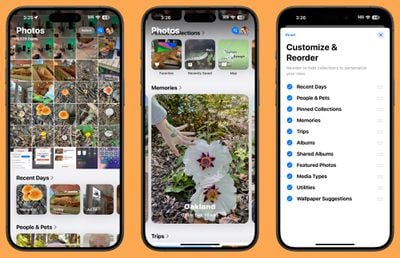
Apple responded to tester feedback about the ‌Photos‌ app, and there have been some changes to streamline the design. The carousel that allowed users to swipe through different Collections from the main ‌Photos‌ grid has been removed entirely, making the app less confusing and repetitive.
ios 18 photos app redesign
The ‌Photos‌ app still has a unified one-screen design, opening up to the photo grid where you can see all of your photos. With the update, more grid images can be seen at once, and you can scroll down to get to Collections.

Users who have multiple albums will see their albums higher up in the ‌Photos‌ app, and Recently Saved content is now integrated into the Recent Days collection. The order of Collections can be customized, as customization tools remain. You can decide what you want to see in the ‌Photos‌ app and where.

Distraction Control in Safari

Apple added a new Distraction Control feature to Safari, which allows iPhone users to hide distracting elements from a webpage or article. Sign in windows, cookie preference popups, GDPR notices, newsletter signup banners, autoplay videos, and more can be hidden from sight.

ios 18 distraction control
Distraction Control is not an ad blocker and it will not hide dynamic elements on a page, such as ads. You can use the feature to temporarily hide them, but when an ad refreshes, it shows back up. It is meant for static page elements.

Distraction Control can be accessed from the Safari webpage settings. Tap on the settings and then choose the Hide Distracting Items option. From there, you can tap the element on the page that you want to hide. Distraction Control does not sync, and page elements must be hidden separately on each of your devices. You can reveal anything hidden by going into the settings and tapping on Show Hidden Items.

Home Screen Options

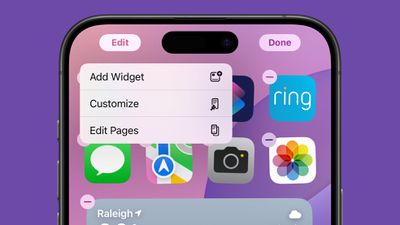
If you long press on the Home Screen and choose "Edit," there is a new "Edit Pages" option. With this setting, you can delete entire ‌Home Screen‌ pages, or hide them from view. This is the same interface you can get to by tapping on the three dots at the bottom of the display when in the ‌Home Screen‌ edit mode, it's just clearer with better labeling.
ios 18 home screen edit pages

Dark Mode Icons

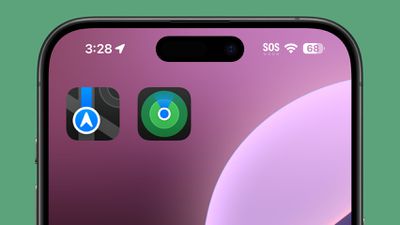
Apple changed some Dark Mode options, redesigning the Maps icon once again and updating the Find My icon. The Maps icon is now black, white, gray, and blue, with Apple eliminating the other colors, while ‌Find My‌ now has more obvious rings in different shades of green.
ios 18 dark mode icon maps

Dark Mode Search

When you search for an app using the search interface, the app icon now correctly shows up in ‌Dark Mode‌ when ‌Dark Mode‌ is turned on. Previously, search showed Light Mode icons.
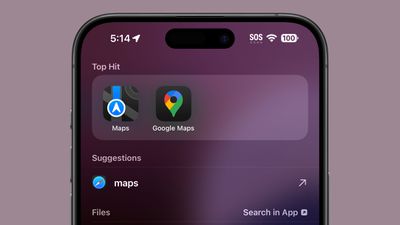
ios 18 dark mode apps search

Control Center

Apple has altered the design of some Control Center icons.
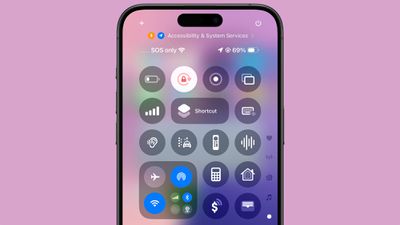
ios 18 control center icon update
Several icons have larger graphics:

  • Voice Memo
  • Stopwatch
  • Airplane Mode
  • Home
  • Remote
  • Shortcuts Open App option
  • Calculator
  • Scan Code
  • Magnifier
  • Wallet
  • Tap to Cash
  • Assistive and Guided Access
  • Hearing, Live Captions, and Left-Right Stereo Balance
  • Switch Control, Voice Control, Full Keyboard Access, Assistive Touch, Apple Watch Mirroring, Control Nearby Devices, and Eye Tracking.
  • Almost all Vision Accessibility icons

And there are several design changes:

  • Orientation Lock is now a red lock with a pink arrow.
  • Screen Recording has a smaller inner dot and a thicker outer dot. When activated, the outer circle is a darker red, the inner circle is the same bright red.
  • Screen Mirroring has different sized rectangles with one darker and one lighter.
  • Cellular Data now has four signal bars instead of an antenna.
  • Orientation Lock now has a gray arrow instead of a white arrow.
  • Shortcuts now includes a black and white version of the Shortcuts icon.
  • The Low Power Mode toggle battery graphic shows less of a charge and the battery outline is now gray instead of white. When it's on, the battery level and outline both turn yellow.
  • The Live Speech toggle has a white keyboard and a gray sound wave instead of the opposite.
  • Headphone Accommodations now has an ear icon instead of a headphones icon.
  • The Vehicle Motion Cues toggle now has a car icon instead of just dots.
  • Smart Invert's colors have changed (white main, and gray star, instead of the opposite).

Apple has also removed the non-functional Bluetooth Power Toggle setting that popped up in the last beta.

More New Changes

Know of a new feature in iOS 18 beta 5 that we left out? Let us know in the comments below.

Related Forums: iOS 18, iPadOS 18, macOS Sequoia

Popular Stories

iPhone Duo Display Cracking

Apple Alerts Stores to iPhone Duo's Display Cracking Issue

Friday October 30, 2026 3:20 pm PDT by
In a memo shared with Apple Stores and Apple Authorized Service Providers this week, and later obtained by MacRumors, Apple provided technicians with guidance on how to diagnose and address the iPhone Duo's inner display cracking issue. If a customer reports the issue, Apple advised technicians to inspect the iPhone Duo and repair or replace it in accordance with their standard procedures....
iPad mini OLED feature 1

Apple Executive Comments on New iPad Mini Lacking 120Hz Display

Thursday October 29, 2026 1:47 pm PDT by
While the new iPad mini has an OLED display, the device does not support ProMotion, meaning the display's refresh rate is limited to 60Hz instead of 120Hz. ProMotion support would have allowed for the iPad mini's refresh rate to automatically adjust from 10Hz to 120Hz depending on the content being displayed, but evidently Apple has kept the feature exclusive to the iPad Pro among iPad...
Pinched iPad Mini

Apple Avoids Showing Pinched Fingers on iPad Mini Page in South Korea

Thursday October 29, 2026 11:52 am PDT by
In the U.S. and most other countries, Apple's website shows the new iPad mini being held by pinched fingers, but this is not the case in South Korea. The new iPad mini shown with pinched fingers on Apple's website in the U.S. On its South Korean website, Apple simply shows an image of the iPad mini on its own. The new iPad mini shown without pinched fingers on Apple's website in South Korea ...

Top Rated Comments

PsykX Avatar
29 months ago
Tried the new Photos app today.
I was very skeptical when they unveiled it at WWDC, and I'm still skeptical today. It's not 100% bad, but a Tab Bar made navigation easier and made the app more in line with the other apps on iOS. I don't know why they really want to get rid of this.


At least, it's better than previous betas.
Score: 14 Votes (Like | Disagree)

MrGimper Avatar
29 months ago

any new ringtone or messages sounds?
People still use sounds? ;)
Score: 8 Votes (Like | Disagree)
Dog Bone Malone Avatar
29 months ago

So Apple still won’t allow us to delete the App Library. Thanks to so much, Tim!
The fact that we don't have the option to at least hide this screen is pretty annoying. I get some people use the app library, but I have never used it.
Score: 4 Votes (Like | Disagree)
29 months ago
Distraction control and changes to Photos app are good.
Score: 3 Votes (Like | Disagree)
EM2013 Avatar
29 months ago
I miss the days when Apple had good wallpapers now they just throw 2 random pastels together & call it a day smh

Attachment Image

Attachment Image
Score: 3 Votes (Like | Disagree)
kirky29 Avatar
29 months ago
So, if you're running 18.1 beta, you won't see this update... Is it just me, or does this feel extremely fragmented? Surely this is how more bugs are created..?
Score: 3 Votes (Like | Disagree)
Latest Stories
Apple Offers Steps to Fix Daylight Saving Time Bug on Apple Watch
3 hours ago
Apple Watch Ultra 4 Hits All-Time Low Price With Amazon's $99 Discount
22 hours ago
Reminder: Apple's Big Discount on Beats 360 Ear Cushions Ends Today
22 hours ago
Here's a New Tour of Apple's HomeView Software
22 hours ago
Apple Reveals New iPad Mini's Battery Capacity
1 day ago
Top Stories: Apple's Big MacBook Pro, iPad mini and iMac Updates
1 day ago
'Pluribus' Season 2 Reportedly Starts Production Today
1 day ago
iPhone 18 Pro Sales Surge in China, Offsetting Decline in U.S. and Japan
1 day ago
HomeView Software 27.2: Wallpapers, Control Center, and More
2 days ago
Apple Alerts Stores to iPhone Duo's Display Cracking Issue
2 days ago
iOS 27.3 Will Enable These Apple Intelligence Features in China
2 days ago
Apple Says iOS 27.3 Beta Coming Next Week
2 days ago
Apple's Flash Storage Suppliers Are Finally 'Getting Their Revenge'
2 days ago
14 New Things Your iPhone Can Do in iOS 27.2
2 days ago
iPhone Duo Review: One Week Later
2 days ago
Samsung Mocks iPhone Duo Display Cracks in New Ad Campaign
2 days ago
The MacRumors Show: OLED MacBook Pro, iPad Mini 8, and More
2 days ago
MacBook Pro With Touch Display: 15 More Details Revealed
2 days ago
Russia Places Apple on State Surveillance Registry
2 days ago
Halloween Weekend Brings Discounts on Apple Accessories and Pre-Orders
2 days ago
Apple Has Released More Than 25 New Products in the Past Two Months
2 days ago
Local Code Launches as Free, Private AI Assistant Tool for Mac
2 days ago
Apple Acquires Ascend.io
2 days ago
HomePod Mini 2 Launches Today: All the New Features
2 days ago
AirTag 2 4-Pack Drops to New Low Price of $69.99
2 days ago
Rian Johnson's iPhone Camera App Goes Viral
2 days ago
Where Did All the iPhone Duos Go? Mostly to Apple's Stores
2 days ago
Apple's Touchscreen MacBook Pro Could Ship 1.5M Units in 2027
2 days ago
New Apple TV 4K and iPad Mini: RAM Amounts Revealed
3 days ago
Apple Executive Comments on New iPad Mini Lacking 120Hz Display
3 days ago

🔗 Related Apple News & Rumors

Stay updated with the latest Apple ecosystem news and verified rumors












































