

iOS 18: Calendar App Design Changes and Reminders Integration - MacRumorsOpen MenuShow RoundupsShow Forums menuVisit ForumsOpen Sidebar
Skip to Content

iOS 18: Calendar App Design Changes and Reminders Integration

Apple in iOS 18 has given the Calendar app a major update, adding some welcome interface design changes, not to mention long-awaited integration with Reminders.
iOS 18 Calendar Feature
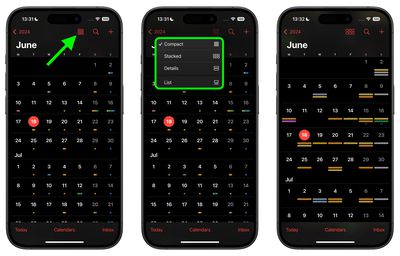
In the month-by-month calendar view, the month now appears in large bold font in the top left, while the Events list toggle has been replaced by a new button that lets you choose between Compact, Stacked, Details, and List views.
ios 18 calendar views
The Compact view looks similar to the standard view in iOS 17, with events indicated by dots (but now colored to indicate which calendar they belong to), while the Stacked view displays each day's events as long thin pills on top of each other.
details calendar view
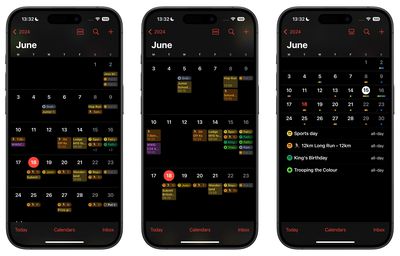
The new Details view shows the title of every event across the month. One neat additional touch here is that you can use a pinch to zoom gesture to expand or reduce the calendar and create more or less space between the days to view more items. This action also gradually switches between the Compact, Stacked, and Details views. Elsewhere, the List view should be familiar, and shows the month with the selected day's events listed below.
multi day calendar view
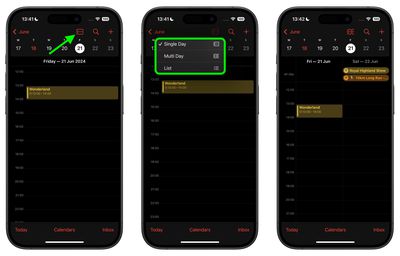
In the Today view, you can now switch between a Single Day or Multi Day view, with the latter providing details of all the day's events alongside any upcoming events for the following day.

When you tap the + icon in the top-right corner, a "New" card appears where you can switch between "Event" and "Reminder" tabs at the top. Reminders now appear in your calendar views, where you can mark them as completed.
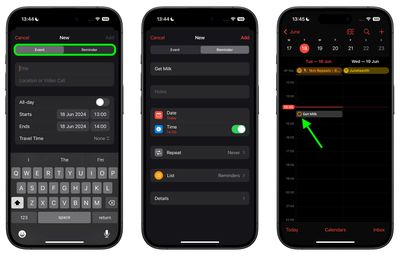
reminders in calendar
You can also tap a reminder to get a Reminder Details screen, which includes the associated reminder list, plus a link to view that item within the Reminders app. There's also an Edit button in the top-right of the Reminder Details screen, which lets you change everything about the reminder that you can in Reminders, except without you having to leave the Calendar app.
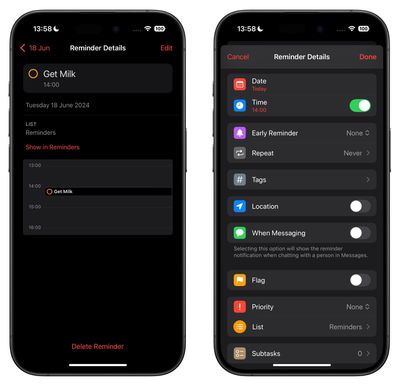
reminder details calendar app
iOS 18 is currently in beta for Apple Developer Program members, with a public beta to follow in July. The update should be widely released in September, but bear in mind that Apple could always make Calendar app changes based on feedback before then.


Related Forums: iOS 18, iPadOS 18

Popular Stories

Apple Event Logo

Apple Working on All-New Operating System

Wednesday July 29, 2026 11:39 am PDT by
Apple is developing an all-new operating system that is essentially a mix of tvOS, watchOS, and iOS, according to Bloomberg's Mark Gurman. In a report this week, he said the operating system will feature a grid of icons, widgets, and apps, along with customizable clock faces. The new software platform is intended for Apple's long-rumored smart home hub. With built-in facial recognition,...
imac video apple feature

Apple Made Its Second-Biggest Acquisition Ever This Year

Wednesday July 29, 2026 12:03 pm PDT by
Apple this year acquired Israeli startup Q.ai for close to $2 billion, according to the Financial Times. That would make this Apple's second-biggest acquisition ever, after it paid $3 billion for the popular headphone maker Beats in 2014. This is also the largest known Apple acquisition since the company purchased Intel's smartphone modem business and patents for $1 billion in 2019. Q.ai...
Dynamic Island iPhone 18 Pro Feature

iPhone 18 Pro: Twelve Changes Coming to Apple's Next Flagship

Thursday July 30, 2026 3:43 am PDT by
We're less than two months out from the launch of Apple's premium next-generation smartphone lineup, and while we're not expecting a dramatic change in terms of functionality, there are still several enhancements rumored to be coming to the iPhone 18 Pro and iPhone 18 Pro Max. One thing worth noting is that Apple is reportedly planning a major change to its iPhone release cycle this year,...

Top Rated Comments

28 months ago
I think they added this feature just to stop me from constantly telling them.

Attachment Image
Score: 30 Votes (Like | Disagree)

fwmireault Avatar
28 months ago
At this point they should just buy Fantastical
Score: 23 Votes (Like | Disagree)
28 months ago
This is huge, Calendar has been miserably barebones for far too long.

I might actually switch back from Fantastical now.
Score: 10 Votes (Like | Disagree)
28 months ago
The more detailed monthly view is long overdue, but so, so welcome.

Hopefully it’ll also be extended to the widget in the (not too distant) future.
Score: 8 Votes (Like | Disagree)
tonywalker23 Avatar
28 months ago
I'm old enough to remember when they were together the first time. I also remember when Mail let you also have RSS feeds
https://512pixels.net/projects/aqua-screenshot-library/mac-os-x-10-5-leopard/#jp-carousel-15822

Attachment Image
Score: 5 Votes (Like | Disagree)
Joosst Avatar
28 months ago
Still sticking with fantastical for my favourite ‘feature’: being able to scroll through a list of all my upcoming events while the month view above it highlights the day as you scroll over it.

It’s so annoying that Apple’s month view shows the title of only one day, and you have to tap on another day to see that title. Scrolling is so much easier than tapping. Especially if you have a gazillion events.
Score: 4 Votes (Like | Disagree)

🔗 Related Apple News & Rumors

Stay updated with the latest Apple ecosystem news and verified rumors











































