

Apple Explains How iOS 18 Genmoji Work

One of the Apple Intelligence features coming in iOS 18 is Genmoji, which will allow iPhone users to use AI to generate all-new emoji characters based on text input. The ‌Genmoji‌ will look similar to emoji, but are custom created, according to an iOS 18 WWDC session focused on Genmoji.
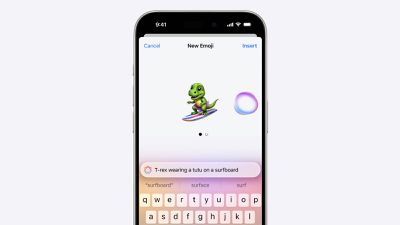
Genmoji iOS 18
Emoji are not images, but are instead pictographs that are encoded in the Unicode Standard and rendered by each platform. Emoji are added by the Unicode Consortium, which raised some questions about how Apple's ‌Genmoji‌ solution will work.

As it turns out, Apple has designed an NSAdaptiveImageGlyph API for ‌Genmoji‌ and also other images like stickers and Memoji, and this API makes them behave like emoji. It is powered by a standard image format in a square aspect ratio with support for multiple resolutions, and it is augmented with metadata. This setup means that ‌Genmoji‌ and other content using NSAdaptiveImageGlyph can be used with and formatted alongside regular text, similar to emoji.

‌Genmoji‌ can be used alone, copied, pasted, and sent as stickers. They can be used inline with text, and they respect line height and text formatting. Anywhere that can support rich text can support ‌Genmoji‌, according to Apple.

‌Genmoji‌ are not Unicode and may not be appropriate for some data such as identifiers, phone numbers, email addresses, and will not be supported as widely as emoji. Prior versions of iOS, iPadOS, and macOS, as well as apps that do not support rich text will denote ‌Genmoji‌ with a text description.

‌Apple Intelligence‌ features like ‌Genmoji‌ are not yet in the iOS 18 developer beta, but Apple plans to let developers begin testing ‌Apple Intelligence‌ sometime this summer. ‌Genmoji‌ and ‌Apple Intelligence‌ will be available to the public this fall, but they will be limited to ‌iPhone‌ 15 Pro models and iPads and Macs with M-series chips.

Related Forums: iOS 18, iPadOS 18

Popular Stories

Aston Martin CarPlay Ultra Screen

Apple's CarPlay Ultra to Expand to These Vehicle Brands Later This Year

Sunday February 1, 2026 10:08 am PST by
Last year, Apple launched CarPlay Ultra, the long-awaited next-generation version of its CarPlay software system for vehicles. Nearly nine months later, CarPlay Ultra is still limited to Aston Martin's latest luxury vehicles, but that should change fairly soon. In May 2025, Apple said many other vehicle brands planned to offer CarPlay Ultra, including Hyundai, Kia, and Genesis. In his Powe...
Apple Logo Black

Apple's Next Launch is 'Imminent'

Sunday February 1, 2026 12:31 pm PST by
The calendar has turned to February, and a new report indicates that Apple's next product launch is "imminent," in the form of new MacBook Pro models. "All signs point to an imminent launch of next-generation MacBook Pros that retain the current form factor but deliver faster chips," Bloomberg's Mark Gurman said on Sunday. "I'm told the new models — code-named J714 and J716 — are slated...
iOS 26

iOS 26.3 and iOS 26.4 Will Add These New Features to Your iPhone

Tuesday February 3, 2026 7:47 am PST by
We are still waiting for the iOS 26.3 Release Candidate to come out, so the first iOS 26.4 beta is likely still at least a week or two away. Following beta testing, iOS 26.4 will likely be released to the general public in March or April. Below, we have recapped known or rumored iOS 26.3 and iOS 26.4 features so far. iOS 26.3 iPhone to Android Transfer Tool iOS 26.3 makes it easier...
Apple MacBook Pro M4 hero

New MacBook Pros Reportedly Launching Alongside macOS 26.3

Sunday February 1, 2026 5:42 am PST by
Apple is planning to launch new MacBook Pro models with M5 Pro and M5 Max chips alongside macOS 26.3, according to Bloomberg's Mark Gurman. "Apple's faster MacBook Pros are planned for the macOS 26.3 release cycle," wrote Gurman, in his Power On newsletter today. "I'm told the new models — code-named J714 and J716 — are slated for the macOS 26.3 software cycle, which runs from...
iOS 26 Home Feature

Apple Gives Final Warning to Home App Users

Tuesday February 3, 2026 8:55 am PST by
In 2022, Apple introduced a new Apple Home architecture that is "more reliable and efficient," and the deadline to upgrade and avoid issues is fast approaching. In an email this week, Apple gave customers a final reminder to upgrade their Home app by February 10, 2026. Apple says users who do not upgrade may experience issues with accessories and automations, or lose access to their smart...

Top Rated Comments

Drs247 Avatar
22 months ago
Couldn't care less but I know that this is gonna be a HIT.
Says loads about the world we live in.
Score: 16 Votes (Like | Disagree)
bassjunky Avatar
22 months ago
Emojis, Memojis, Genmojis, lawd, at my super old-ass age of 47, it all gives me tired-head.
Score: 10 Votes (Like | Disagree)
Surf Monkey Avatar
22 months ago

Would be an interesting statistic to see how many of us have disabled Memoji setting. :rolleyes:
Used it once when it came out. Never again. Too stupid. It’s a feature for kids, not adults.
Score: 7 Votes (Like | Disagree)
mrat93 Avatar
22 months ago

Couldn't care less but I know that this is gonna be a HIT.
Says loads about the world we live in.
It is going to be a scandal that only 15 Pros and 16 models can generate them.
Score: 7 Votes (Like | Disagree)
JosephAW Avatar
22 months ago
Would be an interesting statistic to see how many of us have disabled Memoji setting. :rolleyes:
Score: 7 Votes (Like | Disagree)
Populus Avatar
22 months ago

Would be an interesting statistic to see how many of us have disabled Memoji setting. :rolleyes:
It’s on my list of “settings to disable when restoring or setting up a new device”, right below disabling iCloud Photo.


care to share how to do that?
At least in my case, what I do is disable the Memoji stickers on the Emoji keyboard. It’s under Keyboard settings.
Score: 7 Votes (Like | Disagree)















