

Six Bartender Alternatives to Manage Your Mac's Menu Bar - MacRumorsOpen MenuShow RoundupsShow Forums menuVisit ForumsOpen Sidebar
Skip to Content

Six Bartender Alternatives to Manage Your Mac's Menu Bar

Popular Mac menu bar management utility Bartender was recently quietly sold to another company, a fact that only came to light after app monitoring service MacUpdater alerted users that updates to the app from version 5.0.52 could be potentially unsafe due to the lack of transparency surrounding the situation.
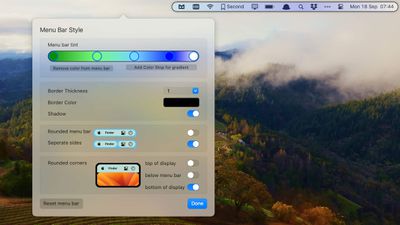
bartender app
The original developer has since acknowledged the sale. However, the new Bartender owner is a largely unknown entity that has reportedly hiked Bartender's purchase options, and is alleged to have added code to the app that may be associated with collecting analytics data on users.

Given that Bartender requires extensive permissions to operate in macOS, including screen recording, the whole event has understandably left many users concerned about privacy. Fortunately, Bartender is not the only app of its kind. So unless Apple ever gets round to integrating better menu bar management into macOS, here are some alternative menu bar utilities that are worth considering.

  • Vanilla (Free) – Simple app that lets you hide menu bar icons. Just hold Command and drag icons between hidden and visible sections. Vanilla Pro ($10) adds keyboard shortcuts, a removed section, start at login, and an auto-hide option after 5 seconds.
  • Ice (Free) – Menu bar management tool that hides items, offers an always-hidden section, show on hover, show on click, show on scroll or swipe, automatic rehide, and app menu overlap correction. Also includes hotkeys, launch at login, and options to change menu bar appearance.
  • Hidden Bar (Free) – Lightweight tool that lets you drag a divider between icons in the menu bar to separate hidden and shown sections. Includes launch at login, auto-hide durations, show/hide global shortcut, and full menu bar mode.
  • iBar (Free) – This tool hides menu bar icons which can be revealed in a floating bar that extends below the notch on MacBook Air and MacBook Pro.
  • Barbee ($3.99) – Management tool with similar interface to Bartender. Includes sections for shown, hidden, and always hidden items, as well as extensive menu bar appearance settings. Also offers ability to quickly search your menu bar items in a Spotlight-style floating window.
  • OnlySwitch (Free) – More than just a menu bar management tool, OnlySwitch offers a broad range of customizable toggle switches designed to offer quick access to system and other settings, such as hide desktop icons, dark mode, hide MacBook notch, mute mic, and more.

If you are a BetterTouchTool user, Andreas Hegenberg has a thorough tutorial on how the utility can be used to hide menu bar items. Know of a great Mac menu bar management tool that we haven't highlighted? Let us know in the comments below and we might append it to this article.


Popular Stories

Apple Event Logo

Apple Working on All-New Operating System

Wednesday July 29, 2026 11:39 am PDT by
Apple is developing an all-new operating system that is essentially a mix of tvOS, watchOS, and iOS, according to Bloomberg's Mark Gurman. In a report this week, he said the operating system will feature a grid of icons, widgets, and apps, along with customizable clock faces. The new software platform is intended for Apple's long-rumored smart home hub. With built-in facial recognition,...
imac video apple feature

Apple Made Its Second-Biggest Acquisition Ever This Year

Wednesday July 29, 2026 12:03 pm PDT by
Apple this year acquired Israeli startup Q.ai for close to $2 billion, according to the Financial Times. That would make this Apple's second-biggest acquisition ever, after it paid $3 billion for the popular headphone maker Beats in 2014. This is also the largest known Apple acquisition since the company purchased Intel's smartphone modem business and patents for $1 billion in 2019. Q.ai...
Four iPhone 18 Pro Colors Mock Feature

iPhone 18 Pro and iPhone Ultra: Pre-Orders and Release Date

Thursday July 30, 2026 6:12 am PDT by
Apple has yet to reveal when the iPhone 18 Pro and iPhone Ultra will be announced and released, but the dates usually follow a familiar pattern. Labor Day is September 7 this year. The last time the holiday fell on that day was in 2020, but the iPhone event that year was delayed until October due to the COVID-19 pandemic. So, the last time Labor Day was on September 7 in a normal year was in ...

Top Rated Comments

pdaholic Avatar
28 months ago
I like how the article has vanilla and ice apps next to each other.
Score: 60 Votes (Like | Disagree)

28 months ago
I used one of these apps for years, but last year I found the easiest and best solution that is app-less. Usually I want all those menu bar items up all the time… but what I don’t want is the giant spacing and padding between them.
Behold in the terminal:

defaults -currentHost write -globalDomain NSStatusItemSpacing -int x
defaults -currentHost write -globalDomain NSStatusItemSelectionPadding -int y

Where x and y are spacing and padding. I found 6 and 3 for me the best:

defaults -currentHost write -globalDomain NSStatusItemSpacing -int 6
defaults -currentHost write -globalDomain NSStatusItemSelectionPadding -int 3

I found I didn’t really need an app after that. All the stuff I wanted to put up there I could fit, and all the stuff that didn’t make it I explicitly took out with ⌘ + drag.


Here’s a reference to the stack overflow I found this:

https://apple.stackexchange.com/questions/406316/can-the-spacing-of-menu-bar-apps-be-modified-in-macos-big-sur-and-later/465674#465674

Attachment Image
Score: 38 Votes (Like | Disagree)
nxt3 Avatar
28 months ago
Switched to Ice yesterday and it does the job perfectly. Great that it's also open source.

RIP Bartender. Been using it since 2015.
Score: 34 Votes (Like | Disagree)
CalMin Avatar
28 months ago
How come I always find out about the free options AFTER I've bought the paid apps!
Score: 24 Votes (Like | Disagree)
Wanted797 Avatar
28 months ago
So “they share the original developers vision”

Yet they’ve already apparently hiked prices and added code for tracking?

Sounds super shady and like someone got some extra $$$ to not say anything.
Score: 22 Votes (Like | Disagree)
28 months ago
This whole timeline is so bizarre. I ran Ben's acknowledgement/apology/whatever the hell that was through an AI detector, it was totally written by ChatGPT.

Attachment Image
Score: 18 Votes (Like | Disagree)

🔗 Related Apple News & Rumors

Stay updated with the latest Apple ecosystem news and verified rumors










































