Apple today previewed many new accessibility features coming later this year with software updates like iOS 18, iPadOS 18, macOS 15, and visionOS 2. The announcement comes one day ahead of Global Accessibility Awareness Day.
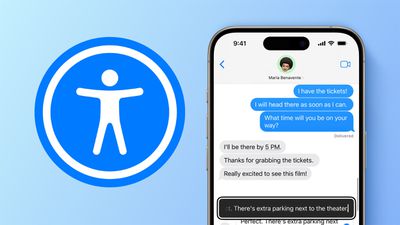
The key new accessibility features for the iPhone and/or iPad will include:
- Eye Tracking
- Music Haptics
- Vocal Shortcuts
- Vehicle Motion Cues
Mac users will gain the ability to customize VoiceOver keyboard shortcuts, and Mandarin support for Personal Voice, while the Vision Pro will get systemwide Live Captions, Reduce Transparency, Smart Invert, and Dim Flashing Lights.
Eye Tracking
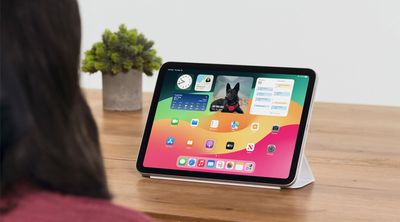
Apple says Eye Tracking on the iPhone and iPad will allow users to navigate system interfaces and apps with just their eyes:
Powered by artificial intelligence, Eye Tracking gives users a built-in option for navigating iPad and iPhone with just their eyes. Designed for users with physical disabilities, Eye Tracking uses the front-facing camera to set up and calibrate in seconds, and with on-device machine learning, all data used to set up and control this feature is kept securely on device, and isn't shared with Apple.
Eye Tracking works across iPadOS and iOS apps, and doesn't require additional hardware or accessories. With Eye Tracking, users can navigate through the elements of an app and use Dwell Control to activate each element, accessing additional functions such as physical buttons, swipes, and other gestures solely with their eyes.
Music Haptics
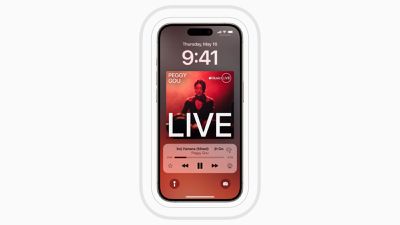
When this feature is turned on, the iPhone's Taptic Engine will play "taps, textures, and refined vibrations" that correspond with the audio of the music:
Music Haptics is a new way for users who are deaf or hard of hearing to experience music on iPhone. With this accessibility feature turned on, the Taptic Engine in iPhone plays taps, textures, and refined vibrations to the audio of the music. Music Haptics works across millions of songs in the Apple Music catalog, and will be available as an API for developers to make music more accessible in their apps.
Vocal Shortcuts
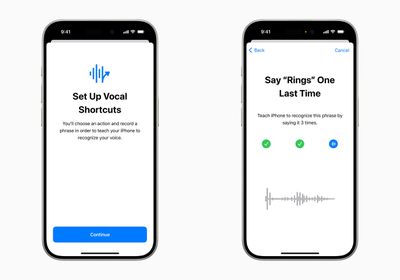
Vocal Shortcuts will allow iPhone and iPad users to assign "custom utterances" that Siri can understand to "launch shortcuts and complete complex tasks."
Vehicle Motion Cues
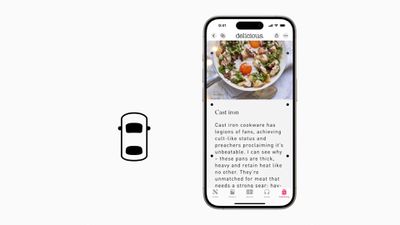
This feature is designed to reduce motion sickness while looking at an iPhone or iPad's screen in a moving vehicle:
With Vehicle Motion Cues, animated dots on the edges of the screen represent changes in vehicle motion to help reduce sensory conflict without interfering with the main content. Using sensors built into iPhone and iPad, Vehicle Motion Cues recognizes when a user is in a moving vehicle and responds accordingly. The feature can be set to show automatically on iPhone, or can be turned on and off in Control Center.
Read our standalone coverage of this feature to learn more.
CarPlay
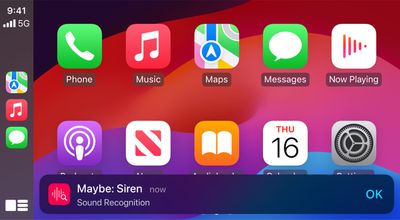
CarPlay will be gaining Voice Control, Color Filters, and Sound Recognition.
Sound Recognition on CarPlay will allow drivers or passengers who are deaf or hard of hearing to turn on alerts to be notified of car horns and sirens.
Live Captions on Vision Pro
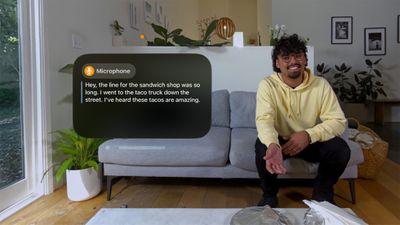
visionOS 2 will support Live Captions, allowing users who are deaf or hard of hearing to follow along with spoken dialogue in live conversations and in audio from apps.
More Features
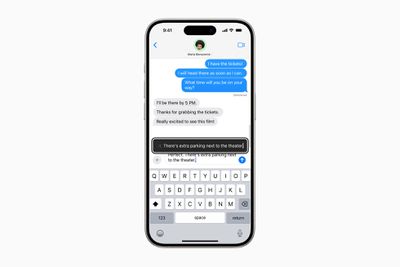 Hover Typing will show larger text when typing in a text field
Apple outlined many more accessibility features coming to its platforms later this year:
- For users who are blind or have low vision, VoiceOver will include new voices, a flexible Voice Rotor, custom volume control, and the ability to customize VoiceOver keyboard shortcuts on Mac.
- Magnifier will offer a new Reader Mode and the option to easily launch Detection Mode with the Action button.
- Braille users will get a new way to start and stay in Braille Screen Input for faster control and text editing; Japanese language availability for Braille Screen Input; support for multi-line braille with Dot Pad; and the option to choose different input and output tables.
- For users with low vision, Hover Typing shows larger text when typing in a text field, and in a user’s preferred font and color.
- For users at risk of losing their ability to speak, Personal Voice will be available in Mandarin Chinese. Users who have difficulty pronouncing or reading full sentences will be able to create a Personal Voice using shortened phrases.
- For users who are nonspeaking, Live Speech will include categories and simultaneous compatibility with Live Captions.
- For users with physical disabilities, Virtual Trackpad for AssistiveTouch allows users to control their device using a small region of the screen as a resizable trackpad.
- Switch Control will include the option to use the cameras in iPhone and iPad to recognize finger-tap gestures as switches.
- Voice Control will offer support for custom vocabularies and complex words.
Apple is expected to unveil iOS 18 and more at its developers conference WWDC on June 10, and the software updates will be widely released later this year.