

Hands-On With the Rabbit r1 Pocket AI Assistant - MacRumorsOpen MenuShow RoundupsShow Forums menuVisit ForumsOpen Sidebar
Skip to Content

Hands-On With the Rabbit r1 Pocket AI Assistant

With the rise of ChatGPT and large language models (LLMs), AI-dedicated devices have started coming out. The Humane AI pin was widely lambasted earlier this month when it launched, and now the Rabbit r1 AI assistant is out. With rumors that Apple is delving into AI in a big way, we thought we'd check out the Rabbit r1 to see what it can do and how it measures up to an iPhone.


Priced at $200, the Rabbit is a square-shaped pocket assistant that can answer questions, look up information, interface with food delivery and ride sharing services, play music, translate languages, and more. It's a cute little device that looks right at home with the Playdate from Panic, but most of what it can do can already be done with an iPhone.

Unlike the Humane AI Pin, the Rabbit r1 has a screen that you can interact with, which makes it much more functional. It comes with an old school scroll wheel for navigating the UI, and there's a built-in camera for recognizing objects. It is Wi-Fi only by default, but you can add a SIM card, which is an added cost.
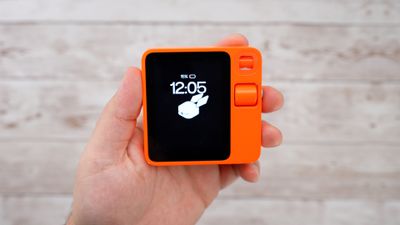
rabbit r1 time
As a first-generation device, the r1 isn't perfect. The setup process is bare bones without tips on how to use the device or what it's able to do. You'll almost certainly need to visit the website to figure out how to use it if you pick one of these up, so it could do with some on-device instruction to make using it smoother. There are, for example, hidden controls like shaking the device to get to the settings, and the settings are the only way to activate the terminal for typing.

The idea with the Rabbit r1 is to be less reliant on a smartphone, so there's no app for it. That's kind of a hassle if you want to get to the photos and other information that you've stored on it, because it's only accessible through the Rabbit Hole website.

You can hook up services like Spotify, but it's not super smart about suggesting songs. Asking it to play liked songs, for example, resulted in random song selections. The option to translate works well, but it can be slow, and it's tough to get to.
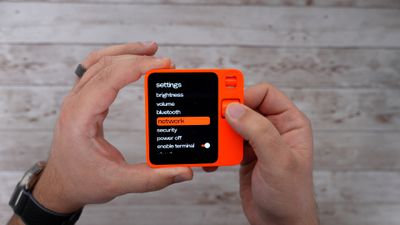
rabbit r1 settings
In some tests, ordering food was successful, but not without hiccups. We didn't test placing an order ourselves, but YouTuber Quinn Nelson did and the AI placed the order but didn't ask for guidance on a tip and ended up being overly generous and tipping the highest suggested amount.

The Rabbit r1 can summarize documents, a task that it's decent at, but that's not really something that a smartphone can't do. It is good at recognizing what's around through the camera, but some things, like a classic Mac, did trip it up.

We need to spend more time testing the Rabbit r1, but so far, it seems like a neat device but also an unnecessary one that isn't quite ready to replace a smartphone. Have an opinion on the r1? Let us know in the comments below.


Popular Stories

apple reference image iphone 18 pro

iPhone 18 Pro Introduces 'Apple Reference Image' to Verify Photo Authenticity

Wednesday September 9, 2026 1:00 pm PDT by
Apple today announced Apple Reference Image, a new opt-in feature for the iPhone 18 Pro and iPhone 18 Pro Max that helps users to prove a photo hasn't been altered since it was taken. Apple Reference Image is powered by a new sensor in the Main camera that signs sensor data at the pixel level at the moment of capture. When a photo is taken in the new Reference mode, that signed data is...

iOS 27 Next to iPhone

Here's When iOS 27 Rolls Out Today in Every Time Zone [Update: It's Out]

Sunday September 13, 2026 3:00 am PDT by
Update 10:04 a.m.: iOS 27 is rolling out now, though it may take a bit for all users to see it, so keep checking! Apple is about to release iOS 27, which will finally deliver more advanced Siri AI capabilities as well as a variety of other refinements, improvements, and new features to iPhones. It's Apple's biggest software update of the year, and Apple announced at Wednesday's iPhone event...
iOS 27 Icon iPhone

iOS 27 Available Now With These 8 New Features

Monday September 14, 2026 9:00 am PDT by
Update — 10 a.m. Pacific Time: Apple has released iOS 27. During its iPhone 18 Pro and iPhone Duo event last week, Apple announced that iOS 27 will be released widely on Monday, September 14. iOS 27 should be available around 10 a.m. Pacific Time / 1 p.m. Eastern Time today via the Settings app, under General → Software Update. Below, we have highlighted eight new features and...

Top Rated Comments

ThunderSkunk Avatar
31 months ago
Maybe I can duct tape it to my iPhone and petend it's siri working that well.
Score: 18 Votes (Like | Disagree)
31 months ago
Hey you there.

Yeah you the rabbit thing.

Get in line with the Humane pin thing and follow the sign that says ‘To ewaste pit ——>’
Score: 17 Votes (Like | Disagree)
31 months ago
Every “new” tech thing lately is something a smart phone could do but worse.
Score: 15 Votes (Like | Disagree)
31 months ago
I predict poor sales and it will disappear from the market. A solution looking for a problem.
Score: 15 Votes (Like | Disagree)
jdawgnoonan Avatar
31 months ago
There is no reason to not use your phone for that stuff, unless you really want a another device that is really only good at one thing to carry around in addition to your smart phone.
Score: 9 Votes (Like | Disagree)
31 months ago

A solution looking for a problem.
You don’t understand the genius behind the GenAI device era.

The makers believe you will never read your documents so you need a bot to summarize them.

The makers believe you don’t know what’s in front of the camera so you need the rabbit to tell you what’s in front of the camera.

Users are just stupid things who hand over money and let the rabbit thing do all the thinking.

That’s the business model with AI.
Score: 8 Votes (Like | Disagree)

🔗 Related Apple News & Rumors

Stay updated with the latest Apple ecosystem news and verified rumors











































