Apple Releases Updated Firmware for First-Generation AirPods Pro and AirPods 2
Apple today introduced a new firmware update for the first-generation AirPods Pro and second-generation AirPods. The new firmware is the same 6A321 version that was released for the third-generation AirPods last week and is up from the 6A300 firmware introduced last September.

Apple's AirPods firmware updates often do not come with details on new features, so it is unclear what might be included in the software. For last week's AirPods 3 update with this firmware version, Apple listed only "bug fixes and other improvements."
Apple also does not offer instructions on how to upgrade AirPods software, but firmware is generally installed over-the-air while the AirPods are connected to an iOS device. Putting the AirPods in the case, connecting the AirPods to a power source, and then pairing the AirPods to an iOS device or Mac should force the update.
You can check your AirPods or AirPods Pro firmware version by following these steps:
- Connect your AirPods to your iOS device.
- Open the Settings app.
- Tap General.
- Tap About.
- Tap AirPods.
- Look at the number next to "Firmware Version."
If we learn more about what's new in the AirPods firmware release, we'll update this article.
Update 1:50 pm: This article has been updated to note the 6A321 update has also been released for the second-generation AirPods.
Popular Stories
Bloomberg's Mark Gurman has high expectations for Apple's first foldable iPhone.
In his Power On newsletter today, he said the foldable iPhone will be "the most significant overhaul in the iPhone's history."
"iPhone 4, iPhone 6 and iPhone X were clearly a big deal, but this is a whole new design," he said.
Like Samsung's Galaxy Z Fold 7, the foldable iPhone will reportedly open up like ...
iOS 26.5 is now available for developers, and while it doesn't include any new Siri capabilities, there are some major changes for the European Union, and smaller tweaks for features available worldwide.
Suggested Places
In the Maps app, there's a new "Suggested Places" feature that recommends locations to visit based on trending places nearby and recent searches. When Apple launches ads in ...
Apple has been celebrating its upcoming 50th anniversary by hosting surprise performances and other events around the world over the past few weeks, and now Bloomberg's Mark Gurman has revealed details about the company's grand finale.
In a social media post, Gurman said Apple's celebrations will conclude this week with a finale at its Apple Park headquarters for employees.
A special...
Popular Stories
Apple is planning to launch at least three new "Ultra"-class devices this year, according to Bloomberg's Mark Gurman.
Writing in this weekend's "Power On" newsletter, Gurman explained that while the low-end of Apple's product lineups are now well-served by the Apple Watch SE, iPad 11, and MacBook Neo, there is "a more significant shift underway" toward higher-end, "Ultra" devices. Apple is...
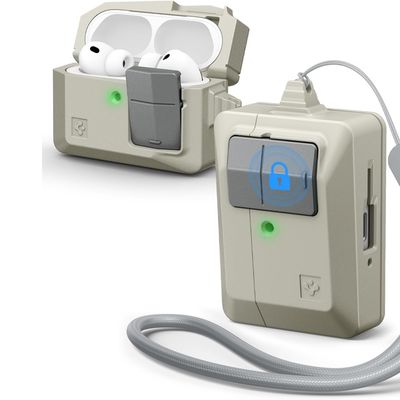
Accessory maker Spigen this week expanded its lineup of case options that are designed to look like vintage Apple Macs. The clever new Classic LS AirPods Pro 3 Case resembles a the iconic Apple Macintosh mouse, so it goes well with Spigen's Mac-style iPhone cases.
Priced at $25 from Amazon, the case features the stone color that was used for the Classic Macintosh, along with a gray mouse...
Apple today released new firmware for the AirPods Pro 2, AirPods Pro 3, and the AirPods 4. The firmware has a version number of 8B39, up from 8B34 on the AirPods Pro 3, 8B28 on the AirPods Pro 2, and 8B21 on the AirPods 4.
There is no word on what's included in the firmware, but Apple has a support document with limited notes. Most updates are limited to bug fixes and performance...