

Apple with iOS 17.1 and watchOS 10.1 introduced a new NameDrop feature that is designed to allow users to place Apple devices near one another to quickly exchange contact information. Sharing contact information is done with explicit user permission, but some news organizations and police departments have been spreading misinformation about how NameDrop functions.
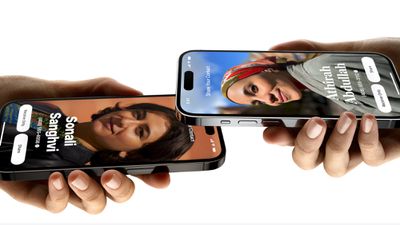
As noted by The Washington Post, there have been warnings about NameDrop popping up on FaceTime. Police departments in Pennsylvania, Oklahoma, Ohio, and other states have been suggesting that contact information can be shared "just by bringing your phones close together." From the City of Chester Police Department in Ohio:
IMPORTANT PRIVACY UPDATE: If you have an iPhone and have done the recent iOS 17 update, they have set a new feature called NameDrop defaulted to ON. This feature allows the sharing of your contact info just by bringing your phones close together. To shut this off go to Settings, General, AirDrop, Bringing Devices Together. Change to OFF.
While it's true that NameDrop is turned on by default, the way that it functions is more nuanced than simply putting two iPhones near each other.
NameDrop works when two iPhones running iOS 17.1 or an iPhone with iOS 17.1 and an Apple Watch running watchOS 10.1 are placed right next to each other, as in almost touching. When the two devices come in close contact and both are unlocked, there is a pop up prompting users to share contact information or an image.
Contact information is not shared automatically, and it is a user-initiated process that requires both people exchanging information to accept the transfer. While an accidental exchange could occur, it would require a user to unlock their device and accept the sharing prompt for that to occur.
Multiple police departments posted the warning above, which was widely shared on Facebook and other social networks. The message from the Noble County Sheriff's Office in Ohio, for example, got upwards of 70,000 shares, while the Dewey Police Department in Pennsylvania's warning was shared 11,000 times. After criticism from some commenters, Noble County edited its message to clarify that there's a popup to transfer content, and Dewey County said that it was attempting to "get parents engaged with their children," but many people who saw the original post may not see the updates.
The intent of the post was to get parents engaged with their children and what they are doing on their devices, not the fear mongering as suggested. We suggest everyone do research on new technology and updates to learn more about what is out there, especially for kids
Several local news stories have also shared similar questionable NameDrop information. KDKA-TV in Pittsburgh, for example, interviewed several people and included quotes suggesting NameDrop happens automatically.
"That's why I turned it off because I don't have a use for it. I don't even have my phone at work so I don't really have a use for it. But I guess a default on could be a bit controversial just because I think giving out your contact should be a conscious decision and not something that could accidentally happen," Jerry said.
"That is a little bit concerning, I think it should be an optional feature instead of automatically happening," said Liz Jones.
If anything, NameDrop has the potential to be more irritating than dangerous, simply because it's likely to activate when your phone is next to someone else's and unlocked, in a situation like a dinner or meeting. Given the negative feedback, Apple may in a future update turn NameDrop off by default, but those who want to disable it now can do so by opening up the Settings app, going to the General section, tapping AirDrop, and turning off "Bringing Devices Together."




/https://forums.macrumors.com/attachments/2317722/)













































