

iPhone's Roadside Assistance via Satellite Feature Tested in New Video - MacRumorsOpen MenuShow RoundupsShow Forums menuVisit ForumsOpen Sidebar
Skip to Content

iPhone's Roadside Assistance via Satellite Feature Tested in New Video

Starting with iOS 17, all iPhone 14 and iPhone 15 models offer a roadside assistance via satellite feature that allows users in the U.S. to contact roadside assistance company AAA for vehicle service when outside of cellular and Wi-Fi coverage. In a video shared today, tech reviewer Brian Tong provided a look at the feature in action.
apple roadside assistance
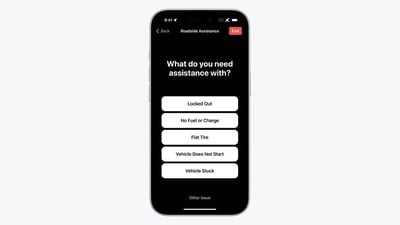
To use the feature, open the Messages app and start a new message. Next, type "roadside" into the address field. When there is no cellular and Wi-Fi coverage available, a "Roadside Assistance" option will appear. Tap on "Roadside Assistance" and follow the on-screen instructions to connect your iPhone to a Globalstar satellite and request help from AAA. You'll need to be outside with a clear view of the sky and horizon, according to Apple.

Tong demoed the feature by having AAA come to jump-start his car's battery. The feature can also be used if you are locked out of your vehicle, have a flat tire, run out of fuel, and for other services offered by AAA.


The feature is included free for two years starting at the time of activation of any new iPhone 14 or iPhone 15 model, with service covered per your AAA membership plan. If you aren't a AAA member, you can still use the service on a pay-per-use basis.

Apple said roadside assistance via satellite is available "beginning" in the U.S., suggesting that it will expand the feature to additional countries over time, but it has not provided any specific details. In Canada, there is a AAA-like organization called CAA, so it would make sense for the service to expand to that country eventually.

Roadside assistance via satellite is an extension of the Emergency SOS via satellite feature. Apple recently extended free usage of the satellite features for an additional year.


Related Forums: iOS 17, iPadOS 17

Popular Stories

Apple Event Logo

Apple Working on All-New Operating System

Wednesday July 29, 2026 11:39 am PDT by
Apple is developing an all-new operating system that is essentially a mix of tvOS, watchOS, and iOS, according to Bloomberg's Mark Gurman. In a report this week, he said the operating system will feature a grid of icons, widgets, and apps, along with customizable clock faces. The new software platform is intended for Apple's long-rumored smart home hub. With built-in facial recognition,...

imac video apple feature

Apple Made Its Second-Biggest Acquisition Ever This Year

Wednesday July 29, 2026 12:03 pm PDT by
Apple this year acquired Israeli startup Q.ai for close to $2 billion, according to the Financial Times. That would make this Apple's second-biggest acquisition ever, after it paid $3 billion for the popular headphone maker Beats in 2014. This is also the largest known Apple acquisition since the company purchased Intel's smartphone modem business and patents for $1 billion in 2019. Q.ai...
Dynamic Island iPhone 18 Pro Feature

iPhone 18 Pro: Twelve Changes Coming to Apple's Next Flagship

Thursday July 30, 2026 3:43 am PDT by
We're less than two months out from the launch of Apple's premium next-generation smartphone lineup, and while we're not expecting a dramatic change in terms of functionality, there are still several enhancements rumored to be coming to the iPhone 18 Pro and iPhone 18 Pro Max. One thing worth noting is that Apple is reportedly planning a major change to its iPhone release cycle this year,...

Top Rated Comments

xxFoxtail Avatar
35 months ago
I would have never known to type roadside into a new message.
Score: 11 Votes (Like | Disagree)
35 months ago
As a AAA member this is great news.
Score: 9 Votes (Like | Disagree)
35 months ago

I get their point. Apple could add a button to access the feature in Settings > Emergency SOS.
Even having it be clicking on the satellite symbol in the row of status icons that would bring up a menu of the options would be a massive improvement.

They could present a button in the messages app now that you’re in SOS Satellite mode to on board you to your options if you need them.

So many things they could do to improve this flow to increase discoverability and usefulness.

It feels like they hid this like a gesture. Except there isn’t anything “natural” about accessing it this way.

My guess is they are still improving on the feature and are trying to limit its use until they’ve completed. Only way I can explain such a complex usability flow for a company that focuses more on user experience than anyone else in the technology industry.
Score: 9 Votes (Like | Disagree)
35 months ago

Seems like a very awkward way to access a critical emergency feature
Seems like exactly how you access it
Score: 9 Votes (Like | Disagree)
Joe Rossignol Avatar
35 months ago

It's perfectly fine and easy. If you fear it, then I'd suggest you NEVER drive anywhere without cellular coverage. Just out of curiosity, how would you suggest Apple should do it?
I get their point. Apple could add a button to access the feature in Settings > Emergency SOS.
Score: 8 Votes (Like | Disagree)
35 months ago
Whoa... What a killer feature! And unexpected - thanx Apple.

I can see using this on roadtrips where cellular service is non-existent, spotty, or unreliable. Such as Joshua Tree National Park or the Mojave Desert, as just two examples.
Score: 7 Votes (Like | Disagree)

🔗 Related Apple News & Rumors

Stay updated with the latest Apple ecosystem news and verified rumors











































