

Apple Releases watchOS 10.1 With Double Tap, NameDrop and More

Apple today released watchOS 10.1, the latest version of the watchOS 10 operating system that was released in September. watchOS 10.1 comes four weeks after watchOS 10.0.2, a minor update that brought bug fixes.
watchOS 10 Launch Feature
‌watchOS 10‌‌.1 can be downloaded for free through the Apple Watch app on an iPhone running iOS 17 or later by opening it up and going to General > Software Update. To install the new software, the Apple Watch needs to have at least 50 percent battery and it needs to be placed on a charger.

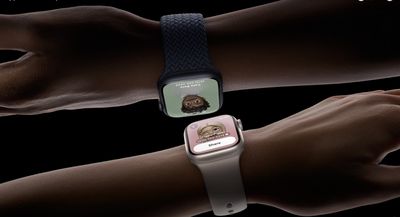
There are several new Apple Watch features enabled in watchOS 10.1, including NameDrop. NameDrop lets you tap an Apple Watch to another Apple Watch or ‌iPhone‌ to exchange contact information with someone.
apple watch namedrop
The update also includes Double Tap, a gesture that is available on the Apple Watch Series 9 and the Apple Watch Ultra 2. Double Tap can be activated by tapping the index finger and thumb together twice, and it can be used to answer phone calls, end phone calls, stop alarms, and more.

Apple Watch Ultra 2 double tap gesture 230912 Faeture Blue
Along with these two features, there are a handful of bug fixes, including an issue that could cause cities not to sync in the Weather app and a bug that could cause the elevation to be incorrect for some users. Apple's full release notes for the update are below.

watchOS 10.1 includes new features, improvements, and bug fixes, including:

  • Double tap gesture can be used to perform the primary action in notifications and most apps so you can answer a call, play and pause music, stop a timer, and more (Available on Apple Watch Series 9 and Apple Watch Ultra 2)
  • NameDrop allows you to exchange contact information with someone new by simply bringing your Apple Watch near their iPhone with iOS 17 or Apple Watch (Available on Apple Watch SE 2, Apple Watch Series 7 and later, and Apple Watch Ultra)
  • My Card is available as a complication for quick access to NameDrop
  • Fix for bug that causes the climate section in the Home app to be blank
  • Addresses an issue that causes a white selection border to be unexpectedly displayed after turning off AssistiveTouch
  • Fixes an issue where cities may not sync between iPhone and watch in Weather
  • Resolves an issue where the scroll bar may unexpectedly be visible on the display
  • Fix for bug that causes elevation to be incorrect for some users
    For information on the security content of Apple software updates, please visit this website: https://support.apple.com/kb/HT201222

More details on everything new in the watchOS 10 update can be found in our watchOS 10 roundup.

Related Roundup: watchOS 26
Related Forum: Apple Watch

Popular Stories

Aston Martin CarPlay Ultra Screen

Apple's CarPlay Ultra to Expand to These Vehicle Brands Later This Year

Sunday February 1, 2026 10:08 am PST by
Last year, Apple launched CarPlay Ultra, the long-awaited next-generation version of its CarPlay software system for vehicles. Nearly nine months later, CarPlay Ultra is still limited to Aston Martin's latest luxury vehicles, but that should change fairly soon. In May 2025, Apple said many other vehicle brands planned to offer CarPlay Ultra, including Hyundai, Kia, and Genesis. In his Powe...
Apple Logo Black

Apple's Next Launch is 'Imminent'

Sunday February 1, 2026 12:31 pm PST by
The calendar has turned to February, and a new report indicates that Apple's next product launch is "imminent," in the form of new MacBook Pro models. "All signs point to an imminent launch of next-generation MacBook Pros that retain the current form factor but deliver faster chips," Bloomberg's Mark Gurman said on Sunday. "I'm told the new models — code-named J714 and J716 — are slated...
Apple MacBook Pro M4 hero

New MacBook Pros Reportedly Launching Alongside macOS 26.3

Sunday February 1, 2026 5:42 am PST by
Apple is planning to launch new MacBook Pro models with M5 Pro and M5 Max chips alongside macOS 26.3, according to Bloomberg's Mark Gurman. "Apple's faster MacBook Pros are planned for the macOS 26.3 release cycle," wrote Gurman, in his Power On newsletter today. "I'm told the new models — code-named J714 and J716 — are slated for the macOS 26.3 software cycle, which runs from...
iOS 26

iOS 26.3 and iOS 26.4 Will Add These New Features to Your iPhone

Tuesday February 3, 2026 7:47 am PST by
We are still waiting for the iOS 26.3 Release Candidate to come out, so the first iOS 26.4 beta is likely still at least a week or two away. Following beta testing, iOS 26.4 will likely be released to the general public in March or April. Below, we have recapped known or rumored iOS 26.3 and iOS 26.4 features so far. iOS 26.3 iPhone to Android Transfer Tool iOS 26.3 makes it easier...
iOS 26 Home Feature

Apple Gives Final Warning to Home App Users

Tuesday February 3, 2026 8:55 am PST by
In 2022, Apple introduced a new Apple Home architecture that is "more reliable and efficient," and the deadline to upgrade and avoid issues is fast approaching. In an email this week, Apple gave customers a final reminder to upgrade their Home app by February 10, 2026. Apple says users who do not upgrade may experience issues with accessories and automations, or lose access to their smart...

Top Rated Comments

tennisproha Avatar
30 months ago
They finally fixed the issue where cities don't sync between iPhone and watch in Weather app after 2 years!!!! First time I"ve seen a bug I've constantly reported actually get fixed. Now if only they can fix the 100s of other bugs riddled through all OSs.
Score: 7 Votes (Like | Disagree)
sniffies Avatar
30 months ago
What should've been watchOS 10.0

But ok, better late than never.

I guess.
Score: 6 Votes (Like | Disagree)
iPhonNick Avatar
30 months ago

Build number?
21S67 (Same as RC)
Score: 4 Votes (Like | Disagree)
Phuz01 Avatar
30 months ago
Holy crap… just used Double Tap to close a notification, and this feels like THE FUTURE!
Score: 4 Votes (Like | Disagree)
Apple_Robert Avatar
30 months ago
I like the new Double Tap feature. Works great.
Score: 3 Votes (Like | Disagree)
Apple_Robert Avatar
30 months ago

How to enable or disable namedrop on apple watch?
There doesn't appear to be a toggle for the watch. You turn it off / on in the phone app (Settings > General > Airdrop > Bring device together toggle off. That controls both.
Score: 3 Votes (Like | Disagree)















