

Apple Seeds watchOS 10.1 Release Candidate to Developers and Public Beta Testers - MacRumorsOpen MenuShow RoundupsShow Forums menuVisit ForumsOpen Sidebar
Skip to Content

Apple Seeds watchOS 10.1 Release Candidate to Developers and Public Beta Testers

Apple today seeded the release candidate version of an upcoming watchOS 10.1 update to developers and public beta testers for testing purposes, with the beta coming a week after the release of the third watchOS 10.1 beta.
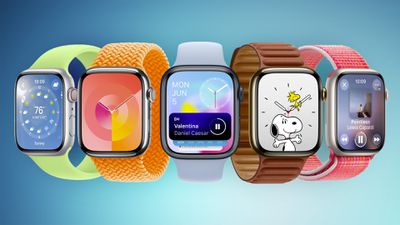
Apple Watch Faces watchOS 10 Feature Blue
To install the ‌watchOS 10‌.1 update, developers will need to open the Apple Watch app, go to the Software Update section under "General" in Settings, and toggle on the ‌watchOS 10‌.1 Developer Beta. An Apple ID linked to a developer account is required. Public beta testers will need to follow the same steps after opting in to the beta through Apple's public beta testing website.

Once beta updates have been activated, ‌watchOS 10.1‌ can be downloaded under the same Software Update section. To install software, an Apple Watch needs to have 50 percent battery life and it must be placed on an Apple Watch charger.

watchOS 10.1 adds NameDrop support for sharing contact information with another Apple Watch or an iPhone, plus it includes Double Tap.

NameDrop can be used by tapping into the Apple Watch Contacts app, selecting your profile, and tapping on the "Share" option. From there, touching the Apple Watch to another Apple Watch running watchOS 10.1 or an iPhone running iOS 17 will initiate a contact transfer.

Double Tap is a gesture exclusive to the Apple Watch Series 9 and the Apple Watch Ultra, and it allows users to tap their thumb and index fingers together to do things like bring up the Smart Stack, start a call, pause a song, and more.

Related Roundups: watchOS 26, watchOS 27
Related Forum: Apple Watch

Popular Stories

watchos 27

Apple Seeds watchOS 27 Beta 3 to Developers

Monday July 6, 2026 10:23 am PDT by
Apple today seeded the third beta of watchOS 27 to developers, with the update coming two weeks after the launch of the second beta. The beta can be downloaded through the Watch app on the iPhone with a free developer account. The Apple Watch will need to be on the charger, connected to Wi-Fi, and have a battery level of 50 percent or above for new software to be installed. The beta is...

General visionOS watchOS and tvOS Betas Feature Redux

Apple Releases Fourth watchOS 26.6, tvOS 26.6 and visionOS 26.6 Betas

Monday July 6, 2026 10:16 am PDT by
Apple today provided developers with the fourth betas of upcoming watchOS 26.6, tvOS 26.6, and visionOS 26.6 betas for testing purposes. The software comes a week after Apple seeded the third betas. The software updates are available through the Settings app on each device, and because these are developer betas, a free developer account is required. There's no word on what's in the...
watchos 27

Siri AI Comes to Apple Watch in watchOS 27 Beta 3

Monday July 6, 2026 1:24 pm PDT by
With watchOS 27 beta 3, Apple added support for Siri AI and the Siri app, so Apple Watch users can now use the features right from their wrist. Apple said Siri AI would be coming to the watch back when watchOS 27 was first introduced, but the feature wasn't live until now. The Dynamic App Grid that pops up when the Digital Crown is pressed displays the Siri app in the center, and the...

Top Rated Comments

jonnysods Avatar
37 months ago
Resurrect my AW6's battery life please!
Score: 5 Votes (Like | Disagree)
dadiy Avatar
37 months ago
Really miffed by double tap. Been using it for years on aw6, you enable it in accessibility so why can I use that in watchOS 10 but not the “new” double tap.
Score: 2 Votes (Like | Disagree)
MacNut Avatar
37 months ago
Hopefully it fixes the altimeter readings.
Score: 2 Votes (Like | Disagree)
pdaholic Avatar
37 months ago

Interesting. Of all the things I don't like, I think the redesigns are mostly good. Which app redesign did you not like?

I don't like the game of musical chairs they played between control center, app view, and dock.

I also wish they had a corner digital time complication, while we're at it.
A couple of things that come to mind immediately--the scrolling list view of the calendar and its fonts having a similar color to the background on the entry; calendar entries in the widgets have bright white backgrounds, while the rest of the OS looks to be in "dark mode"; tapping the calendar complication takes me now to a detailed list of information about the entry that I don't need...I could keep going. There also seems to be a bug with third party calendar apps not showing entries, but I'm hoping that will be fixed.
Score: 2 Votes (Like | Disagree)
36 months ago

That is ...not a fix.
People can’t even see the watch in dark rooms and they are not doing anything — do you really think they are going to undo a “feature” that was intentionally removed LOL
Score: 1 Votes (Like | Disagree)
jonnysods Avatar
36 months ago

I had a S6 and just made a trade in for an Ultra 2. Got 130 USD for the trade-in.
S6 was a great series - and I miss it but if you can afford - I would recommend it because next year it’s not gonna be worth too much.

Again, it;s all about your financials - I know it’s expensive… :( but if you can - it’s an insane upgrade
I really want the AWU2 and was holding out for it - but its the coinage, need to be wise with what I have (even though it pains me!)
Score: 1 Votes (Like | Disagree)

🔗 Related Apple News & Rumors

Stay updated with the latest Apple ecosystem news and verified rumors









































