

iOS 17 Launching Tomorrow for iPhones With These 10 New Features

In June, Apple announced iOS 17 with a wide range of new features and changes for the iPhone. Following over three months of beta testing, the free software update will be released this Monday, September 18 for the iPhone XS and newer.
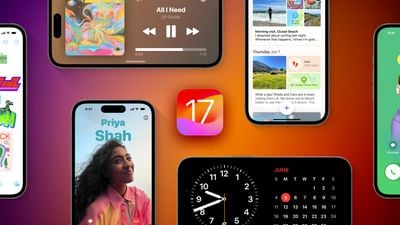
iOS 17 and iPhones Feature
Below, we have recapped 10 key features coming to the iPhone with iOS 17, with additional features coming later this year. The update should be released to users around 10 a.m. Pacific Time / 1 p.m. Eastern Time today, and once it is available, it can be installed from the Settings app under General → Software Update.

StandBy

StandBy iOS 17
StandBy is a new full-screen view that provides glanceable information designed to be viewed from a distance when an iPhone is on its side and charging, according to Apple. The customizable interface can show a clock in various styles, a calendar, favorite photos, the weather forecast, music playback controls, widgets, and more.

StandBy is designed for an iPhone charging on a nightstand, kitchen counter, or desk, and it supports Live Activities, Siri, incoming calls, and larger notifications. The feature also works with the iPhone 14 Pro's always-on display.

Contact Posters

Contact Posters iOS 17
iOS 17 lets users create a personalized Contact Poster that appears during an incoming phone call on another person's iPhone. The poster can include a photo or Memoji, and the font and background color can also be customized. The feature is available in the built-in Phone app and will also be available for third-party calling apps.

NameDrop

namedrop
NameDrop allows users to easily share contact information by bringing their iPhones close together. Both individuals can choose the specific phone numbers or email addresses they would like to share, and can also share their Contact Posters.

Live Voicemail

Live Voicemail iOS 17
Live Voicemail provides real-time transcription on the screen as someone leaves a voicemail. If the user considers the voicemail to be important, they can pick up the call while the caller is leaving their message. Apple says calls identified as spam by carriers are not transcribed and will instead be instantly declined.

Swipe to Reply in iMessage

iMessage Swipe to Reply
In the Messages app, users can now swipe to the right on any message to send an inline reply.

Interactive Widgets
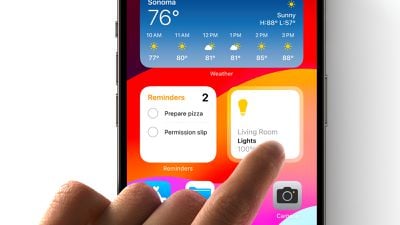
iOS 17 Interactive Widgets
Interactive widgets are now available on the iPhone across the Home Screen, Lock Screen, and the new StandBy view. Apple gave some examples of what interactive widgets can be used for, including marking a reminder as completed, playing or pausing a song or podcast, and controlling accessories in the Home app, and there will be many more possibilities as third-party apps are updated with support in the coming months.

Home Screen widgets offered limited functionality until now, as Apple did not allow developers to include scrolling, buttons, or animations.

Improved Autocorrect
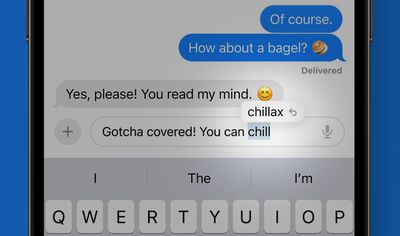
iOS 17 Autocorrect Feature
Apple says iOS 17 includes a state-of-the-art language model for word prediction that will greatly improve autocorrection on the iPhone. When typing, on-device machine learning will intelligently correct mistakes with greater accuracy than ever before. In addition, users will now receive predictive text recommendations inline as they type, allowing for words or complete sentences to be added by tapping the space bar.

Autocorrection has an updated design on iOS 17 that briefly underlines an autocorrected word. Tapping on an underlined word reveals the original word typed, making it easy to quickly revert the change. The system will also learn the user's typing habits over time and avoid some corrections, which Apple's software engineering chief Craig Federighi said is designed for "those moments where you just want to type a ducking word."

Apple Maps Offline
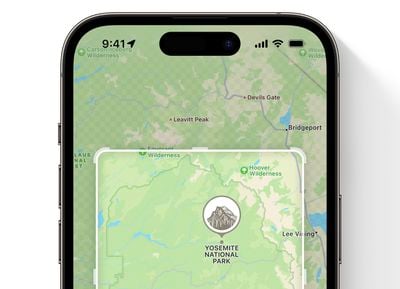
Apple Maps Offline
Apple Maps is catching up on a key Google Maps feature on iOS 17 with the ability to download maps for offline use. Apple says users can download a specific map area and access turn-by-turn navigation, view their estimated time of arrival, find places, and more when an iPhone is not connected to a cellular or Wi-Fi network.

Stickers Drawer

iOS 17 Sticker Drawer
A new stickers drawer on iOS 17 provides access to all stickers, including Live Stickers, emoji, Memoji, and iMessage sticker packs in one place. Live Stickers can be created by touching and holding an object in a photo, such as a cat or a dog.

"Hey Siri" Shortened to Siri

Hey Siri vs Siri
Apple has simplified the voice command to invoke Siri on the iPhone and other Apple devices, including the iPad, Mac, HomePod, and newest AirPods Pro. Instead of "Hey Siri," users are now simply able to say "Siri" to activate the voice assistant, and can issue multiple commands in succession without having to say "Siri" again.

For more features, read our in-depth iOS 17 roundup.

Related Forums: iOS 17, iPadOS 17

Popular Stories

Aston Martin CarPlay Ultra Screen

Apple's CarPlay Ultra to Expand to These Vehicle Brands Later This Year

Sunday February 1, 2026 10:08 am PST by
Last year, Apple launched CarPlay Ultra, the long-awaited next-generation version of its CarPlay software system for vehicles. Nearly nine months later, CarPlay Ultra is still limited to Aston Martin's latest luxury vehicles, but that should change fairly soon. In May 2025, Apple said many other vehicle brands planned to offer CarPlay Ultra, including Hyundai, Kia, and Genesis. In his Powe...
Apple Logo Black

Apple's Next Launch is 'Imminent'

Sunday February 1, 2026 12:31 pm PST by
The calendar has turned to February, and a new report indicates that Apple's next product launch is "imminent," in the form of new MacBook Pro models. "All signs point to an imminent launch of next-generation MacBook Pros that retain the current form factor but deliver faster chips," Bloomberg's Mark Gurman said on Sunday. "I'm told the new models — code-named J714 and J716 — are slated...
Apple MacBook Pro M4 hero

New MacBook Pros Reportedly Launching Alongside macOS 26.3

Sunday February 1, 2026 5:42 am PST by
Apple is planning to launch new MacBook Pro models with M5 Pro and M5 Max chips alongside macOS 26.3, according to Bloomberg's Mark Gurman. "Apple's faster MacBook Pros are planned for the macOS 26.3 release cycle," wrote Gurman, in his Power On newsletter today. "I'm told the new models — code-named J714 and J716 — are slated for the macOS 26.3 software cycle, which runs from...
iOS 26

iOS 26.3 and iOS 26.4 Will Add These New Features to Your iPhone

Tuesday February 3, 2026 7:47 am PST by
We are still waiting for the iOS 26.3 Release Candidate to come out, so the first iOS 26.4 beta is likely still at least a week or two away. Following beta testing, iOS 26.4 will likely be released to the general public in March or April. Below, we have recapped known or rumored iOS 26.3 and iOS 26.4 features so far. iOS 26.3 iPhone to Android Transfer Tool iOS 26.3 makes it easier...
14 inch MacBook Pro Keyboard

Apple Changes How You Order a Mac

Saturday January 31, 2026 10:51 am PST by
Apple recently updated its online store with a new ordering process for Macs, including the MacBook Air, MacBook Pro, iMac, Mac mini, Mac Studio, and Mac Pro. There used to be a handful of standard configurations available for each Mac, but now you must configure a Mac entirely from scratch on a feature-by-feature basis. In other words, ordering a new Mac now works much like ordering an...

Top Rated Comments

AndiG Avatar
31 months ago
Functions, functions, functions. Apple's iOS was once known for its tremendous simplicity. There was a golden rule: focus on 80% of the features, but make those features solid and easy to use.

But Tim never got that, and needed new features every year to sell more and more, while scrapping the simplicity of iOS.

The features Apple wants to sell should be outsourced to apps without touching the core functionality.

But Tim never understood that.
Score: 34 Votes (Like | Disagree)
polyphenol Avatar
31 months ago
Downloadable maps! Nothing else matters nearly so much.

I regularly drive in areas with poor/patchy signals and that makes downloadable extremely desirable.

Editing to add a link to my post about first use of offline maps (mixed): https://forums.macrumors.com/threads/offline-maps-uk-first-try.2403694/
Score: 30 Votes (Like | Disagree)
techTAG Avatar
31 months ago

Downloadable maps! Nothing else matters nearly so much.

I regularly drive in areas with poor/patchy signals and that makes downloadable extremely desirable.
Google maps has had them for years. Apple Maps is improving, but for me personally, they are still not even close to being as good as Google.
The only thing I prefer Apple to is the GUI- the animations look amazing, but Google is more precise and reliable day to day still.
Score: 23 Votes (Like | Disagree)
pdaholic Avatar
31 months ago
As someone who works in an emergency department, I can tell you that, even though raccoons look cute and friendly, they are not.
Score: 17 Votes (Like | Disagree)
JamesMay82 Avatar
31 months ago
It must be an age thing because I just don’t get excited by any of these features. The name drop is cool but I probably would use that once or twice a year at best..

iPad is more exciting if the stage manager is improved like they say.

Other than that it’s all incremental updates which will be unnoticeable in my day to day.

To me the big game changers for iOS was iMessage, FaceTime, Apple Pay and thr files app. I can’t think what’s been big since then?
Score: 13 Votes (Like | Disagree)
infix Avatar
31 months ago

Where’s that phone stand from? I can’t seem to find it on apples website.
It's the twelvesouth stand in the magsafe section

Attachment Image
Score: 11 Votes (Like | Disagree)















