Here's How Web Apps Work in macOS Sonoma - MacRumorsOpen MenuShow RoundupsShow Forums menuVisit ForumsOpen Sidebar
Skip to Content

Here's How Web Apps Work in macOS Sonoma

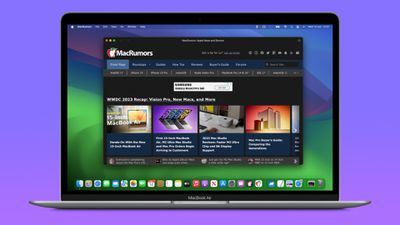
In macOS Sonoma, currently in beta, you can create individual web apps for any website that you frequent in Safari, and have them sit beside other apps in your Dock. Let's take a closer look at how it all works by turning MacRumors.com into a virtual Mac app as an example.
macos sonoma web app MacRumors
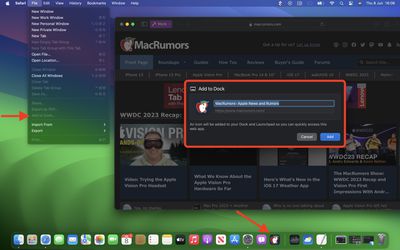
In macOS Sonoma, any website viewed in Safari can be turned into a web app, thanks to a new "Add to Dock" option in the File menu. In other words, no work is required on the part of web developers to make a site web app compatible, although there are some elements of web apps that developers can have control over (see below).

How to Turn MacRumors into a Web App

  1. In macOS Sonoma developer beta, navigate to MacRumors.com in Safari.
  2. Choose File -> Add to Dock in the menu bar.
  3. If you want, you can change the MacRumors icon by clicking it in the Add to Dock window. You can also edit the web app's name using the title field – "MacRumors" is more succinct, for example.
  4. Click the blue Add button.

macos sonoma tidbits6

You will now see the MacRumors web app sitting in your Dock, ready for use independently of Safari. The web app works with Mission Control and Stage Manager just like any app, and can also be opened via Launchpad or Spotlight Search.

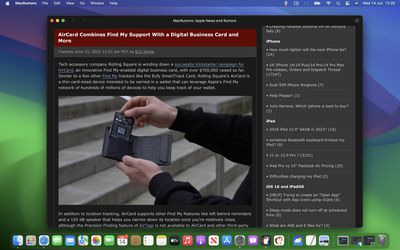
On opening the web app, you'll notice its window includes a simplified toolbar with navigation buttons (note: Website developers can control whether these are shown). As you can see in the image, the MacRumors theme color for the site blends into the toolbar for a more seamless look.
web app MacRumors macos
In terms of navigation, the scope of the web app is dictated by the host of the webpage – in this case www.macrumors.com – so you can navigate anywhere within the MacRumors website, but if you click a link outside of the host page, such as the MacRumors Forums, which is separately hosted at forums.macrumors.com, this will open the linked webpage in Safari. Therefore, if you are a frequenter of both the MacRumors website and the MacRumors Forums, you should create separate web apps for each.

Web developers have the ability to refine the scope of a web app to a specific path on their site if they wish. For example, MacRumors could theoretically provide a facility to make web apps dedicated to navigating only how-to articles or guides. This is something MacRumors may implement in the future.

Website Logins and Notifications

By default, Safari copies a website's cookies to its web app. So if you create a MacRumors Forums web app and you were logged into your account at the time, you will remain logged in inside the web app. Even if you weren't logged in, you can do so within the web app with minimal effort, since Apple has integrated support for Password and Passkey AutoFill.

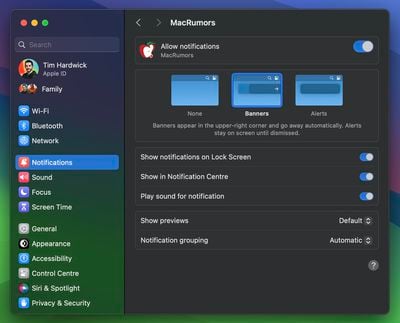
If a website already supports web push notifications – as MacRumors does – and you have signed up to them, you will receive web app push notifications that display the corresponding MacRumors icon, giving you more context than a standard Safari notification and icon would.

The web app icon in the Dock will also show a badge when a notification is received. Web app notifications are silent by default, although developers can change them to play a sound. However, the end decision over sound and icon badges is left to the user in System Settings -> Notifications.
web app notifications mr
Web apps also respect Focus modes, so you can include or exclude them from allowed notifications based on what you're doing. Lastly, with privacy in mind, Apple has added options to control web apps' access to camera, microphone, and location in System Settings -> Privacy & Security, just like for native apps.

For those who wish to delve further into macOS Sonoma, it is currently available to download as a developer beta, although caution is warranted, as beta versions can be unstable and buggy. For those willing to wait, the official public release is expected to land in the fall.


Related Forum: macOS Sonoma

Popular Stories

Apple Event Logo

Apple Working on All-New Operating System

Wednesday July 29, 2026 11:39 am PDT by
Apple is developing an all-new operating system that is essentially a mix of tvOS, watchOS, and iOS, according to Bloomberg's Mark Gurman. In a report this week, he said the operating system will feature a grid of icons, widgets, and apps, along with customizable clock faces. The new software platform is intended for Apple's long-rumored smart home hub. With built-in facial recognition,...
imac video apple feature

Apple Made Its Second-Biggest Acquisition Ever This Year

Wednesday July 29, 2026 12:03 pm PDT by
Apple this year acquired Israeli startup Q.ai for close to $2 billion, according to the Financial Times. That would make this Apple's second-biggest acquisition ever, after it paid $3 billion for the popular headphone maker Beats in 2014. This is also the largest known Apple acquisition since the company purchased Intel's smartphone modem business and patents for $1 billion in 2019. Q.ai...
Dynamic Island iPhone 18 Pro Feature

iPhone 18 Pro: Twelve Changes Coming to Apple's Next Flagship

Thursday July 30, 2026 3:43 am PDT by
We're less than two months out from the launch of Apple's premium next-generation smartphone lineup, and while we're not expecting a dramatic change in terms of functionality, there are still several enhancements rumored to be coming to the iPhone 18 Pro and iPhone 18 Pro Max. One thing worth noting is that Apple is reportedly planning a major change to its iPhone release cycle this year,...

Top Rated Comments

41 months ago
This was the biggest eyeroll moment of the WWDC keynote for me. (I liked all the rest)

PWA's are a thing for years and years. They even got a spokesperson and demo for pinning a webapp and made it sound like they invented something magical and revolutionary that will enrich people's lives.

Can't believe it took them so long to add something that has been considered 'a basic feature' for years on other platforms and browsers.
Score: 46 Votes (Like | Disagree)
41 months ago
The fact that subdomains (forums.maxrumors.com) need their own web app is not ideal. It could definitely break web apps for some sites that use subdomains for load balancing or other purposes such as login.


Score: 12 Votes (Like | Disagree)
41 months ago
Nice to see MacOS finally catching up to iPadOS/iOS in this regard
Score: 11 Votes (Like | Disagree)
bigjnyc Avatar
41 months ago

This was the biggest eyeroll moment of the WWDC keynote for me. (I liked all the rest)

PWA's are a thing for years and years. They even got a spokesperson and demo for pinning a webapp and made it sound like they invented something magical and revolutionary that will enrich people's lives.

Can't believe it took them so long to add something that has been considered 'a basic feature' for years on other platforms and browsers.
Is this your first Apple keynote? They do this with at least 2 or 3 features every. single. year. It never fails and is a running joke at this point.
Score: 9 Votes (Like | Disagree)
41 months ago

This was the biggest eyeroll moment of the WWDC keynote for me. (I liked all the rest)

PWA's are a thing for years and years. They even got a spokesperson and demo for pinning a webapp and made it sound like they invented something magical and revolutionary that will enrich people's lives.

Can't believe it took them so long to add something that has been considered 'a basic feature' for years on other platforms and browsers.
It's apple, what do you expect . They self congratulated themselves for the "new" 15" design, almost sucking their own *censored* , and people cheering up

Still , the implementation is nice , and with the power apple has , it might make their web app and guidelines respected by devs

In all fairness I've no idea why theyve been waiting so long while iOS had it a deceny ago already

But yeah apple can afford to be late in any area they want
Score: 8 Votes (Like | Disagree)
mattopotamus Avatar
41 months ago

Does it need to remain in the dock or can that be deleted? Does it show up as an application in the Applications folder?
It does not need to remain in the dock. You can remove it there and still access it through finder or spotlight search.
Score: 7 Votes (Like | Disagree)

🔗 Related Apple News & Rumors

Stay updated with the latest Apple ecosystem news and verified rumors