

macOS Sonoma Tidbits: New FaceTime UI, Safari Profiles, Screen Sharing Improvements, and More

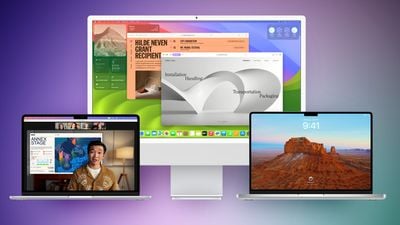
The first macOS Sonoma beta was released to developers and early adopters this week, and changes in the newest version of Apple's macOS operating system are still being unearthed. Below are just a handful of notable differences that may have passed you by.
macos sonoma feature purple green

System Settings

In macOS Ventura, Apple replaced System Preferences with System Settings to align it with iOS and iPadOS, but the way controls were organized left many users wanting.
macos sonoma tidbits2
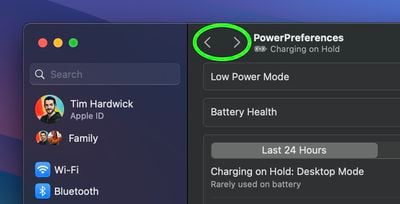
The same System Settings interface remains in macOS Sonoma, but it is now easier to navigate through different menu screens you have visited without continually scrolling through the side bar, thanks to the addition of backward and forward buttons.

FaceTime UI and Reactions

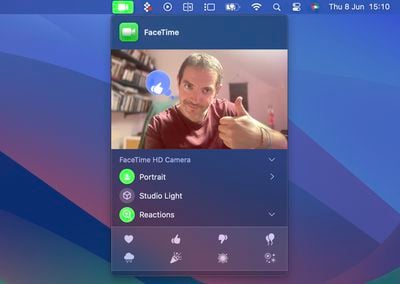
Apple has changed the way FaceTime integrates with the menu bar. The video effects options no longer appear in the Control Center, and instead have a new home in a dedicated green ‌FaceTime‌ menu bar item, which also includes a mini webcam view and buttons to trigger Reactions.
macos sonoma tidbits1
Reactions include Love, Like, Dislike, Balloons, Rain, Confetti, Lasers, and Fireworks. Some reactions are even triggered automatically by the user's physical actions: One thumb up triggers a Like, and two thumbs up are attended by Fireworks. Similarly, one thumb down counts as a dislike, and two thumbs down initiates a rain shower.

Safari Profiles

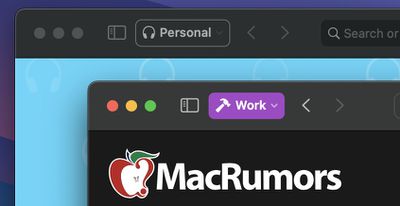
Safari has gained a new feature called Profiles, which is designed to help keep your browsing separate for topics like Work, School, or Personal.
macos sonoma tidbits3
Each profile gets its own icon and silos your history, Tab Groups, favorites, and cookies. You can even assign specific extensions to different profiles to optimize your browsing experience based on the task at hand.

Seamless Keyboard Input and Dictation

macOS Sonoma supports simultaneous use of keyboard input and Dictation, without any disruption in your flow of thought.
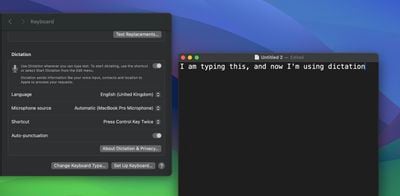
macos sonoma tidbits4
In other words, you can keep typing after hitting the Dictation shortcut. So whenever your fingers need a rest, you can complete the sentence you were just typing by saying it out loud.

Screen Sharing Improvements

When you're in a ‌FaceTime‌ or Zoom call, click-hold the green traffic light in the corner of an open app window and you'll see a screen sharing option, and a new Presenter Overlay feature can be used to keep you on screen and better able to point to details.
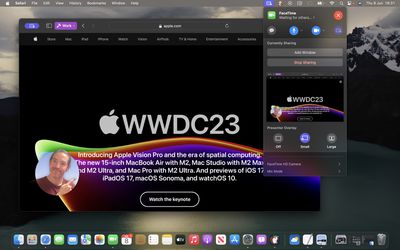
macos sonoma tidbits7
When on a video call, you can either place yourself inside a movable bubble in the corner of the window or desktop that you're sharing, or you can bring on-screen content into the background of your own environment so that it looks as if you're standing just in front of it.

Docked Web Apps

Thanks to a new option in Safari, you can now create independent web apps that can be added to your Dock.
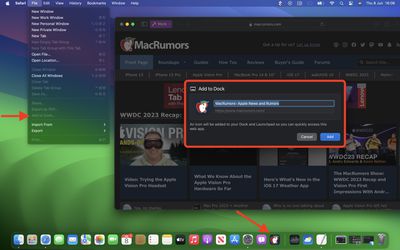
macos sonoma tidbits6
All you have to do is visit a website and select File -> Add to Dock.... You can then give the web app a name and even change its icon. When you open a docked web app, it will open in its own separate window that includes back and forward buttons for simple navigation.

Other Notable Tidbits

  • New visual Caps Lock indicator
  • Mail search prioritizes upcoming travel-related emails
  • Use the Share button to send a note in Notes into Pages.
  • New Zoom and Pan controls for Continuity Camera

Developers are still learning what else has changed in macOS Sonoma, so be sure to check back for more coverage here on MacRumors.


Related Forum: macOS Sonoma

Popular Stories

Aston Martin CarPlay Ultra Screen

Apple's CarPlay Ultra to Expand to These Vehicle Brands Later This Year

Sunday February 1, 2026 10:08 am PST by
Last year, Apple launched CarPlay Ultra, the long-awaited next-generation version of its CarPlay software system for vehicles. Nearly nine months later, CarPlay Ultra is still limited to Aston Martin's latest luxury vehicles, but that should change fairly soon. In May 2025, Apple said many other vehicle brands planned to offer CarPlay Ultra, including Hyundai, Kia, and Genesis. In his Powe...
Apple Logo Black

Apple's Next Launch is 'Imminent'

Sunday February 1, 2026 12:31 pm PST by
The calendar has turned to February, and a new report indicates that Apple's next product launch is "imminent," in the form of new MacBook Pro models. "All signs point to an imminent launch of next-generation MacBook Pros that retain the current form factor but deliver faster chips," Bloomberg's Mark Gurman said on Sunday. "I'm told the new models — code-named J714 and J716 — are slated...
iOS 26

iOS 26.3 and iOS 26.4 Will Add These New Features to Your iPhone

Tuesday February 3, 2026 7:47 am PST by
We are still waiting for the iOS 26.3 Release Candidate to come out, so the first iOS 26.4 beta is likely still at least a week or two away. Following beta testing, iOS 26.4 will likely be released to the general public in March or April. Below, we have recapped known or rumored iOS 26.3 and iOS 26.4 features so far. iOS 26.3 iPhone to Android Transfer Tool iOS 26.3 makes it easier...
Apple MacBook Pro M4 hero

New MacBook Pros Reportedly Launching Alongside macOS 26.3

Sunday February 1, 2026 5:42 am PST by
Apple is planning to launch new MacBook Pro models with M5 Pro and M5 Max chips alongside macOS 26.3, according to Bloomberg's Mark Gurman. "Apple's faster MacBook Pros are planned for the macOS 26.3 release cycle," wrote Gurman, in his Power On newsletter today. "I'm told the new models — code-named J714 and J716 — are slated for the macOS 26.3 software cycle, which runs from...
iOS 26 Home Feature

Apple Gives Final Warning to Home App Users

Tuesday February 3, 2026 8:55 am PST by
In 2022, Apple introduced a new Apple Home architecture that is "more reliable and efficient," and the deadline to upgrade and avoid issues is fast approaching. In an email this week, Apple gave customers a final reminder to upgrade their Home app by February 10, 2026. Apple says users who do not upgrade may experience issues with accessories and automations, or lose access to their smart...

Top Rated Comments

TheYayAreaLiving ?️ Avatar
35 months ago
The widgets on the desktop are amazing! Apple did a great job with that! Well-refined!
Score: 12 Votes (Like | Disagree)
BenGoren Avatar
35 months ago
What I most want for Safari is for every top-level domain to sandboxed. That is, even if foo.com sets a bunch of Google and Facebook tracking cookies, when you visit bar.com, it has no access to them whatsoever. And, of course, if bar.com sets those same cookies, foo.com can’t see them, either.

Of course, not just cookies, but all Website data.

That’s the reason why I always use private browsing everywhere. I’m okay with MacRumors knowing which articles I click through to, but I’m not okay with Google knowing that I read both MacRumors and, say, the Times. And that I might then click through to the Wirecutter and compare prices for a given product on a few different retailers.

Ideally, this should work even as I click through links from one domain to another. So, if MacRumors links to the Times and I click on it, the Times should have no way to access anything that MacRumors might have set. If I go back (or re-visit) MacRumors, it shouldn’t have any clue that I even know that the Times exists.

And, of course, with embedded media … a YouTube video embedded in a MacRumors page shouldn’t be able to know that I’ve logged into MacRumors with my ID. Indeed, YouTube shouldn’t know anything other than the URL of the embedded video. If I then click, “Open in YouTube” and I’ve logged in to YouTube, it should see that as me directly pasting that link into YouTube, with no knowledge of how I got the link. If I’ve never visited YouTube before, or if I’ve cleared history for YouTube, then YouTube should get a completely clean slate. It would also be nice to designate sites as “always private (don’t save data),” so YouTube couldn’t build an anonymous profile of what I watch and then match that up should I log in later. Or, the reverse: everything private, but with an exception list for sites I don’t mind staying signed into across sessions.

Make that the default behavior … and Apple will have done as much to protect user privacy as everything else they’ve done combined. (And, to be sure, that’s an awful lot more than any other big company has done.)

b&
Score: 11 Votes (Like | Disagree)
Larsen2k4 Avatar
35 months ago
Another tiny but nice tweak: The text input cursor now smoothly fades in and out like on iOS ?
Score: 9 Votes (Like | Disagree)
gmanist1000 Avatar
35 months ago
The Safari profiles are confusing. I created two profiles, Work and Home. When I open Safari fresh, it opens.... neither profile... it's just a normal window. I have to navigate to the menu bar and click New > Work, or Home. How do I set a default to open automatically??
Score: 7 Votes (Like | Disagree)
Brad7 Avatar
35 months ago
I love the new moving screensavers/wallpapers, they’re really mesmerizing. They should really bring them to iOS and tvOS.

Web apps are finally here, too. Now I can just use those instead of native apps that suck up all our personal data. Tracking protection and extensions will be there now, too.
Score: 7 Votes (Like | Disagree)
Brad7 Avatar
35 months ago

for people using Sonoma already, do you need to have safari itself opened , in order to launch a web app/pwa ? or can it be open undependantly?
Just tried - it opens independently. ?
Score: 7 Votes (Like | Disagree)














