

iOS 17 Lets You Share iCloud Keychain Passwords With Friends and Family - MacRumorsOpen MenuShow RoundupsShow Forums menuVisit ForumsOpen Sidebar
Skip to Content

iOS 17 Lets You Share iCloud Keychain Passwords With Friends and Family

Apple has been improving password management over the last several years to encourage people to use separate, hard-to-guess passwords for each site, and the latest improvement adds password sharing.
ios 17 shared passwords
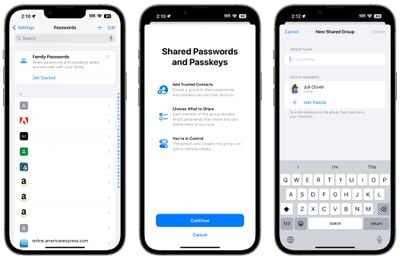
In iOS 17, Family Passwords is designed to let you share your passwords and passkeys with friends and family members. Using the Passwords section of the Settings app, you can create a group of people to share passwords with.

Using a setup process, you can select trusted contacts to share information with. Each person who is in the group can select passwords and passkeys to share with others. You can, for example, share passwords to streaming services and online bill paying sites without having to share the password for your bank.

You can select specific passwords to share after the group is created, and then people in the group can upload their own. Each participant can edit and add passwords, with changes synced across the entire group. There are options to create multiple groups, so you can have a group with a spouse and children and then a separate group with just a spouse, or a group of roommates and friends.

The person who created the group can add and delete people at will, and the entire group can be deleted as well. Adding people to a group requires the person to be in your Contact list, and everyone also must be running the iOS 17 update.

Like regular passwords, shared passwords are stored in iCloud Keychain and are end-to-end encrypted. Passkeys, Apple's device-verified alternative to passwords, can also be shared.

The addition of multi-user password sharing brings Apple's free built-in Password functionality closer to third-party apps like 1Password and LastPass, as there was previously no simple, free, and secure way to share passwords between Apple device users.


Related Forums: iOS 17, iPadOS 17

Popular Stories

Apple Event Logo

Apple Working on All-New Operating System

Wednesday July 29, 2026 11:39 am PDT by
Apple is developing an all-new operating system that is essentially a mix of tvOS, watchOS, and iOS, according to Bloomberg's Mark Gurman. In a report this week, he said the operating system will feature a grid of icons, widgets, and apps, along with customizable clock faces. The new software platform is intended for Apple's long-rumored smart home hub. With built-in facial recognition,...


Four iPhone 18 Pro Colors Mock Feature

iPhone 18 Pro and iPhone Ultra: Pre-Orders and Release Date

Thursday July 30, 2026 6:12 am PDT by
Apple has yet to reveal when the iPhone 18 Pro and iPhone Ultra will be announced and released, but the dates usually follow a familiar pattern. Labor Day is September 7 this year. The last time the holiday fell on that day was in 2020, but the iPhone event that year was delayed until October due to the COVID-19 pandemic. So, the last time Labor Day was on September 7 in a normal year was in ...
Dynamic Island iPhone 18 Pro Feature

iPhone 18 Pro: Twelve Changes Coming to Apple's Next Flagship

Thursday July 30, 2026 3:43 am PDT by
We're less than two months out from the launch of Apple's premium next-generation smartphone lineup, and while we're not expecting a dramatic change in terms of functionality, there are still several enhancements rumored to be coming to the iPhone 18 Pro and iPhone 18 Pro Max. One thing worth noting is that Apple is reportedly planning a major change to its iPhone release cycle this year,...

Top Rated Comments

aperture01 Avatar
41 months ago
But are they going to make it easier to access the password manager? Right now I have to go to settings > safari > passwords. It’s hella annoying. Can I just have an icon on the Home Screen or in the control center?
Score: 18 Votes (Like | Disagree)
tubedogg Avatar
41 months ago
As much as I despised 1Password's move to Electron, after trying a bunch of alternatives, I ended up sticking with it due to the feature set offered. And those claiming the death of the service (or any third-party password manager) are far too premature, for a number of reasons.

This sharing requires iOS 17 (and presumably macOS 14). I currently have 1Password running on my Apple devices ranging from iOS 16 and macOS 13 down to iOS 12 and macOS 10.12.

Apparently there is a Windows app (or at least browser extension?) for iCloud Passwords, but on macOS, if you don't use Safari, you're completely out of luck.

And none of this takes into account 1Password's pivot into enterprise. I don't know what kind of inroads they've made there, but this sharing is likely not enterprise-grade (i.e. can it be remotely configured?).

1Password, Enpass, Bitwarden...none of them will be going away as a result of this announcement. The people who use a password manager other than iCloud Passwords right now are likely doing so because of a wealth of other features, not just sharing, none of which this new feature addresses.
Score: 11 Votes (Like | Disagree)
macsplusmacs Avatar
41 months ago
LOL! to 1Password.

Going to use the heck out of this. (and be Electron free)
Score: 10 Votes (Like | Disagree)
AppliedMicro Avatar
41 months ago

Can I just have an icon on the Home Screen or in the control center?
With a shortcut, you can.

Edit: Using Shortcuts app, create a new shortcut to Open URL „prefs:root=PASSWORDS“ (without quotation marks) as documented by Viticci ('https://www.macstories.net/ios/a-comprehensive-guide-to-all-120-settings-urls-supported-by-ios-and-ipados-13-1/') and add it to your home screen.
Score: 7 Votes (Like | Disagree)
41 months ago
Unfortunately still doesn’t have the cross-platform support of Bitwarden. Getting better, though.
Score: 5 Votes (Like | Disagree)
james2538 Avatar
41 months ago
1Password will always be superior for me simply because gaining access to my phone doesn't automatically gain access to 1Password. With all those recent stories of theses stealing phones via the passcode it's important to remember that means they also will gain access to your iCloud Keychain.
Score: 4 Votes (Like | Disagree)

🔗 Related Apple News & Rumors

Stay updated with the latest Apple ecosystem news and verified rumors









































