

iOS 17's StandBy Mode Turns a Charging iPhone Into a Home Hub - MacRumorsOpen MenuShow RoundupsShow Forums menuVisit ForumsOpen Sidebar
Skip to Content

iOS 17's StandBy Mode Turns a Charging iPhone Into a Home Hub

Apple in iOS 17 is introducing StandBy mode, which is a new display experience designed for a charging iPhone that's placed in a horizontal orientation. An iPhone in this position is able to display an array of full-screen widgets, turning it into a useful home hub.
standby mode 1
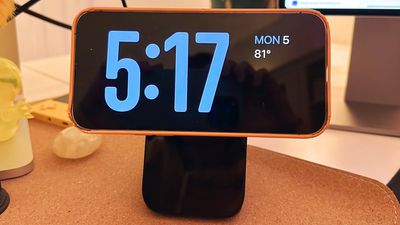
StandBy mode activates automatically on an iPhone running iOS 17 that's placed horizontally on a charger. You can see information such as the time, weather, a calendar, music controls, your photos, and more.

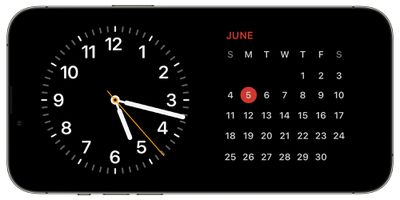
You can swipe left or right through the available StandBy options, and long press or swipe up/down to customize. With the time, for example, you can choose from an analog view, a digital view, a bubbly font, and a solar view where the background color shifts based on the time.
standby mode 2
There are options to add Home Screen widgets to the main StandBy view, which is the first option you see when activating StandBy. In this view, you can select two widgets to display side-by-side, so you can control your HomeKit products, see your calendar events, keep an eye on the stock market, check on device battery life, see the weather, and more.

If a Live Activity is active, it will be displayed full screen, as will results from Siri requests.

At night, StandBy mode will get darker if the room you're in is dark, so that it is not distracting at night while you're sleeping. StandBy mode is akin to Nightstand Mode on the Apple Watch, and it functions in much of the same way.

Note that having the iPhone continually show information requires an iPhone 14 Pro or Pro Max with always-on display technology. On other iPhones, a tap is required to see what's on the screen.


Related Forums: iOS 17, iPadOS 17

Popular Stories

Apple Event Logo

Apple Working on All-New Operating System

Wednesday July 29, 2026 11:39 am PDT by
Apple is developing an all-new operating system that is essentially a mix of tvOS, watchOS, and iOS, according to Bloomberg's Mark Gurman. In a report this week, he said the operating system will feature a grid of icons, widgets, and apps, along with customizable clock faces. The new software platform is intended for Apple's long-rumored smart home hub. With built-in facial recognition,...
imac video apple feature

Apple Made Its Second-Biggest Acquisition Ever This Year

Wednesday July 29, 2026 12:03 pm PDT by
Apple this year acquired Israeli startup Q.ai for close to $2 billion, according to the Financial Times. That would make this Apple's second-biggest acquisition ever, after it paid $3 billion for the popular headphone maker Beats in 2014. This is also the largest known Apple acquisition since the company purchased Intel's smartphone modem business and patents for $1 billion in 2019. Q.ai...
Dynamic Island iPhone 18 Pro Feature

iPhone 18 Pro: Twelve Changes Coming to Apple's Next Flagship

Thursday July 30, 2026 3:43 am PDT by
We're less than two months out from the launch of Apple's premium next-generation smartphone lineup, and while we're not expecting a dramatic change in terms of functionality, there are still several enhancements rumored to be coming to the iPhone 18 Pro and iPhone 18 Pro Max. One thing worth noting is that Apple is reportedly planning a major change to its iPhone release cycle this year,...

Top Rated Comments

CalMin Avatar
41 months ago


Note that having the iPhone continually show information requires an iPhone 14 Pro or Pro Max with always-on display technology. On other iPhones, a tap is required to see what's on the screen.

Ugh - Apple, c'mon! Needing an always on display seems unnecessary if it's connected to power.
Score: 15 Votes (Like | Disagree)
mudflap Avatar
41 months ago

The dumbest thing I've seen in years.
If this is the dumbest thing you've seen in years, you haven't been paying attention to the world's current state of affairs.
Score: 10 Votes (Like | Disagree)
41 months ago

Anyone know what stand they were using in the keynote?
Forté from Twelve South
Score: 10 Votes (Like | Disagree)
onFIRE Avatar
41 months ago
Anyone know what stand they were using in the keynote?
Score: 10 Votes (Like | Disagree)
41 months ago

Note that having the iPhone continually show information requires an iPhone 14 Pro or Pro Max with always-on display technology. On other iPhones, a tap is required to see what's on the screen.
Would be much more cool if Apple would make use of the hardware already on the phones like proximity sensors and FaceID IR illuminators to activate the display when a person moves into the device's field of view (or waves a hand etc). My cheap old Nest thermostat display basically already does this, no tapping required.

Score: 9 Votes (Like | Disagree)
41 months ago
Probably should use a different phrase other than "Home Hub", that's reserved for HomeKit - this headline confused me.
Score: 7 Votes (Like | Disagree)

🔗 Related Apple News & Rumors

Stay updated with the latest Apple ecosystem news and verified rumors










































