

Apple Explains iOS 16.3's New Security Keys Feature - MacRumorsOpen MenuShow RoundupsShow Forums menuVisit ForumsOpen Sidebar
Skip to Content

Apple Explains iOS 16.3's New Security Keys Feature

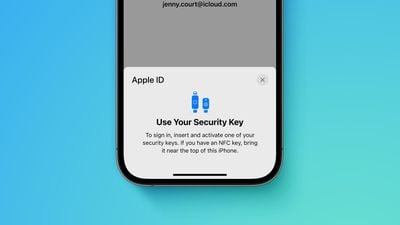
Apple this week shared a support document with details about its new Security Keys for Apple ID feature, available starting with iOS 16.3, iPadOS 16.3, and macOS 13.2. The document provides an overview of the feature and explains how to use it.
Apple advanced security Security Keys screen Feature crop
Apple says the optional security feature is designed for individuals who want "extra protection from targeted attacks, such as phishing or social engineering scams." When it is enabled, signing into an Apple ID requires entering your account's password and then using a FIDO Certified security key to complete two-factor authentication, instead of a traditional six-digit verification code from another Apple device.

Those who enable the feature must be very careful not to lose their security keys, as this could result in losing access to your Apple ID account permanently. For this reason, you must set up at least two security keys, with up to six supported in total.

Apple recommends keeping security keys in more than one place. For example, you could hide a key somewhere at home as a backup solution.

"Keep your security keys in a safe place, and consider keeping a security key in more than one place," the document says. "For example, keep one key at home and one key at work. If you're traveling, you might want to leave one of your security keys at home."

To enable Security Keys for Apple ID on an iPhone or iPad, open the Settings app, tap your name, tap "Password & Security," select "Add Security Keys" and follow the on-screen instructions. On the Mac, open the System Settings app, click on your name, click "Password & Security," click "Add" next to "Security Keys," and follow the steps.

Security keys can be removed at any time by repeating the steps outlined above and tapping or clicking on "Remove All Security Keys," at which point your Apple ID reverts to using a six-digit verification code for two-factor authentication.

Many security keys look similar to a USB thumb drive, with some options available with NFC for wireless use and others equipped with Lightning, USB-C, and/or USB-A ports for direct connectivity with iPhones, iPads, and Macs. Apple recommends a few security keys in the document, such as the YubiKey 5Ci with both Lightning and USB-C.

Apple's document provides some other important details, so it is worth reviewing before enabling the feature. For example, you can't sign in to iCloud for Windows when the feature is enabled, and some types of Apple ID accounts are not supported.


Related Forum: iOS 16

Popular Stories

Home Hub Command Center with Dome Base Feature

Apple Smart Home Hub to Feature iMac G4-Style Design

Wednesday September 30, 2026 4:36 am PDT by
Apple's long-rumored smart home hub will have an iMac G4-style design and a host of unique features, Bloomberg's Mark Gurman reports. The smart home hub is said to feature a square 6-inch display, with variants that can be placed on a countertop or mounted on a wall. It features a single FaceTime camera on the front, with microphones and speakers in its connected base. Gurman described the...
HomePod minis on gradient feature 1 1

Three New Apple Smart Home Products Coming on October 13

Wednesday September 30, 2026 4:04 am PDT by
Apple plans to introduce a series of new smart home products on Tuesday, October 13, according to Bloomberg's Mark Gurman. Apple reportedly plans to debut its long-awaited smart home hub device, a new HomePod mini, and a new Apple TV on the date. The new HomePod mini and Apple TV are set to retain their existing designs, but tout faster chips to support Siri AI. The new HomePod mini will...
Apple TV Sans Remote Feature

New Apple TV 4K Leaked

Friday September 25, 2026 8:16 am PDT by
MacRumors contributor Aaron Perris has uncovered an image file from Apple for an unreleased Apple TV 4K, suggesting that a new model will finally be released soon. The image is specifically for an "Apple TV 4K (4th generation)" model. Apple TV 4K (4th generation) image (on a gradient) The image reveals that the Apple TV will have the same external design as the current model, with all of its...

Top Rated Comments

48 months ago
iPhone Forum:

I lost my security key and forgot my password. Am I screwed?
Score: 21 Votes (Like | Disagree)
krspkbl Avatar
48 months ago
I bought 2x Yubico Keys for this. Well, not just Apple but my other accounts too obviously. I've been thinking of getting a key for a while but now Apple supports it I might as well jump on it now.

I got the Yubico 5 NFC key. Won't arrive for a couple days but excited to set it up. I'll have a read over the document to familiarise myself with how to set it up. Unfortunatly most people won't care about security keys so I am one of the few who see this is as the biggest feature of 16.3!

Requiring 2x keys will put a lot of people off, I think. I spent almost £100 on the 2 keys. Other accounts allow you to set them up with just 1. I think it's good that Apple requires 2 keys to set it up. If you don't want to spend £100 on security then might as well not bother using a key at all.
Score: 13 Votes (Like | Disagree)
48 months ago
“For example, you could hide a key somewhere at home as a backup solution.”

No; please don’t do this. You’ll just forget where you put it

“ … and one key at work.”

*PLEASE* don’t do this! Whoever owns the company can trivially steal your account if you do so. Even if you’re the person who owns the company, whoever cleans your office could steal your account.

You should have a secure place at home to keep important documents. At the very least, a drawer of a filing cabinet, but a small fireproof safe is preferable. You can decide the level of security you need, all the way up to a personal bank vault — but don’t rely on obscurity to keep it secure. Keep the backup there.

And it’s a good idea to have a safe deposit box at a bank. Keep the other backup there.

If you really need more than those two backups, then add more safe deposit boxes at different banks, or a locked fireproof safe at a trusted family member’s home, or some other variation on the theme. But you almost certainly don’t need nor want that many backups.

Incidentally, these are also where you should be keeping portable hard drives with backups of whatever data you most care about.

b&
Score: 7 Votes (Like | Disagree)
riverfreak Avatar
48 months ago

Two-factor authentication is enough major PITA. I don't work for the NSA, so major pass.

Anyone else want a phone dongle?

Wonder how long it will be before a future iOS update turns it on by default.

Here's a scenario; some of the ppl using these things will be dealing with nuclear emergencies and will lose their dongle and backup dongle or have them appropriated for espionage. Doesn't anyone at Apple ever think of worst-case scenarios?

I know. Corporate culture.
2FA is a total pain? So is having your bank account drained.

I don’t use sites or services that can’t be bothered to implement 2FA, at a bare minimum via SMS which I despise as it isn’t always VOIP or travel-friendly. I’ve even moved financial institutions as they refused for years to add 2FA.

Security keys FTW. Different strokes I guess.
Score: 6 Votes (Like | Disagree)
krspkbl Avatar
48 months ago

Two-factor authentication is enough major PITA. I don't work for the NSA, so major pass.

Anyone else want a phone dongle?

Wonder how long it will be before a future iOS update turns it on by default.

Here's a scenario; some of the ppl using these things will be dealing with nuclear emergencies and will lose their dongle and backup dongle. Doesn't anyone at Apple ever think of worst-case scenarios?

I know. Corporate culture.
You already need 2FA enabled on your Apple account for things like Airtags, iCloud Keychain, Find my iPhone, Apple Card/Cash, and Sign in with Apple.

I don't think they'll force people to use physical keys but they'll keep pushing 2FA. As it is I don't mind having 2FA enabled as it makes my account secure.
Score: 5 Votes (Like | Disagree)
48 months ago
If Apple would kindly put NFC in iPads and Macs as well this would be even better, and quicker to use.
Not sure why it isn’t.

Regards keeping one at work, ‘they’ would still need to know the actual account username and password, so fairly low risk, and for most people the most obvious/easiest off site option.
Advantage of course if you work in IT and have access to a media safe 😉
Score: 5 Votes (Like | Disagree)
Latest Stories
Apple's Smart Home Hub: Everything We Know So Far
8 hours ago
Apple's Home Hub Borrows From the iPhone Duo's StandBy Mode
9 hours ago
Apple Invites App Updated With Three New Features
13 hours ago
Apple Event on October 13?
14 hours ago
Apple Watch SE 3 vs. Series 12 Buyer's Guide: Which Should You Buy?
15 hours ago
iPad Mini 8 to Offer These 10 New Features
16 hours ago
DoorDash Unveils AI Food Ordering Through Apple's Messages App
17 hours ago
Amazon Takes Up to $150 Off Select M5 MacBook Air Models
17 hours ago
Apple Still Plans to Release a New Full-Sized HomePod
19 hours ago
Apple Working to Expand HomeKit
20 hours ago
Apple Smart Home Hub to Feature iMac G4-Style Design
20 hours ago
Three New Apple Smart Home Products Coming on October 13
21 hours ago
Apple Pay Now Available in India With Axis Bank Cards
1 day ago
OpenAI Launches Always-On 'Dots' Agents to Rival Meta's Muse
1 day ago
AirPods 5 Teardown: Batteries Removable, Case Still Tough
1 day ago
iPhone 18 Pro Owners Complain of Speaker Crackling or Popping
1 day ago
You Can 'Get Ready' for iPhone Duo Pre-Orders on October 12
1 day ago
Apple Pay Reportedly Launching in India Today
2 days ago
Apple Releases New AirPods Beta Firmware
2 days ago
Apple Shares New Guide for Using iOS 27 Parental Controls
2 days ago
Apple Creator Studio and Final Cut Camera Get New Features
2 days ago
Apple Explains Why It Removed ICE Tracking Apps Last Year
2 days ago
Amazon Expands $779.99 Apple Watch Ultra 4 Deal to More Models
2 days ago
Switch Siri AI for ChatGPT on Your Mac
2 days ago
Apple Says Emergency SOS via Satellite Now Available in Norway
2 days ago
AppleCare Guide: Is it Worth Paying For?
2 days ago
Apple Reportedly Planned to Replace 5,000 Support Employees With AI
2 days ago
Apple Planning to Launch Products Faster and More Often
2 days ago
Amazon Discounting New Mac Mini and Mac Studio Alongside Early Prime Day Deals on Monitors
2 days ago
New Apple TV 4K Hinted at in Support Document
2 days ago

🔗 Related Apple News & Rumors

Stay updated with the latest Apple ecosystem news and verified rumors









































