

Test Shows How Much Battery Drain Your Wallpaper Causes on the iPhone 14 Pro's Always-On Display - MacRumorsOpen MenuShow RoundupsShow Forums menuVisit ForumsOpen Sidebar
Skip to Content

Test Shows How Much Battery Drain Your Wallpaper Causes on the iPhone 14 Pro's Always-On Display

With the introduction of an always-on display in the iPhone 14 Pro and iPhone 14 Pro Max, many users have wondered how much impact the feature has on battery life. A new video takes a careful look at just how much battery drain there is with the always-on display and whether turning off the wallpaper reduces that drain.


At launch, users were unable to customize different aspects of the always-on display, but as of the iOS 16.2 update released last month, Apple has given users options to enable or disable the wallpaper and notifications while the Lock Screen is dimmed.

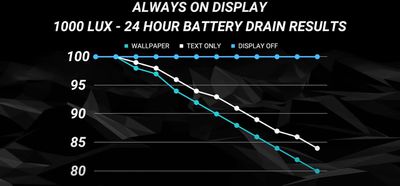
By disabling the wallpaper, the always-on display is black other than for the clock, date, any widgets you have set up on your iOS lock screen, and recent notifications, if enabled. YouTuber PhoneBuff tested whether or not enabling or disabling the wallpaper impacts overall iPhone battery life.
iphone 14 pro ios 16 battery drain2
In the test, it was found that by having the wallpaper enabled for the always-on display, an iPhone 14 Pro will drain around 0.8% per hour, compared to 0.6% an hour for the wallpaper disabled on the always-on display.

In the video, PhoneBuff also compared the iPhone 14 Pro's always-on display technology to the Samsung Galaxy S22 Ultra. One interesting point found in that comparison was that over time, the Galaxy S22 Ultra would move the clock on the always-on display around, presumably to prevent OLED burn-in from a static image being shown on display for prolonged periods.

On the iPhone, no such thing occurs, as time and all other information stay in place. The iPhone 14 Pro and Galaxy S22 Ultra drained at the same rate during the test, reaching 84% after 24 hours of the always-on display.


Related Forum: iPhone

Popular Stories

iOS 27 Next to iPhone

Here's When iOS 27 Rolls Out Today in Every Time Zone [Update: It's Out]

Sunday September 13, 2026 3:00 am PDT by
Update 10:04 a.m.: iOS 27 is rolling out now, though it may take a bit for all users to see it, so keep checking! Apple is about to release iOS 27, which will finally deliver more advanced Siri AI capabilities as well as a variety of other refinements, improvements, and new features to iPhones. It's Apple's biggest software update of the year, and Apple announced at Wednesday's iPhone event...

iOS 27 Icon iPhone

iOS 27 Available Today With These 8 New Features

Monday September 14, 2026 9:00 am PDT by
Update: Apple has released iOS 27. During its iPhone 18 Pro and iPhone Duo event last week, Apple announced that iOS 27 will be released widely on Monday, September 14. iOS 27 should be available around 10 a.m. Pacific Time / 1 p.m. Eastern Time today via the Settings app, under General → Software Update. Below, we have highlighted eight new features and changes coming with iOS...
deep black iphone 18 pro

Apple Says iPhone 18 Pro Max Sold in U.S. Differs in One Way

Saturday September 12, 2026 3:27 pm PDT by
As noted by Nicolas Lellouche, who writes for the French tech website Numerama, Apple has updated its tech specs pages for the iPhone 18 Pro and iPhone 18 Pro Max to clarify which models are equipped with its new C2 cellular modem and where. Apple now says the iPhone 18 Pro has a C2 modem worldwide, while the iPhone 18 Pro Max uses the chip in every country except for the U.S. According...

Top Rated Comments

Saladin12 Avatar
48 months ago
This really highlights how efficient Apple's original implantation (see edit), wallpaper included, really is.

That being said, ever since turning off the wallpaper for AOD, I haven't looked back. So much nicer on my eyes.

Edit: that should say implementation not implantation.. ffs
Score: 24 Votes (Like | Disagree)
philcourage Avatar
48 months ago
You know, if you really want to save battery, cut off the middle man and just shut the phone down and never use it. And don't forget to make a video of your findings, please. Preferably one with a photo of you making a silly face in the thumbnail.
Score: 23 Votes (Like | Disagree)
Macintosh Quadra 840av Avatar
48 months ago
I have stellar battery life with it on, so I'm not gonna bother turning it off at this point. Always make it through the day with plenty of charge left.
Score: 18 Votes (Like | Disagree)
TheYayAreaLiving 🎗️ Avatar
48 months ago
Regardless of the outcome iPhone 14 Pro Max has an amazing battery life.
Score: 14 Votes (Like | Disagree)
hortod1 Avatar
48 months ago
For me the AOD with wallpaper was a huge distraction. Turning off the wallpaper made a huge difference.
Score: 14 Votes (Like | Disagree)
Rychiar Avatar
48 months ago

Yeah I keep it off on the Watch for the increased battery life, it definitely makes an improvement to the battery life. I had it on for a couple of years, but noticed some burn-in due to me using the same watch face. Switching it off made a big improvement to the "ghost" effect over the course of a year though, so it can be somewhat reversed.
I can’t even fathom turning it off on the watch. AOD was a game changer on watches and my series 5 gets the same battery life as my series 2 without... which is a full day charge. I charge every night while Sleeping.
Score: 10 Votes (Like | Disagree)

🔗 Related Apple News & Rumors

Stay updated with the latest Apple ecosystem news and verified rumors











































