Later this week, Apple will launch the Apple Watch Ultra, a more rugged, capable smartwatch aimed at explorers, adventurers, and athletes. One of the many unique features of the $799 watch is the addition of a third button called the Action button. This article previews what you'll be able to do with it.
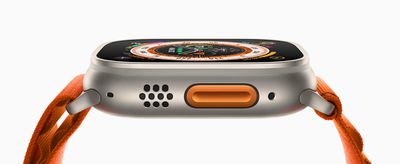
Location of the Action Button
Colored in "International Orange," the indented, pill-shaped Action button is located beside the display on the left side of the Apple Watch Ultra's titanium case, in between the dual speakers and the siren.
Activating the Siren
Pressing and holding the Action button will activate the built-in 86-decibel siren, which can be heard from up to 600 feet (180 meters) away, and is meant to be used to attract help during an emergency.
Custom Actions
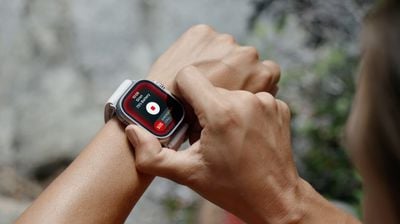
The Action button is also customizable, meaning it can perform whatever function the user configures for it. Apple Watch Ultra users are able to choose an initial function for the Action button when they set up their device. Later, they can adjust this choice in Settings, where a new section lists apps that support the button.
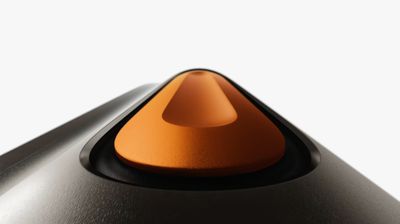
Apple's examples of what the button can be configured to do include starting Backtrack (which uses GPS data to create a path of where you've been so you can retrace your steps), starting a workout, and beginning a dive.
The Action button can also be assigned to system-level functions, like turning the Flashlight on and off, marking a Compass Waypoint, or starting the Stopwatch. In addition, Apple Watch Ultra users can pause the current function by pressing the Action and Side buttons together.
Assigning Shortcuts
Because the Action button is powered by the new App Intents APIs that Apple released at WWDC in June, Apple Watch Ultra users will be also able to assign Shortcuts to it, bringing huge potential for customization, like the ability to control smart home accessories.
The Apple Watch Ultra’s Action Button is powered by some awesome new App Intents APIs. You will be able to build your own apps to integrate with it, like a hockey app that uses the button to record goals! And for users, the button can kick off any Shortcut you want! — Michael Gorbach (@mgorbach) September 7, 2022
Assigning a dedicated Shortcut to the Action button could also pave the way for additional, adaptive functionality. For instance, Shortcuts with location- or time-based actions could allow the Action button to perform different functions throughout the day.
Multifunction Use With Subsequent Presses
Depending on what app the Action button is being used to control, Apple Watch Ultra users will in some cases be able to choose additional actions for subsequent presses.
Apple envisions people using the Action button without looking at the screen, so a subsequent button press should flow logically from the first press, while also making sense in the current context.
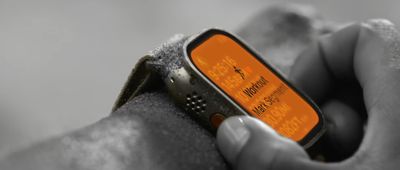
For example, a workout app might let the user start a triathlon with the first button press and switch to another segment with a subsequent press.
It's worth noting however that apps won't be able to assign functions to a long press of the Action button, since watchOS 9 reserves this interaction for the emergency SOS feature.
Final Thoughts
Apple's decision to add a third physical control to the Apple Watch Ultra in the form of the Action button doesn't just allow quick access to a range of system-provided functions. It also hands a new tool to third-party developers that will enable them to bring key app features to users at the press of a button.
Whether Apple intends to bring the Action button to its more affordable Apple Watch Series models in the future is an intriguing question, the answer to which may depend on just how versatile and indispensable it proves to be in the hands of Ultra users.
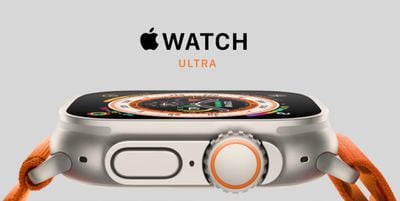
Priced at $799, the Apple Watch Ultra is available in a single 49mm size, with Trail, Ocean, and Alpine band options available. The new smartwatch can be pre-ordered now and launches alongside the second-generation AirPods Pro this coming Friday, September 23. For more on the Apple Watch Ultra's design and features, be sure to check out our dedicated roundup.