Apple Watch Series 8 Takes Five Nights to Establish Baseline Wrist Temperature
Apple today published a new support document with additional details about the new wrist temperature sensing feature available on Apple Watch Series 8 and Apple Watch Ultra models, and it turns out the feature requires users to wear their watch for five nights before it can detect a baseline temperature.
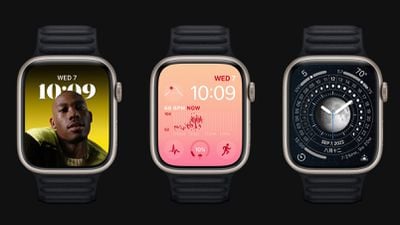
Apple Watch Series 8 and Apple Watch Ultra have two temperature sensors — one on the back crystal, near your skin, and another just under the display. While the wearer sleeps, Apple Watch samples wrist temperature every five seconds. This design improves accuracy by reducing bias from the outside environment, according to Apple.
Your body temperature naturally fluctuates and can vary each night due to your diet and exercise, alcohol consumption, sleep environment, or physiological factors such as menstrual cycles and illness. After about 5 nights, your Apple Watch will determine your baseline wrist temperature and look for nightly changes to it.
Apple says that Sleep must be set up with "Track Sleep with Apple Watch" enabled, and Sleep Focus must be enabled for at least four hours a night for about five nights. After that, users can check Body Measurements -> Wrist Temperature in the Health app for recorded measurements.
Apple cautions that the feature isn't a medical-grade device and shouldn't be used for any medical purpose, nor is it a thermometer, and it cannot provide measurements on demand. A loose-fitting Apple Watch can also impact wrist temperature data.
Apple is marketing the feature in promotional materials for the new Apple Watch models as a way to improve period predictions and retrospective ovulation estimates, but the support document suggests that tracking nightly temperature changes while sleeping can give anyone insight into their "overall well-being."
For those who have no use for the feature, Wrist Temperature can be turned off in the Watch app on iPhone, under Privacy -> Turn off Wrist Temperature.
Popular Stories
Last year, Apple launched CarPlay Ultra, the long-awaited next-generation version of its CarPlay software system for vehicles. Nearly nine months later, CarPlay Ultra is still limited to Aston Martin's latest luxury vehicles, but that should change fairly soon.
In May 2025, Apple said many other vehicle brands planned to offer CarPlay Ultra, including Hyundai, Kia, and Genesis.
In his Powe...
The calendar has turned to February, and a new report indicates that Apple's next product launch is "imminent," in the form of new MacBook Pro models.
"All signs point to an imminent launch of next-generation MacBook Pros that retain the current form factor but deliver faster chips," Bloomberg's Mark Gurman said on Sunday. "I'm told the new models — code-named J714 and J716 — are slated...
We are still waiting for the iOS 26.3 Release Candidate to come out, so the first iOS 26.4 beta is likely still at least a week or two away. Following beta testing, iOS 26.4 will likely be released to the general public in March or April.
Below, we have recapped known or rumored iOS 26.3 and iOS 26.4 features so far.
iOS 26.3
iPhone to Android Transfer Tool
iOS 26.3 makes it easier...
Apple is planning to launch new MacBook Pro models with M5 Pro and M5 Max chips alongside macOS 26.3, according to Bloomberg's Mark Gurman.
"Apple's faster MacBook Pros are planned for the macOS 26.3 release cycle," wrote Gurman, in his Power On newsletter today.
"I'm told the new models — code-named J714 and J716 — are slated for the macOS 26.3 software cycle, which runs from...
In 2022, Apple introduced a new Apple Home architecture that is "more reliable and efficient," and the deadline to upgrade and avoid issues is fast approaching.
In an email this week, Apple gave customers a final reminder to upgrade their Home app by February 10, 2026. Apple says users who do not upgrade may experience issues with accessories and automations, or lose access to their smart...






















