

Apple today released watchOS 9, the latest version of the watchOS operating system designed to run on newer Apple Watch models. watchOS 8 is compatible with the Apple Watch Series 4 and later.
watchOS 9 can be downloaded for free through the Apple Watch app on the iPhone by opening it up and going to General > Software Update. To install the new software, the Apple Watch needs to have at least 50 percent battery, it needs to be placed on a charger, and it needs to be in range of the iPhone.
Apple added four new watch faces in watchOS 9. Lunar shows the relationship between the Gregorian calendar and lunar calendas, while Playtime offers animated and personified numbers created in collaboration with artist Joi Fulton. Metropolitan is a classic type-driven watch face and Astronomy is a revamped version of the original astronomy watch face with a remastered design and new star map and cloud data.
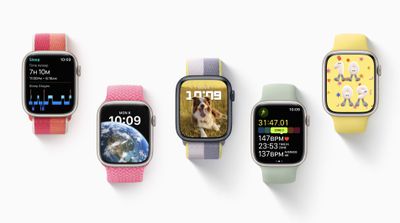
Apple updated several existing watch faces with a more modern look and added new complications, plus Focus modes can now be associated with a specific watch face. Sleep tracking in watchOS 9 now includes sleep stages, allowing users to detect when users are in REM, Core, or Deep sleep.
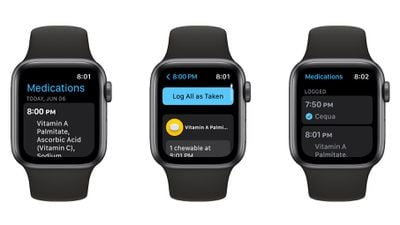
A new Medications app on the Apple Watch is designed to help users manage and track their medications, vitamins, and supplements. The app keeps a list of medications, sends reminders when it's time to take them, and watches out for any drug interactions (U.S. only).
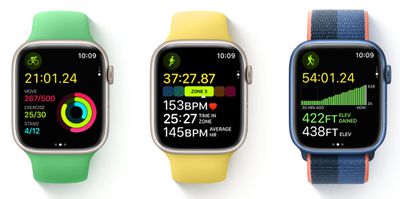
For the Workout app, there's a new option to make custom workouts that can include work and rest intervals, and Heart Rate Zones can be created to monitor the intensity of a workout, and there are new alerts for pace, power, heart rate, and cadence that can guide users through workouts.
Swimmers, runners, and triathletes have new Activity options that take into account new metrics, and Fitness+ users who don't have an Apple TV can use AirPlay to stream workouts and meditations to compatible third-party TVs for use without an Apple TV.
The ECG app's atrial fibrillation (AFib) warnings have been updated, with Apple adding a new AFib History feature. Patients with AFib can turn on AFib History to track AFib frequency for deeper insight into their heart condition that can also be shared with medical professionals.
Apple redesigned notifications on the Apple Watch to feature slimline banners that are less interruptive when the watch is in active use, and Family Setup now supports the Home app so kids can control smart home accessories from their wrists. Quick Actions on the Apple Watch allow users to do more with a double-pinch gesture, including answering/ending phone calls, playing/pausing media, and starting or pausing a workout.
Apple's release notes for the update are below:
watchOS 9 brings great new ways to keep you active, healthy, and connected with Apple Watch. You have more ways to train and measure your workouts, a completely redesigned compass app, a new app to track your medications, more powerful sleep tracking with sleep stages, and better insights and support for your heart health if you have been diagnosed with atrial fibrillation.
Watch Faces
- Astronomy now displays current cloud coverage and star map
- Lunar includes a Chinese, Hebrew, or Islamic lunar calendar wrapped around a moon with a live rendering of moon phases
- Playtime includes animated numbers designed by Chicago artist Joi -Fulton with editing options for background colors
- Metropolitan features a type-driven watch face with numbers that dynamically change in style and weight as you turn the Digital Crown
- Nike Analog, Nike Bounce, Nike Compact, Nike Digital, and Nike Hybrid, all with a tappable Nike Swoosh that launches Nike Run Club, are now available for more models of Apple Watch
- Rich Complications, Chinese script options, and background color editor available on Breathe, California, Modular, Typograph and more
- Portraits now supports portraits of dogs and cats and landscapes with the ability to customize the color of the background or entire photo
- Ability to choose the watch face displayed when a Focus is activeWorkout
- Ability to customize and scroll through multiple Workout Views during a workout including Splits, Segments, Activity Rings, and more
- Heart Rate Zones view uses max and resting heart rate to create personalized zones and shows time spent in each zone
- Elevation view displays current elevation and elevation gain and visually maps your elevation progress during Outdoor Run, Outdoor Cycle, Outdoor Wheelchair Run Pace, Hiking, Outdoor Walk and Outdoor Wheelchair Walk Pace
- Running Power view, measured in watts, shows an instantaneous measure of how much power is generated during your run (Apple Watch SE and Apple Watch Series 6 and later)
- Running Form Metrics including Stride Length, Ground Contact Time, and Vertical Oscillation available in Workout Views to monitor and trend running efficiency (Apple Watch SE and Apple Watch Series 6 and later)
- Custom Workout enables you to create Workouts with repeating sets of intervals that can be based on a time, distance or an open goal with automatic or manual advancement to your next set
- Pacer provides a training experience to help you sustain a desired pace using alerts and a dedicated workout view
- Multisport Workout supports duathlon or triathlon training with automatic detection of Open Water/Pool Swim, Indoor/Outdoor Cycle, Indoor/Outdoor Run, and transitions to the next leg
- Workout alerts can be customized for metrics like pace, power, cadence, and heart rate zones
- Pool Swim workouts automatically detect kickboard
- SWOLF swimming efficiency metric calculated as stroke count plus time to complete lapFitness+
- Trainer guidance displayed on-screen including targets for Intensity, strokes per minute for Rowing, revolutions per minute for Cycling, and incline percentage for Treadmill
- Trainer guidance and personal fitness metrics displayed on-screen for compatible third party TVs and devicesCompass
- Redesigned compass app with more in-depth information and zoomable views (Apple Watch SE and Apple Watch Series 5 and later)
- Primary face supports both an analog compass dial and a digital view of current bearing and direction
- Zoomed view provides analog view of bearing plus your elevation, incline and coordinates
- Compass Waypoints allow you to mark your position or point of interest (Apple Watch SE and Apple Watch Series 6 and later)
- Backtrack uses GPS to track your historic path in case you get lost or disoriented (Apple Watch SE and Apple Watch Series 6 and later)Sleep
- Sleep stage tracking using data from the accelerometer and heart rate sensor to detect time spent in REM, Core, and Deep sleep, as well as awake
- Comparisons chart provides a view of heart rate and respiratory rate alongside time asleep in the Health app on iPhoneMedications
- Capabilities to log as-needed and scheduled medications, including the amount and time taken
- Ability to view medication schedule and what you have logged for the day
- Reminders to log scheduled medications
- Medications complication to see your schedule or quickly open the app
- AFib History
- Weekly notifications with estimate of the percentage of time spent in atrial fibrillation during previous calendar week
- Highlights show which day of week and time of day when AFib is highest
- Tracking of lifestyle factors that may influence time spent in AFib including Exercise, Sleep, Weight, Alcohol Consumption, and Mindful Minutes in the Health app on iPhone
- Sharable PDF for richer conversations with healthcare providers
- Support for users 22 years or older with diagnosis of atrial fibrillationFamily Setup
- Podcasts app is now available and includes ability to search, download, follow shows, and explore curated content
- Third party email support extended to Yahoo and Outlook
- Editing and sharing contact photos now availableAccessibility
- Expanded Quick Actions with AssistiveTouch for play and pause in Now Playing, pause and resume in Workout, take a photo using Camera Remote, and toggle between map view and turn-by-turn directions in Maps
- Bluetooth keyboard pairing with Apple Watch
- Apple Watch Mirroring lets you control Apple Watch remotely from your paired iPhone via AirPlay with support for assistive technologies like Voice Control or Switch Control as an alternative to tapping the Apple Watch displayOther features and improvements:
- Low Power Mode maintains core features of Apple Watch while temporarily disabling select background features such as always on display and heart health notifications to extend battery life
- Support for international roaming allows you to stay connected to your cellular network while traveling abroad (Apple Watch SE and Apple Watch Series 5 and later)
- Expanded keyboard languages including French, German, Italian, Japanese, Portuguese, and Spanish available on Apple Watch Series 7 and later
- Communication safety setting in Screen Time gives parents the ability to enable warnings for children when they receive or attempt to send photos that contain nudity in Messages
- Cycle deviation notifications alert you if your logged menstrual cycles show a pattern of infrequent periods, irregular periods, prolonged periods, or persistent spotting
- New Cardio Recovery metric estimated by Apple Watch available in the Health app
- Reminders app updated to support editing so you can add key details like location, tags, and due times
- Calendar app redesigned to support creation of new calendar events with ability to switch to day, list, and week views
- Enhanced Podcast experience with support for search, ability to follow and unfollow shows, and discover new content in Listen Now
- Dock updated to show apps running in background at the top
- Notifications redesigned with streamlined slimline banner when actively using Apple WatchSome features may not be available for all countries or all areas, for more information visit:
https://www.apple.com/watchos/feature-availability/For information on the security content of Apple software updates, please visit this website:
https://support.apple.com/kb/HT201222
More on everything new in watchOS 9 can be found in our dedicated watchOS 9 roundup.



/https://forums.macrumors.com/attachments/2061497/)













































