

iOS 16 Now Available: Six New Features Worth Checking Out

Apple released iOS 16 on Monday, September 12 as a free software update for the iPhone 8 and newer. iOS 16 includes plenty of new features, ranging from a customizable Lock Screen to the ability to temporarily edit or unsend iMessages.
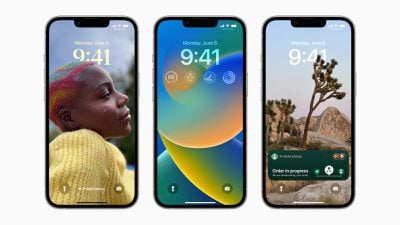
ios 16 lockscreens
To install iOS 16, open the Settings app on your iPhone and tap General → Software Update. After you update your iPhone to iOS 16, check out our list of six useful new features to try out below.

Customize the Lock Screen

The headline new feature of iOS 16 is the ability to personalize the Lock Screen with multi-layered wallpapers, widgets, custom fonts for the date and time, and more. You can also select a set of photos to shuffle on the Lock Screen throughout the day.
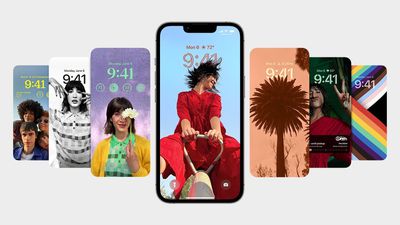
iOS 16 Lock Screen Customize
The new Lock Screen gallery showcases a range of Lock Screen options, including a new Weather wallpaper with live weather conditions and an Astronomy wallpaper that provides views of the Earth, Moon, and Solar System. iOS 16 includes support for multiple Lock Screen designs, allowing you to switch between your favorites with a swipe.

Related: How to customize the Lock Screen on iOS 16

Edit or Unsend an iMessage

iOS 16 introduces the ability to temporarily edit or unsend iMessages, as well as mark iMessage conversations as unread after opening them.

Apple allows you to edit an iMessage for up to 15 minutes after sending it, with up to five edits allowed per message. Recipients are able to see a record of edits made to the message, and on devices running iOS 15 or earlier, edited messages are received as a new message that says "Edited to [new message]."
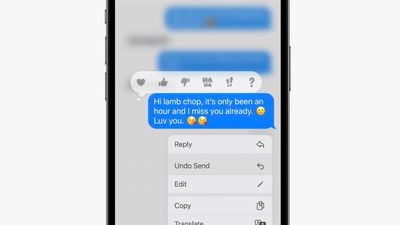
ios 16 imessage edit unsend
To edit or unsend a message, simply tap and hold on a bubble and select the appropriate option in the menu that appears. iMessages that have been edited are marked as "edited" below the message bubble. SMS messages (green bubbles) cannot be edited or unsent.

Use the Full-Screen Music Player

iOS 16 reintroduces a full-screen music player on the Lock Screen with large album art and a color-matched wallpaper.
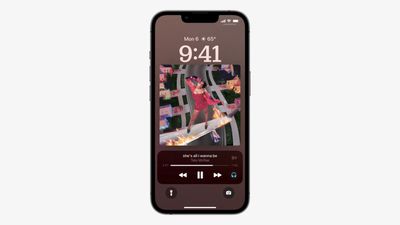
ios 16 lock screen music player
Apple last offered a full-screen music player on the Lock Screen on iOS 10 in 2016. If you don't like the feature, you can tap on the bottom of the display to minimize the music player and revert to your standard Lock Screen wallpaper.

Game With Nintendo Joy-Cons

iPhones feature support for many additional Bluetooth game controllers on iOS 16, including the Nintendo Switch's Joy-Cons and Pro Controller. iPhones running iOS 16 can be used with either single left or right Joy-Cons, or both at once as a singular controller.
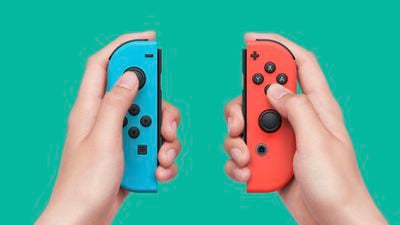
nintendo joy cons
This is on top of the iPhone's existing compatibility with PS5 DualSense and Xbox Series X controllers since the release of iOS 14.5 last year.

Track an Apple Pay Order

Apple Pay on iOS 16 features new built-in order tracking information in the Wallet app for online orders completed via Apple Pay. The tracker provides an order's estimated delivery date and indicates when a package is out for delivery.
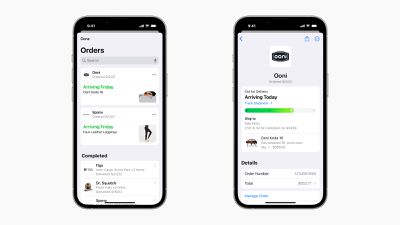
ios 16 apple pay order tracking

Close Your Rings Without an Apple Watch

Starting with iOS 16, the Fitness app is now available on the iPhone for all users, even without an Apple Watch. The app features a daily Activity ring that relies on the iPhone's motion sensors to estimate a person's calories burned and steps per day.
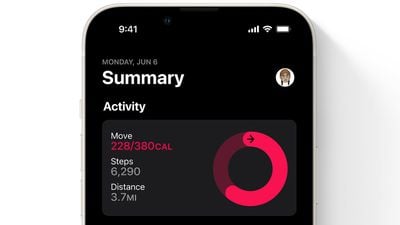
fitness app ios 16
During its iPhone 14 event, Apple announced that its Fitness+ service will be available for iPhone users without an Apple Watch later this year in the 21 countries where the service is available. Fitness+ is priced at $9.99 per month or $79.99 per year.


Related Forum: iOS 16

Popular Stories

Aston Martin CarPlay Ultra Screen

Apple's CarPlay Ultra to Expand to These Vehicle Brands Later This Year

Sunday February 1, 2026 10:08 am PST by
Last year, Apple launched CarPlay Ultra, the long-awaited next-generation version of its CarPlay software system for vehicles. Nearly nine months later, CarPlay Ultra is still limited to Aston Martin's latest luxury vehicles, but that should change fairly soon. In May 2025, Apple said many other vehicle brands planned to offer CarPlay Ultra, including Hyundai, Kia, and Genesis. In his Powe...
Apple Logo Black

Apple's Next Launch is 'Imminent'

Sunday February 1, 2026 12:31 pm PST by
The calendar has turned to February, and a new report indicates that Apple's next product launch is "imminent," in the form of new MacBook Pro models. "All signs point to an imminent launch of next-generation MacBook Pros that retain the current form factor but deliver faster chips," Bloomberg's Mark Gurman said on Sunday. "I'm told the new models — code-named J714 and J716 — are slated...
iOS 26

iOS 26.3 and iOS 26.4 Will Add These New Features to Your iPhone

Tuesday February 3, 2026 7:47 am PST by
We are still waiting for the iOS 26.3 Release Candidate to come out, so the first iOS 26.4 beta is likely still at least a week or two away. Following beta testing, iOS 26.4 will likely be released to the general public in March or April. Below, we have recapped known or rumored iOS 26.3 and iOS 26.4 features so far. iOS 26.3 iPhone to Android Transfer Tool iOS 26.3 makes it easier...
Apple MacBook Pro M4 hero

New MacBook Pros Reportedly Launching Alongside macOS 26.3

Sunday February 1, 2026 5:42 am PST by
Apple is planning to launch new MacBook Pro models with M5 Pro and M5 Max chips alongside macOS 26.3, according to Bloomberg's Mark Gurman. "Apple's faster MacBook Pros are planned for the macOS 26.3 release cycle," wrote Gurman, in his Power On newsletter today. "I'm told the new models — code-named J714 and J716 — are slated for the macOS 26.3 software cycle, which runs from...
iOS 26 Home Feature

Apple Gives Final Warning to Home App Users

Tuesday February 3, 2026 8:55 am PST by
In 2022, Apple introduced a new Apple Home architecture that is "more reliable and efficient," and the deadline to upgrade and avoid issues is fast approaching. In an email this week, Apple gave customers a final reminder to upgrade their Home app by February 10, 2026. Apple says users who do not upgrade may experience issues with accessories and automations, or lose access to their smart...

Top Rated Comments

Someyoungguy Avatar
44 months ago
Wow, so customizable, and yet I can’t get rid of the flashlight or camera buttons that I constantly activate by accident.

On that topic, why the hell do we need a camera button AND a swipe left for the camera?
Score: 36 Votes (Like | Disagree)
ian87w Avatar
44 months ago
Now the real beta testing phase starts ?
Score: 19 Votes (Like | Disagree)
snak-atak Avatar
44 months ago
Track medications on iPhone ('https://9to5mac.com/2022/07/29/track-medications-on-iphone/') is an underrated feature that, to me, is a much more important feature than Nintendo Switch controllers.
Score: 18 Votes (Like | Disagree)
SW3029 Avatar
44 months ago
After having used iOS 16 for several weeks now, I think it's a pretty minor – even "meh" – upgrade. Maybe that's good if it means fewer bugs. And it's hard to introduce killer features year after year. But overall, once you spend 2 minutes customizing your first lock screen, there's not much different than iOS 15.
Score: 17 Votes (Like | Disagree)
Jack Neill Avatar
44 months ago
Not sure if I want to subject my XS to this or not..
Score: 14 Votes (Like | Disagree)
citysnaps Avatar
44 months ago

Oooh hell noo not updating my iphone 12 its lagging already on ios 15
Really? My iPhone 12 still runs fast on iOS 15. Zero lagging on any app.
Score: 9 Votes (Like | Disagree)














