Apple Seeds Fourth Beta of watchOS 9 to Developers

Apple today seeded the fourth beta of an upcoming watchOS 9 update to developers for testing purposes, with the new beta coming three weeks after Apple released the third beta to developers.
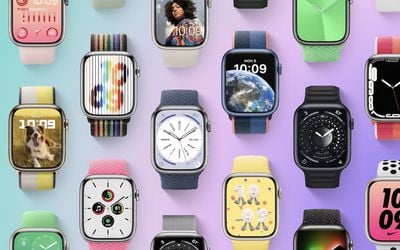
watchOS 9 Feature
To install ‌watchOS 9, developers will need to download the configuration profile from the Apple Developer Center. Once installed, ‌watchOS 8‌ can be downloaded through the dedicated Apple Watch app on the iPhone by going to General > Software update. To update to new software, an Apple Watch needs to have 50 percent battery life, it must be placed on the charger, and it needs to be in range of the ‌‌iPhone‌‌.

watchOS 9 introduces four new watch faces, including Lunar, Playtime, Metropolitan, and Astronomy, plus it includes updates to some existing watch faces and complications. The ECG app now supports AFib History for tracking how long a person has been in atrial fibrillation.

The sleep tracking feature now includes sleep stages, letting the Apple Watch track when users are in REM, Core, or Deep sleep, and Apple has added a Medications app. The Medications app lets users manage and track their medications, vitamins, and supplements, with reminders when it's time to take them.

Updates to the Workout app add custom workouts and improvements for runners, triathletes, and swimmers. Fitness+ workouts now support streaming to certain third-party TVs for those who don't have an Apple TV, and notifications have been redesigned to be less obtrusive when the watch's screen is active.

Other new features include a CallKit API that allows VOIP calls to be answered on Apple Watch, Apple Watch Mirroring for controlling the Apple Watch with an ‌iPhone‌, Quick Actions for doing more with a double pinch gesture, and updates to the Reminders and Calendar apps.


Related Roundup: watchOS 26
Related Forum: Apple Watch

Popular Stories

Aston Martin CarPlay Ultra Screen

Apple's CarPlay Ultra to Expand to These Vehicle Brands Later This Year

Sunday February 1, 2026 10:08 am PST by
Last year, Apple launched CarPlay Ultra, the long-awaited next-generation version of its CarPlay software system for vehicles. Nearly nine months later, CarPlay Ultra is still limited to Aston Martin's latest luxury vehicles, but that should change fairly soon. In May 2025, Apple said many other vehicle brands planned to offer CarPlay Ultra, including Hyundai, Kia, and Genesis. In his Powe...
Apple Logo Black

Apple Just Made Its Second-Biggest Acquisition Ever After Beats

Thursday January 29, 2026 10:07 am PST by
Apple today confirmed to Reuters that it has acquired Q.ai, an Israeli startup that is working on artificial intelligence technology for audio. Apple paid close to $2 billion for Q.ai, according to sources cited by the Financial Times. That would make this Apple's second-biggest acquisition ever, after it paid $3 billion for the popular headphone and audio brand Beats in 2014. Q.ai has...
Apple Logo Black

Apple's Next Launch is 'Imminent'

Sunday February 1, 2026 12:31 pm PST by
The calendar has turned to February, and a new report indicates that Apple's next product launch is "imminent," in the form of new MacBook Pro models. "All signs point to an imminent launch of next-generation MacBook Pros that retain the current form factor but deliver faster chips," Bloomberg's Mark Gurman said on Sunday. "I'm told the new models — code-named J714 and J716 — are slated...
14 inch MacBook Pro Keyboard

Apple Changes How You Order a Mac

Saturday January 31, 2026 10:51 am PST by
Apple recently updated its online store with a new ordering process for Macs, including the MacBook Air, MacBook Pro, iMac, Mac mini, Mac Studio, and Mac Pro. There used to be a handful of standard configurations available for each Mac, but now you must configure a Mac entirely from scratch on a feature-by-feature basis. In other words, ordering a new Mac now works much like ordering an...
Apple MacBook Pro M4 hero

New MacBook Pros Reportedly Launching Alongside macOS 26.3

Sunday February 1, 2026 5:42 am PST by
Apple is planning to launch new MacBook Pro models with M5 Pro and M5 Max chips alongside macOS 26.3, according to Bloomberg's Mark Gurman. "Apple's faster MacBook Pros are planned for the macOS 26.3 release cycle," wrote Gurman, in his Power On newsletter today. "I'm told the new models — code-named J714 and J716 — are slated for the macOS 26.3 software cycle, which runs from...

Top Rated Comments

mavis Avatar
46 months ago
So I posted this in the Watch forum but hopefully some people will see it here:

Don't reboot your watch on watchOS 9b4! Edit: rebooting didn't fix it, but a hard reset did. Hold the Digital Crown and side button, until the watch powers off.

I installed watchOS 9 beta 4 on my S7 today, and the first thing I checked once it finished was Airplane Mode mirroring (it was broken on b3 and it remains broken on b4 - Focus mirroring works fine, but Airplane Mode doesn't) ... so I rebooted both my iPhone and my watch. Big mistake.

After rebooting, none of my third-party app complications are visible. The complications are not selectable while editing watch faces directly on the watch (only Apple's stock app complications show up). I can see the complications on my iPhone, but setting them up in the iPhone's Watch app doesn't actually make them visible on the watch. So Carrot, HeartWatch, etc - nothing works.

Just an FYI. It worked after updating to b4, but not after rebooting. YMMV, but this is what happened to me.
Score: 4 Votes (Like | Disagree)
Funny Apple Man Avatar
46 months ago
* cries in Apple Watch Series 3 *
Score: 2 Votes (Like | Disagree)
_Spinn_ Avatar
46 months ago
Interesting that this came out a day later than the other developer betas.
Score: 1 Votes (Like | Disagree)
BarrettF77 Avatar
46 months ago
For the most part the first PB has been mostly stable. Better than ones last year and better than watch os 8 for sure.
Score: 1 Votes (Like | Disagree)
BriceApp Avatar
46 months ago

So I posted this in the Watch forum but hopefully some people will see it here:

Don't reboot your watch on watchOS 9b4! Edit: rebooting didn't fix it, but a hard reset did. Hold the Digital Crown and side button, until the watch powers off.

I installed watchOS 9 beta 4 on my S7 today, and the first thing I checked once it finished was Airplane Mode mirroring (it was broken on b3 and it remains broken on b4 - Focus mirroring works fine, but Airplane Mode doesn't) ... so I rebooted both my iPhone and my watch. Big mistake.

After rebooting, none of my third-party app complications are visible. The complications are not selectable while editing watch faces directly on the watch (only Apple's stock app complications show up). I can see the complications on my iPhone, but setting them up in the iPhone's Watch app doesn't actually make them visible on the watch. So Carrot, HeartWatch, etc - nothing works.

Just an FYI. It worked after updating to b4, but not after rebooting. YMMV, but this is what happened to me.
I noticed this too after rebooting. I uninstalled Outlook on my watch for example and reinstalled it. I was able to then get it to work as a complication on my watch again.
Score: 1 Votes (Like | Disagree)
chickeneaster Avatar
46 months ago

I don´t care to test a Beta in my Iphone, as I can revert easily. But I have never tried in my Apple Watch.
The first time I tried a beta on my watch was for WatchOS 7 but I waited until the beta that released in late July (because I knew it was harder to revert back on the Watch) and right now is the second time I'm trying a beta for the Watch
Score: 1 Votes (Like | Disagree)