

iOS 16 Public Beta: Seven New Features to Check Out on Your iPhone

Apple has released the first public beta of iOS 16, allowing anyone with an iPhone 8 or newer to test out the software update for free. iOS 16 includes plenty of new features, ranging from a customizable Lock Screen to the ability to edit or unsend iMessages.
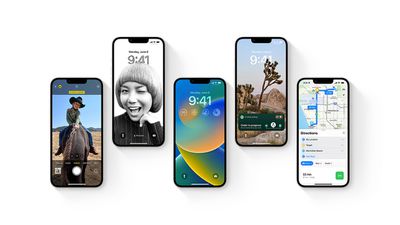
iOS 16 Preview
To get the iOS 16 public beta, sign up for the free Apple Beta Software Program directly on your iPhone. Given that iOS 16 is still in beta, keep in mind that you may encounter bugs, incompatible apps, reduced battery life, or other issues. Think carefully before deciding to install the public beta on an iPhone that you rely on for daily use.

If you are installing the iOS 16 public beta on your iPhone, we've put together a list of seven new features worth checking out below.

Customize the Lock Screen

The headline new feature of iOS 16 is the ability to personalize the Lock Screen with multilayered wallpapers, custom fonts for the date and time, and widgets for upcoming calendar events, the weather, battery levels, alarms, time zones, Activity rings, and more.
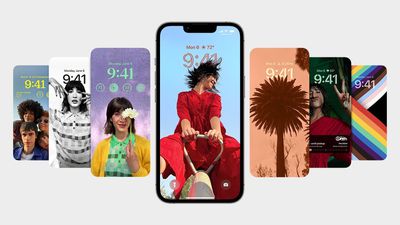
iOS 16 Lock Screen Customize
The new Lock Screen gallery showcases a range of Lock Screen options, including a new Weather wallpaper with live weather conditions and an Astronomy wallpaper that provides views of the Earth, moon, and solar system. iOS 16 includes support for multiple Lock Screen designs, allowing you to switch between your favorites with a swipe.

Edit or Unsend an iMessage

iOS 16 introduces the ability to edit or unsend recently sent iMessages, as well as mark iMessage conversations as unread after opening them. Apple allows you to edit or unsend an iMessage for up to 15 minutes after sending it.
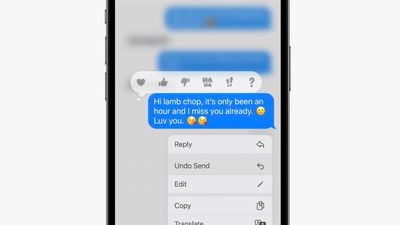
ios 16 imessage edit unsend
To edit or unsend a message, you simply need to tap and hold on a bubble and select the appropriate option in the menu that appears. iMessages that have been edited are marked as "edited" below the message bubble. On devices running iOS 15 or earlier, edited messages are received as a new message that says "Edited to [X]."

Use the Full-Screen Music Player

The first public beta of iOS 16 enables a full-screen music player on the Lock Screen with album art and a color-matched wallpaper.
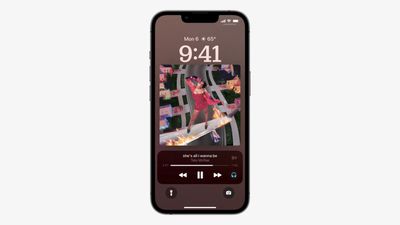
ios 16 lock screen music player
Apple last offered a full-screen music player on the Lock Screen on iOS 10 in 2016. If you don't like the feature, you can tap on the bottom of the display to minimize the music player and revert to your standard Lock Screen wallpaper.

Create an iCloud Shared Photo Library

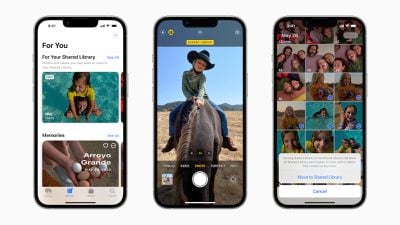
One of the most useful new features in the iOS 16 public beta is the ability to create an iCloud Shared Photo Library in the Photos app.
ios 16 icloud shared photo library
iCloud‌ Shared Photo Library is designed to make it easier for you to share photos with your family members or friends. The feature allows you and up to five other people to add, edit, or remove photos in a shared library accessible via iCloud.

Game With Nintendo Joy-Cons

Apple says the iPhone supports many other additional Bluetooth game controllers on iOS 16, including Nintendo's Joy-Cons and Pro Controller. iPhones running iOS 16 can be used with either single left or right Joy-Cons, or both at once as a singular controller.

nintendo joy cons
This is on top of the iPhone's existing compatibility with PS5 DualSense and Xbox Series X controllers since the release of iOS 14.5 last year.

Track an Apple Pay Order

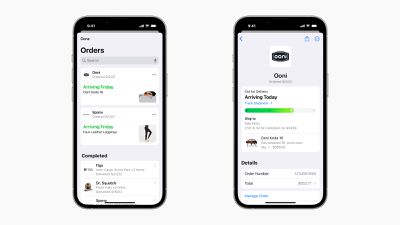
Apple Pay on iOS 16 features new built-in order tracking information in the Wallet app for online orders completed via Apple Pay. The tracker provides an order's estimated delivery date and indicates when a package is out for delivery.
ios 16 apple pay order tracking

Close Your Rings Without an Apple Watch

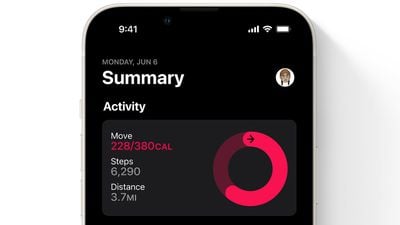
Starting with iOS 16, the Fitness app is now available on the iPhone for all users, even if they don't own an Apple Watch. The app features a daily Activity ring that relies on the iPhone's motion sensors to estimate a person's calories burned and steps per day.
fitness app ios 16
iOS 16 should be released to all users in September. For a closer look at the update, watch our video walkthrough of some of the biggest new features.


Related Forum: iOS 16

Popular Stories

Aston Martin CarPlay Ultra Screen

Apple's CarPlay Ultra to Expand to These Vehicle Brands Later This Year

Sunday February 1, 2026 10:08 am PST by
Last year, Apple launched CarPlay Ultra, the long-awaited next-generation version of its CarPlay software system for vehicles. Nearly nine months later, CarPlay Ultra is still limited to Aston Martin's latest luxury vehicles, but that should change fairly soon. In May 2025, Apple said many other vehicle brands planned to offer CarPlay Ultra, including Hyundai, Kia, and Genesis. In his Powe...
Apple Logo Black

Apple's Next Launch is 'Imminent'

Sunday February 1, 2026 12:31 pm PST by
The calendar has turned to February, and a new report indicates that Apple's next product launch is "imminent," in the form of new MacBook Pro models. "All signs point to an imminent launch of next-generation MacBook Pros that retain the current form factor but deliver faster chips," Bloomberg's Mark Gurman said on Sunday. "I'm told the new models — code-named J714 and J716 — are slated...
iOS 26

iOS 26.3 and iOS 26.4 Will Add These New Features to Your iPhone

Tuesday February 3, 2026 7:47 am PST by
We are still waiting for the iOS 26.3 Release Candidate to come out, so the first iOS 26.4 beta is likely still at least a week or two away. Following beta testing, iOS 26.4 will likely be released to the general public in March or April. Below, we have recapped known or rumored iOS 26.3 and iOS 26.4 features so far. iOS 26.3 iPhone to Android Transfer Tool iOS 26.3 makes it easier...
Apple MacBook Pro M4 hero

New MacBook Pros Reportedly Launching Alongside macOS 26.3

Sunday February 1, 2026 5:42 am PST by
Apple is planning to launch new MacBook Pro models with M5 Pro and M5 Max chips alongside macOS 26.3, according to Bloomberg's Mark Gurman. "Apple's faster MacBook Pros are planned for the macOS 26.3 release cycle," wrote Gurman, in his Power On newsletter today. "I'm told the new models — code-named J714 and J716 — are slated for the macOS 26.3 software cycle, which runs from...
iOS 26 Home Feature

Apple Gives Final Warning to Home App Users

Tuesday February 3, 2026 8:55 am PST by
In 2022, Apple introduced a new Apple Home architecture that is "more reliable and efficient," and the deadline to upgrade and avoid issues is fast approaching. In an email this week, Apple gave customers a final reminder to upgrade their Home app by February 10, 2026. Apple says users who do not upgrade may experience issues with accessories and automations, or lose access to their smart...

Top Rated Comments

bhanson1 Avatar
47 months ago
so all of the hype about customization on the lock screen and I STILL can't get rid of the flashlight or camera!
Score: 11 Votes (Like | Disagree)
Stromos Avatar
47 months ago

so all of the hype about customization on the lock screen and I STILL can't get rid of the flashlight or camera!

It is truly pathetic that Apple hasn’t yet seen fit to allow users to remove these items from the lock screen. This is the entire reason for the mind blown emoji to exist ?
What's the fun in that? I love that I can pick up any iPhone unattended and take some photos to surprise the person later :p
Score: 5 Votes (Like | Disagree)
contacos Avatar
47 months ago

Most people will think they are still on iOS 15
Apple really needs some „What is new“ on-boarding pop up screens after updating an OS. I swear to god, my family does not even know widgets exist
Score: 4 Votes (Like | Disagree)
Jim Lahey Avatar
47 months ago

so all of the hype about customization on the lock screen and I STILL can't get rid of the flashlight or camera!
It is truly pathetic that Apple hasn’t yet seen fit to allow users to remove these items from the lock screen. This is the entire reason for the mind blown emoji to exist ?
Score: 3 Votes (Like | Disagree)
cvam1985 Avatar
47 months ago
“Full screen” music on the Lock Screen and still the scrubbing bar is microscopic. Pfft. :rolleyes::rolleyes:
Score: 3 Votes (Like | Disagree)
skitidetdu Avatar
47 months ago
Lots of cool new things but I’m looking mostly forward to closing the rings without the need to go buy the watch! ?
Score: 2 Votes (Like | Disagree)














