Even More iOS 16 Tidbits: Battery Charging Notifications, New AirPods Symbols, Refreshed iCloud Settings, and More - MacRumorsOpen MenuShow RoundupsShow Forums menuVisit ForumsOpen Sidebar
Skip to Content

Even More iOS 16 Tidbits: Battery Charging Notifications, New AirPods Symbols, Refreshed iCloud Settings, and More

iOS 16 is chock-full of new features and changes, and earlier today we shared six interesting and unknown features Apple is bringing to the iPhone. Now, we're sharing six more iOS 16 tidbits.
ios 16 lock screen

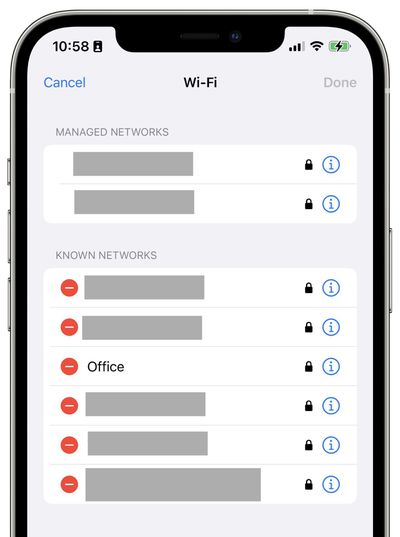
Easily Manage Known WiFi Networks

ios 16 manage wifi connections
Alongside being able to see your WiFi's password in iOS 16, users can now easily manage known and managed WiFi networks. Within the WiFi page in Settings, tap edit and authenticate with Touch ID or Face ID. From there, you'll be able to delete known networks and see their details.

Cleaner iCloud Settings Page
ios 16 new icloud pages
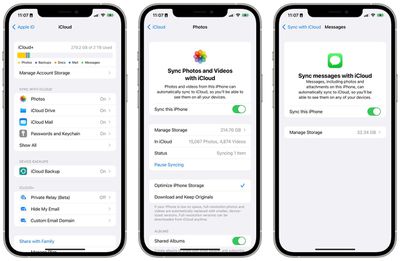
Apple has rethought the layout and structure of iCloud settings within the Settings app on iPhone. The page is now organized into different sections, including "Sync with ‌iCloud‌," "Device Backups," and "‌iCloud‌+."

Within the Photos, iCloud Drive, Notes, Messages, Health, and Passwords and Keychain subpages, Apple has added a new icon, a small paragraph explaining the feature, and the ability to manage per-app functionality and storage.

New AirPods Glyph in Control Center and Now Playing
ios 16 airpods glyp now playing
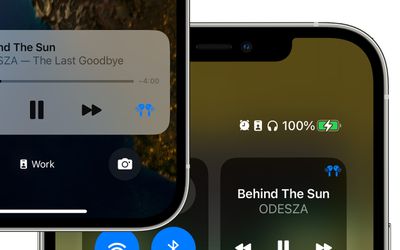
When connected to AirPods, a new corresponding glyph for your AirPods model will appear on the Now Playing section in Control Center and on the Lock Screen. This replaces the old AirPlay icon that remained static regardless of which device you're using.

New Battery Charging Being Held Alert
ios 16 battery hold notfication
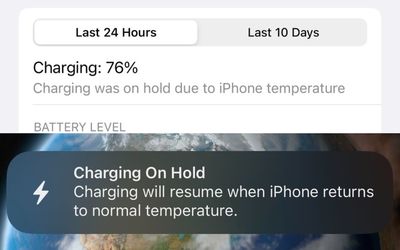
As spotted on Twitter (1, 2), iOS 16 will now alert users when the system has stopped charging the iPhone due to overheating, which could damage the longevity of the battery. The new notification will be displayed on the Lock Screen, Notification Center, and within the Battery page in Settings.

Redesigned Text and Editing Menu
ios 16 menu text editing option
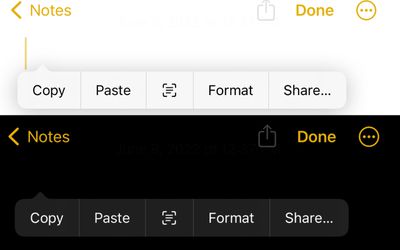
Apple has redesigned the text and editing menu option on iOS 16, making it cleaner and now offering it in both light and dark themes, depending on your iPhone's current mode. In instances where the menu is longer, Apple has also readjusted the behavior of scrolling through options.

Quick Note Comes to iPhone
ios 16 quick note
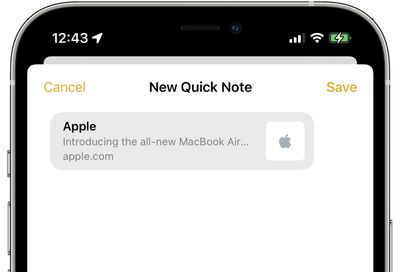
Introduced in iPadOS 15 and macOS Monterey, Quick Note has come to the iPhone with iOS 16. Quick Note can be accessed via the Share Sheet across iOS, including for images, websites, and more.

Contacts Widget Now Indicates Unread Messages
ios 16 contacts widget unread messages
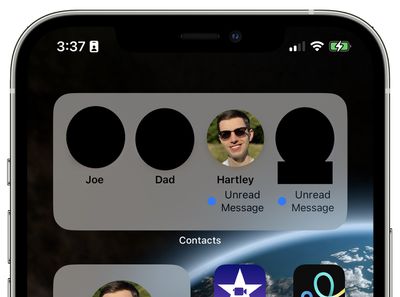
The Contacts widget will now indicate if you have unread messages from a specific contact. The unread messages banner is limited to just the medium and large sized widgets for the Contacts app.


Related Forum: iOS 16

Popular Stories

Apple Event Logo

Apple Working on All-New Operating System

Wednesday July 29, 2026 11:39 am PDT by
Apple is developing an all-new operating system that is essentially a mix of tvOS, watchOS, and iOS, according to Bloomberg's Mark Gurman. In a report this week, he said the operating system will feature a grid of icons, widgets, and apps, along with customizable clock faces. The new software platform is intended for Apple's long-rumored smart home hub. With built-in facial recognition,...
imac video apple feature

Apple Made Its Second-Biggest Acquisition Ever This Year

Wednesday July 29, 2026 12:03 pm PDT by
Apple this year acquired Israeli startup Q.ai for close to $2 billion, according to the Financial Times. That would make this Apple's second-biggest acquisition ever, after it paid $3 billion for the popular headphone maker Beats in 2014. This is also the largest known Apple acquisition since the company purchased Intel's smartphone modem business and patents for $1 billion in 2019. Q.ai...
Dynamic Island iPhone 18 Pro Feature

iPhone 18 Pro: Twelve Changes Coming to Apple's Next Flagship

Thursday July 30, 2026 3:43 am PDT by
We're less than two months out from the launch of Apple's premium next-generation smartphone lineup, and while we're not expecting a dramatic change in terms of functionality, there are still several enhancements rumored to be coming to the iPhone 18 Pro and iPhone 18 Pro Max. One thing worth noting is that Apple is reportedly planning a major change to its iPhone release cycle this year,...

Top Rated Comments

Andres Cantu Avatar
54 months ago
“Easily Manage Known Wi-Fi Networks”

FINALLY!

iOS 16 is shaping up to be one of the biggest quality-of-life improvement releases ever.
Score: 12 Votes (Like | Disagree)

54 months ago

Great, so now all the people that came to my house who I shared my WiFi with using the WiFi Password Sharing feature will soon be able to go into their settings and see what it actually is and then try to log into my online accounts.
Not sure how many times this needs to be said, and has been Said, and will continue to be said, but…
STOP RE-USING PASSWORDS!!!
That’s the solution to your problem.
Don’t use the same login for your Wi-Fi network that you do for your bank account, that you do for your Facebook account, that you do for your Google account, that you do for your Amazon account, that you do for your PayPal account… and so on and so on.
It’s so easy these days, especially on iOS which automatically gives you randomized passwords and automatically saves them, and if it doesn’t it takes two seconds to manually enter them into the keychain settings panel.
On top of that, everyone should have two factor authentication in 2022. Face ID, Touch ID, email verification, SMS verification, other device verification… Doesn’t matter, you should have one of them.
If someone can see your Wi-Fi password, and then they immediately can access the rest of your accounts, you have an issue. That’s on you, not Apple
Score: 11 Votes (Like | Disagree)
zorinlynx Avatar
54 months ago
I love being able to see all known networks. On iOS right now, the only way to forget a known network is for it to be nearby. Now you can actually see all the networks your phone knows about, like you can on the Mac.
Score: 11 Votes (Like | Disagree)
jezbd1997 Avatar
54 months ago
if there’s ability to re-arrange wifi priority like macOS I will be very glad! this management is much better than a full network settings reset
Score: 10 Votes (Like | Disagree)
TheYayAreaLiving 🎗️ Avatar
54 months ago
This battery indicator needs to be on the iPhone permanently. Hopefully with the new iPhone 14 pill-shape design. It will have enough room to keep it there.


Attachment Image
Score: 10 Votes (Like | Disagree)
54 months ago
I’m thankful for these articles. It helps me find out the new features of iOS 16. I’m loving it so far. A lot of the changes made were necessary and long overdue.
Score: 9 Votes (Like | Disagree)

🔗 Related Apple News & Rumors

Stay updated with the latest Apple ecosystem news and verified rumors