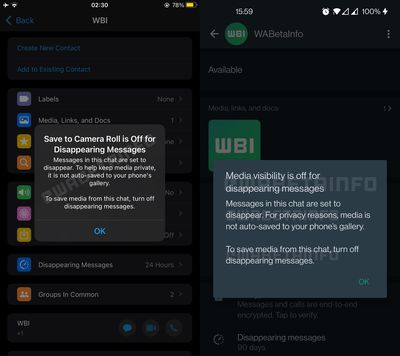
WhatsApp is changing the way the platform handles media sent over chats with disappearing messages enabled, reports WABetaInfo.
Going forward, WhatsApp will no longer automatically save images and other visual media to your iPhone’s Photos library if they appear within a chat thread that has disappearing messages turned on. The "Save to Camera Roll" option is now automatically turned off for disappearing chats, meaning images, videos, and GIFs won't be saved even if the general auto-save setting is enabled.
The previous default of saving images from disappearing chats to the Photos app was a discrepancy given the privacy focus of disappearing messages, so the change is likely to be welcomed by those who depend on the feature to share sensitive media.
Having said that, WhatsApp users can still manually save media that appears in disappearing chats they’ve received, or even take a screenshot of the chat thread, so what you send using the feature can still be potentially saved by the recipient after the message has disappeared.
In another change coming to WhatsApp and highlighted by WABetaInfo, the drawing interface is being tweaked so that the blur tool appears at the bottom of the screen, where it will sit alongside two new drawing pencils.
The change to the way WhatsApp handles media in disappearing messages is rolling out now to all users on iOS, but it’s not clear when the drawing interface tweaks will come out of beta and be made available to the chat platform’s wider user base.
Sunday February 1, 2026 10:08 am PST by Joe Rossignol
Last year, Apple launched CarPlay Ultra, the long-awaited next-generation version of its CarPlay software system for vehicles. Nearly nine months later, CarPlay Ultra is still limited to Aston Martin's latest luxury vehicles, but that should change fairly soon.
In May 2025, Apple said many other vehicle brands planned to offer CarPlay Ultra, including Hyundai, Kia, and Genesis.
In his Powe...
Sunday February 1, 2026 12:31 pm PST by Joe Rossignol
The calendar has turned to February, and a new report indicates that Apple's next product launch is "imminent," in the form of new MacBook Pro models.
"All signs point to an imminent launch of next-generation MacBook Pros that retain the current form factor but deliver faster chips," Bloomberg's Mark Gurman said on Sunday. "I'm told the new models — code-named J714 and J716 — are slated...
Sunday February 1, 2026 5:42 am PST by Joe Rossignol
Apple is planning to launch new MacBook Pro models with M5 Pro and M5 Max chips alongside macOS 26.3, according to Bloomberg's Mark Gurman.
"Apple's faster MacBook Pros are planned for the macOS 26.3 release cycle," wrote Gurman, in his Power On newsletter today.
"I'm told the new models — code-named J714 and J716 — are slated for the macOS 26.3 software cycle, which runs from...
Tuesday February 3, 2026 7:47 am PST by Joe Rossignol
We are still waiting for the iOS 26.3 Release Candidate to come out, so the first iOS 26.4 beta is likely still at least a week or two away. Following beta testing, iOS 26.4 will likely be released to the general public in March or April.
Below, we have recapped known or rumored iOS 26.3 and iOS 26.4 features so far.
iOS 26.3
iPhone to Android Transfer Tool
iOS 26.3 makes it easier...
Saturday January 31, 2026 10:51 am PST by Joe Rossignol
Apple recently updated its online store with a new ordering process for Macs, including the MacBook Air, MacBook Pro, iMac, Mac mini, Mac Studio, and Mac Pro.
There used to be a handful of standard configurations available for each Mac, but now you must configure a Mac entirely from scratch on a feature-by-feature basis. In other words, ordering a new Mac now works much like ordering an...
This is an example of a privacy-friendly feature, though.
No it's not. It's not even remotely privacy oriented. I prefer to refer to it as digital flashing. For the disempowered at the receiving end it allows people to send stuff to them with no evidence that it was ever sent. For those who can take a screenshot on their phone, it completely removes the privacy stance of it. Thus it's stupid and it's not privacy friendly.
Apple needs to have a look at WhatsApp and steal how they handle attachments. It is such a mess on iMessage, especially with iCloud Messages enabled. I also hate how it doesn’t automatically save photos to the photo library (shared with you just isn’t the same).
I delete a photo right from the messaging app and it sometimes appears again after closing the app (or it just doesn’t let me delete it at all). I delete an image but somehow they still appear under iPhone storage, i delete all photos in iPhone storage yet it still shows photos in the messaging app. I delete every single photo but iCloud claims i have 3GB of iMessage attachments, yet there is NOTHING. Or I delete all iMessage photos on my iPhone but my Mac shows me images that do not appear for the same conversation on my iPad or iPhone whatsoever.
there isn’t even a button to remove all attachments at once! You literally have to tap on each individually because for some reason swipe to select doesn’t work either, unlike the photos app
You just tap to save the ones you want. I'm not sure what the issue is. Literally I don't want my photos library cluttered with every meme my kids send me. If you delete the conversation then the attachments go with it. I have about 6Gb in iMessage at the moment. It's mostly a non-issue for me as I've saved everything worth keeping as I go.
No it's not. It's not even remotely privacy oriented. I prefer to refer to it as digital flashing. For the disempowered at the receiving end it allows people to send stuff to them with no evidence that it was ever sent. For those who can take a screenshot on their phone, it completely removes the privacy stance of it. Thus it's stupid and it's not privacy friendly.
That's quite a cynical read. I imagine such scenarios happen, but "I want to share something but with a time limit" has tons and tons of users who aren't malicious like that at all; they really just want stuff to remain private.
Apple needs to have a look at WhatsApp and steal how they handle attachments. It is such a mess on iMessage, especially with iCloud Messages enabled. I also hate how it doesn’t automatically save photos to the photo library (shared with you just isn’t the same).
I delete a photo right from the messaging app and it sometimes appears again after closing the app (or it just doesn’t let me delete it at all). I delete an image but somehow they still appear under iPhone storage, i delete all photos in iPhone storage yet it still shows photos in the messaging app. I delete every single photo but iCloud claims i have 3GB of iMessage attachments, yet there is NOTHING. Or I delete all iMessage photos on my iPhone but my Mac shows me images that do not appear for the same conversation on my iPad or iPhone whatsoever.
there isn’t even a button to remove all attachments at once! You literally have to tap on each individually because for some reason swipe to select doesn’t work either, unlike the photos app
That's quite a cynical read. I imagine such scenarios happen, but "I want to share something but with a time limit" has tons and tons of users who aren't malicious like that at all; they really just want stuff to remain private.
I have a friend who gets self-expiring dick pictures at least once a week.
It enables those people somewhat.
There is no valid usage for "this message will self destruct" that I can think of.