

Apple Clarifies iCloud Private Relay Wording in iOS 15.3 to Prevent Confusion Over Carrier Support - MacRumorsOpen MenuShow RoundupsShow Forums menuVisit ForumsOpen Sidebar
Skip to Content

Apple Clarifies iCloud Private Relay Wording in iOS 15.3 to Prevent Confusion Over Carrier Support

In today's iOS 15.3 beta, Apple has updated the wording that people see when iCloud Private Relay is disabled for a cellular or WiFi network, clarifying that when it's off, it's not always because of a lack of carrier support.
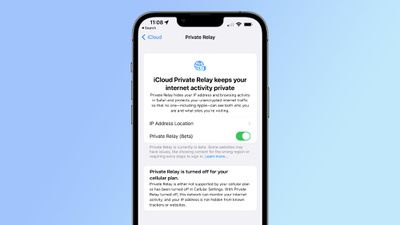
icloud private relay change ios 15 3
The new message says that Private Relay is turned off, but it explains that either a cellular plan does not support it or that it has been deactivated in Cellular Settings.

In iOS 15.2 and prior iOS 15.3 betas, if ‌iCloud‌ Private Relay was disabled for a cellular plan, Apple placed all of the blame on the carrier. Here's the previous wording:

"Private Relay is turned off for your cellular plan. Your cellular plan doesn't support ‌iCloud‌ Private Relay. With ‌iCloud‌ Private Relay turned off, this network can monitor your internet activity, and your IP address is not hidden from known trackers or websites."

And the new wording:

"Private Relay is turned off for your cellular plan. Private Relay is either not supported by your cellular plan or has been turned off in Cellular Settings. With Private Relay turned off, this network can monitor your internet activity, and your IP address is not hidden from known trackers or websites."

Apple's current wording does not allow for the possibility that ‌iCloud‌ Private Relay is unavailable because it has been disabled in the Settings app. ‌iCloud‌ Private Relay can be turned on or turned off for specific WiFi and cellular networks, and there may be an iOS 15.2 bug that is causing some users to have these settings disabled by default.

Going to your Cellular Settings and toggling on "Limit IP Address Tracking" will ensure that ‌iCloud‌ Private Relay is active for your cellular network, while going to WiFi, tapping the "i" button next to your network and toggling on "Limit IP Address Tracking" will turn it on for your WiFi network if it's not already enabled.

Apple's vague ‌iCloud‌ Private Relay wording got T-Mobile in some hot water earlier this week. The carrier was accused of disabling ‌iCloud‌ Private Relay for its users, preventing them from using the privacy-enhancing feature. Apple's messaging placed the blame on T-Mobile even if ‌iCloud‌ Private Relay was disabled simply due to being toggled off in the Settings app.

T-Mobile was silent on the accusations for a day, and then clarified that there appears to be an iOS 15.2 bug that can cause device settings for the Private Relay feature to be toggled to off. T-Mobile contacted Apple, and Apple updated its support document to instruct people how to make sure their settings are correct, and now the Cupertino company has also added this information into the ‌iCloud‌ Private Relay settings.

The major U.S. carriers, including T-Mobile, Verizon, and AT&T have all confirmed that they are not blocking ‌iCloud‌ Private Relay and do not have plans to do so. For T-Mobile users who have content filtering like parental controls enabled, ‌iCloud‌ Private Relay will be disabled because the services are not able to work with the feature turned on.

(Thanks, Steve Moser!)

Related Forum: iOS 15

Popular Stories

Four iPhone 18 Pro Colors Mock Feature

iPhone 18 Pro and iPhone Ultra: Pre-Orders and Release Date

Thursday July 30, 2026 6:12 am PDT by
Apple has yet to reveal when the iPhone 18 Pro and iPhone Ultra will be announced and released, but the dates usually follow a familiar pattern. Labor Day is September 7 this year. The last time the holiday fell on that day was in 2020, but the iPhone event that year was delayed until October due to the COVID-19 pandemic. So, the last time Labor Day was on September 7 in a normal year was in ...
Apple Event Logo

Apple Working on All-New Operating System

Wednesday July 29, 2026 11:39 am PDT by
Apple is developing an all-new operating system that is essentially a mix of tvOS, watchOS, and iOS, according to Bloomberg's Mark Gurman. In a report this week, he said the operating system will feature a grid of icons, widgets, and apps, along with customizable clock faces. The new software platform is intended for Apple's long-rumored smart home hub. With built-in facial recognition,...
Dynamic Island iPhone 18 Pro Feature

iPhone 18 Pro: Twelve Changes Coming to Apple's Next Flagship

Thursday July 30, 2026 3:43 am PDT by
We're less than two months out from the launch of Apple's premium next-generation smartphone lineup, and while we're not expecting a dramatic change in terms of functionality, there are still several enhancements rumored to be coming to the iPhone 18 Pro and iPhone 18 Pro Max. One thing worth noting is that Apple is reportedly planning a major change to its iPhone release cycle this year,...

Top Rated Comments

nwcs Avatar
60 months ago
Now if they can make this functionality work across all network activity on the iOS device instead of just Safari I'll be happy.
Score: 10 Votes (Like | Disagree)

60 months ago

If a carrier blocks private relay I’m changing carrier Simple as that I’m not staying with a carrier that wants my data
I don't understand your argument here. Private relay currently only applies to Safari and the Apple Mail app. So if you use Google Chrome or Firefox as your browser, the carrier still has visibility. Use the Gmail or Outlook or Yahoo Mail client, the carrier sees your data. Use any other application, the carrier sees your data. If you are concerned, swiching carriers is not your solution. Using a VPN instead of iCloud Private relay is what your solution.
Score: 7 Votes (Like | Disagree)
RouterCFW Avatar
60 months ago
If a carrier blocks private relay I’m changing carrier Simple as that I’m not staying with a carrier that wants my data
Score: 7 Votes (Like | Disagree)
Westside guy Avatar
60 months ago
So basically all the stories stating that these carriers were blocking it... were incorrect?
Score: 3 Votes (Like | Disagree)
60 months ago
Get a VPN and set it to auto connect on any network (Wi-Fi or cellular). No need for this. It’s buggy anyway and noticeably slows connection speeds.
Score: 2 Votes (Like | Disagree)
Mdracer Avatar
60 months ago
***Checks Carrier and Relay Settings***

'Still enabled' So my monthly payment to them continues...
Score: 2 Votes (Like | Disagree)

🔗 Related Apple News & Rumors

Stay updated with the latest Apple ecosystem news and verified rumors











































