

iOS 15 Removes Do Not Disturb Option That Silenced Notifications Only When iPhone Was Locked - MacRumorsOpen MenuShow RoundupsShow Forums menuVisit ForumsOpen Sidebar
Skip to Content

iOS 15 Removes Do Not Disturb Option That Silenced Notifications Only When iPhone Was Locked

With iOS 15, Apple expanded the Do Not Disturb feature from iOS 14 into a full Focus Mode option that's designed to allow users to set up different scenarios to manage their incoming notifications.
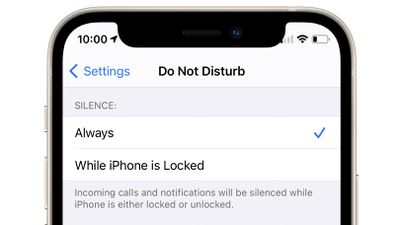
do not disturb feature removed
Focus Mode is handy because it lets you decide exactly what alerts and apps you want to see at home, while at work, when sleeping, when exercising, and in other situations, but as Reddit users have pointed out, Apple has dropped a key Do Not Disturb feature.

Do Not Disturb in iOS 14 had a setting that allowed incoming calls and notifications to be silenced at all times, or only when the iPhone was locked. With this setting, you could turn on Do Not Disturb but still get all of your calls and notifications if you unlocked your phone and were actively using it.

Some people used this setting to have Do Not Disturb active at all times during the day so the iPhone was silenced when it was locked, but they weren't missing alerts when the iPhone was in use. From Reddit:

Really surprised they've done this, but it appears there is no longer an option in iOS 15 to still show notifications when in Do Not Disturb but unlocked.

My phone basically lived on Do Not Disturb mode up until now but I'll have to stop using it now which is really annoying.

Like, I don't want notifications when my phone is locked, but while I'm actively using it I still need them to pop up.

There is no equivalent setting in Focus Mode, so there's no longer an option to receive notifications when the iPhone is unlocked and silence them when it's not in use. With Focus Mode, it's an all or nothing experience - notifications are being received, or they're silenced in all situations.

Many Reddit users are unhappy with the change and are hoping that Apple will reintroduce a similar feature in a future iOS 15 update.


Related Forum: iOS 15

Popular Stories

Apple Event Logo

Apple Working on All-New Operating System

Wednesday July 29, 2026 11:39 am PDT by
Apple is developing an all-new operating system that is essentially a mix of tvOS, watchOS, and iOS, according to Bloomberg's Mark Gurman. In a report this week, he said the operating system will feature a grid of icons, widgets, and apps, along with customizable clock faces. The new software platform is intended for Apple's long-rumored smart home hub. With built-in facial recognition,...
imac video apple feature

Apple Made Its Second-Biggest Acquisition Ever This Year

Wednesday July 29, 2026 12:03 pm PDT by
Apple this year acquired Israeli startup Q.ai for close to $2 billion, according to the Financial Times. That would make this Apple's second-biggest acquisition ever, after it paid $3 billion for the popular headphone maker Beats in 2014. This is also the largest known Apple acquisition since the company purchased Intel's smartphone modem business and patents for $1 billion in 2019. Q.ai...
Dynamic Island iPhone 18 Pro Feature

iPhone 18 Pro: Twelve Changes Coming to Apple's Next Flagship

Thursday July 30, 2026 3:43 am PDT by
We're less than two months out from the launch of Apple's premium next-generation smartphone lineup, and while we're not expecting a dramatic change in terms of functionality, there are still several enhancements rumored to be coming to the iPhone 18 Pro and iPhone 18 Pro Max. One thing worth noting is that Apple is reportedly planning a major change to its iPhone release cycle this year,...

Top Rated Comments

64 months ago
Yikes, I basically left my iPad in this state permanently. This sucks..
Score: 26 Votes (Like | Disagree)
alexandr Avatar
64 months ago
hm, i didn't use this much, but i could see this being super annoying for those who did. why would they even remove this?..
Score: 19 Votes (Like | Disagree)
64 months ago

They did carry over what was already setup for DND, either. I had to go through and select those notifications I had defined previously after the update. Didn't know this until notifications began coming through after I had gone to bed. Very frustrating!

Tell me about it. For years I have used DnD on a time schedule to silence the phone at night. Today it woke me up in the middle of the night when some emails arrived, because iOS 15 did't carry over the DnD schedule. Then I had trouble finding where in the settings the feature now is, all at 2am and barely awake. :rolleyes: I also find the "focus" settings overloaded and pretty confusing.


Score: 18 Votes (Like | Disagree)
ANDJOE Avatar
64 months ago

Create a custom focus and disable all features. No notifications on the screen while iphone is locked/unlocked.
I'm not sure you are clear on what the article is stating. Many users don't want to be disturbed when the phone is locked but DO want notifications on screen with then phone is unlocked.
Score: 16 Votes (Like | Disagree)
macduke Avatar
64 months ago

Many Reddit users are unhappy
Should've ended the sentence there.
Score: 14 Votes (Like | Disagree)
alexandr Avatar
64 months ago

While useful for some I was always annoyed at being in DND and using the device and still getting notifications. I wanted it all to be in the background.
and you had the option to do that.
Score: 13 Votes (Like | Disagree)

🔗 Related Apple News & Rumors

Stay updated with the latest Apple ecosystem news and verified rumors








































