

iOS 15 Tidbits: Per-App Settings, Notification Summaries, New Calendar Widget, and More

We've highlighted several new features coming in iOS 15, like the return of the text cursor magnifier and the ability to rearrange Home Screen pages, but additional tidbits continue to surface that we think readers will find noteworthy.
iOS 15 General Feature Blue

Per-App Accessibility Settings

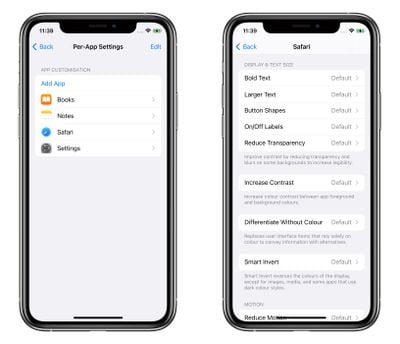
Last week, we highlighted a new Control Center option that lets you set the text size for individual apps. But per-app accessibility settings don't end there.
settings
Individual app customizations also include adjustments to bold text, button shapes, toggle switches, transparency, contrast, color, motion, and more, allowing you to effectively remodel many app elements that you find particularly burdensome to use.

Small Calendar Month Widget

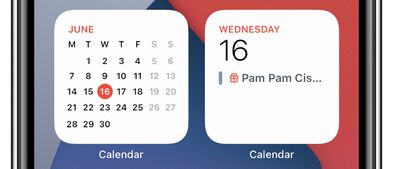
Annoyingly for many iOS 14 users, the square Calendar widget only shows the current day and any events, rather than the full calendar month, which can only be displayed in the larger 2x4 widget.
calendar

New 2x2 Calendar widget (left) versus original 2x2 widget

This always felt like a poor use of widget space, but fortunately iOS 15 adds a new 2x2 widget that displays the full calendar month with the current day highlighted. In another related change, you can now make a calendar a custom color using the color picker, in addition to the seven default color options that the Calendar app offers.

Improved Siri Suggestions

Apple continues to work hard to improve Siri in iOS 15, not only in terms of voice requests, which now get processed on your device instead of being sent to the cloud, but also when it comes to ‌Siri‌ suggestions, as evidenced by the following suggestion spotted by a Redditor.

siri suggestion birthday ios 15
The user had simply wished someone in their contacts a happy birthday during a Messages conversation, which resulted in the notification "‌Siri‌ Found a Birthday" and the option to update that contact card with their birth date. This is similar to the existing suggestion to add someone to your contacts if they say their name or have Share Name and Photo turned on, but adds another layer of contextual awareness.

Custom Frequency of Notification Summaries

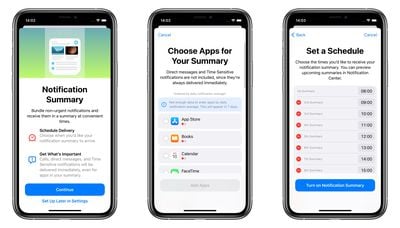
In iOS 15, notifications have been redesigned, and Apple now also includes a Notification Summary option that uses on-device machine learning to automatically populate notifications based on priority in a new lock screen design.
notification summary ios 15
You can select which apps are included in these summaries, which are delivered to your lock screen at a time of your choosing. For example, you could opt to have them delivered during your lunch break, after dinner, or last thing before bedtime. If that sounds a little too infrequent, no problem – you can have up to 12 individual notification summaries within a 24-hour period, which could be timed hourly over the course of a working day, for instance.

Along with macOS Monterey and iPad iOS 15, iOS 15 is currently in developer beta with a public beta due next month and an official release sometime in the fall.


Related Forum: iOS 15

Popular Stories

Aston Martin CarPlay Ultra Screen

Apple's CarPlay Ultra to Expand to These Vehicle Brands Later This Year

Sunday February 1, 2026 10:08 am PST by
Last year, Apple launched CarPlay Ultra, the long-awaited next-generation version of its CarPlay software system for vehicles. Nearly nine months later, CarPlay Ultra is still limited to Aston Martin's latest luxury vehicles, but that should change fairly soon. In May 2025, Apple said many other vehicle brands planned to offer CarPlay Ultra, including Hyundai, Kia, and Genesis. In his Powe...
Apple Logo Black

Apple's Next Launch is 'Imminent'

Sunday February 1, 2026 12:31 pm PST by
The calendar has turned to February, and a new report indicates that Apple's next product launch is "imminent," in the form of new MacBook Pro models. "All signs point to an imminent launch of next-generation MacBook Pros that retain the current form factor but deliver faster chips," Bloomberg's Mark Gurman said on Sunday. "I'm told the new models — code-named J714 and J716 — are slated...
Apple MacBook Pro M4 hero

New MacBook Pros Reportedly Launching Alongside macOS 26.3

Sunday February 1, 2026 5:42 am PST by
Apple is planning to launch new MacBook Pro models with M5 Pro and M5 Max chips alongside macOS 26.3, according to Bloomberg's Mark Gurman. "Apple's faster MacBook Pros are planned for the macOS 26.3 release cycle," wrote Gurman, in his Power On newsletter today. "I'm told the new models — code-named J714 and J716 — are slated for the macOS 26.3 software cycle, which runs from...
iOS 26

iOS 26.3 and iOS 26.4 Will Add These New Features to Your iPhone

Tuesday February 3, 2026 7:47 am PST by
We are still waiting for the iOS 26.3 Release Candidate to come out, so the first iOS 26.4 beta is likely still at least a week or two away. Following beta testing, iOS 26.4 will likely be released to the general public in March or April. Below, we have recapped known or rumored iOS 26.3 and iOS 26.4 features so far. iOS 26.3 iPhone to Android Transfer Tool iOS 26.3 makes it easier...
14 inch MacBook Pro Keyboard

Apple Changes How You Order a Mac

Saturday January 31, 2026 10:51 am PST by
Apple recently updated its online store with a new ordering process for Macs, including the MacBook Air, MacBook Pro, iMac, Mac mini, Mac Studio, and Mac Pro. There used to be a handful of standard configurations available for each Mac, but now you must configure a Mac entirely from scratch on a feature-by-feature basis. In other words, ordering a new Mac now works much like ordering an...

Top Rated Comments

Dekema2 Avatar
61 months ago
Would be nice if there was an option to "Disable Opening in App" for webpages and their corresponding apps.
Score: 12 Votes (Like | Disagree)
gwhizkids Avatar
61 months ago
I know these changes are not the red meat many were looking for, but in many ways they make the iPhone a more functional, more usable product.
Score: 11 Votes (Like | Disagree)
motm95 Avatar
61 months ago
Please, Apple, let us finally put icons or widgets wherever we want without being forced into the grid layout.
Score: 5 Votes (Like | Disagree)
gwhizkids Avatar
61 months ago
I switched to Android at the beginning of the year after being on the iPhone since the first one in 2007. I was blown away at how much better the Android OS is.

I had no idea what I was missing with interactive widgets. I can't belive Apple hasn't given this to their users yet.

Also, the standard grid layout with iOS always annoyed me because there is so much wasted space on the iPhone screen. Android allowed me to add a row and a column, easy peasy. So much better!

Those are two simple things but they make my phone usage much, much better. I couldn't possibly go back to iOS now that I know what I've been missing. Not being restricted to only the apps Apple deems suitable for me is another huge advantage, the camera on the S21 ultra is insane also.

iOS 15 doesn't have a single thing in it that would woo me back. Even my wife is starting to hate her iPhone now. I keep laughing saying the screen looks like a child's toy.
Thank you for sharing your happiness with us. We wish you well. It is good to find something you like.
Score: 3 Votes (Like | Disagree)
Wando64 Avatar
61 months ago

I switched to Android at the beginning of the year after being on the iPhone since the first one in 2007. I was blown away at how much better the Android OS is.

I had no idea what I was missing with interactive widgets. I can't belive Apple hasn't given this to their users yet.

Also, the standard grid layout with iOS always annoyed me because there is so much wasted space on the iPhone screen. Android allowed me to add a row and a column, easy peasy. So much better!

Those are two simple things but they make my phone usage much, much better. I couldn't possibly go back to iOS now that I know what I've been missing. Not being restricted to only the apps Apple deems suitable for me is another huge advantage, the camera on the S21 ultra is insane also.

iOS 15 doesn't have a single thing in it that would woo me back. Even my wife is starting to hate her iPhone now. I keep laughing saying the screen looks like a child's toy.
That’s right. As long as it looks pretty, who cares about security, privacy and seamless ecosystem integration.
Score: 2 Votes (Like | Disagree)
Attirex Avatar
61 months ago
If you need to use that functionality to manage that many daily notifications, you have larger issues in your life to deal with. Unless you're the Most Important Person on Earth or a constantly texting teenager, I don't get it.

In fact, a lot of iOS 15 features seem targeted towards insane use cases where someone gets 500,000 notifications every day including 14,000 phone calls, 60,000 text messages, 80,000 calendar reminders, and manages 40,000 notes. Who are these people? Can I be you? Or maybe I don't want to be....hm.
Score: 2 Votes (Like | Disagree)














