

macOS Monterey Features Dedicated Password Section in System Preferences, Built-In Authenticator and More - MacRumorsOpen MenuShow RoundupsShow Forums menuVisit ForumsOpen Sidebar
Skip to Content

macOS Monterey Features Dedicated Password Section in System Preferences, Built-In Authenticator and More

macOS Monterey makes several improvements to password management, positioning iCloud Keychain as an ideal password service to replace third-party services like Lastpass and 1Password.
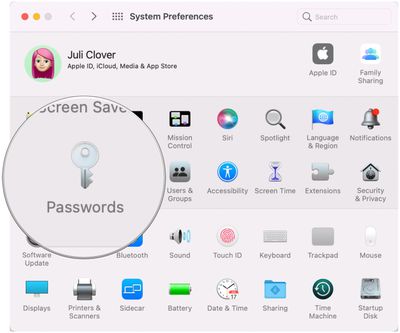
passwords system preferences
In System Preferences, there's a new "Passwords" section that houses all of your ‌iCloud‌ Keychain logins and passwords so they're easier to get to, edit, and manage. There's a similar Passwords section that's been on iOS for some time now, so now there's one streamlined way to access your passwords across Apple devices.
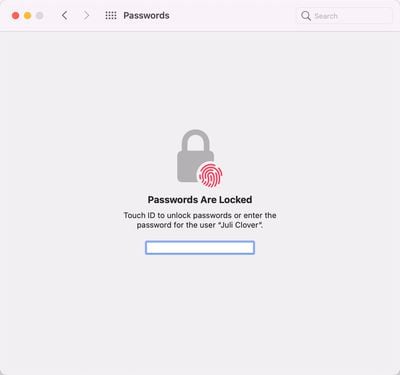
passwords monterey 2
Prior to now, passwords on Mac were accessible through the Preferences interface in Safari, but the System Preferences option is easier to find. As with the prior version of the feature, Safari will suggest passwords automatically and detect compromised passwords for you.

New in Monterey is an option to import and export passwords, so you can move your logins between ‌iCloud‌ Keychain and other password management apps. ‌iCloud‌ Keychain does not have as many entry fields as some password managers, but it supports username, password, and website data.
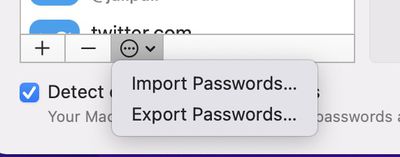
importing password monterey
There's also a built-in authenticator feature, which is coming to iOS and iPadOS 15 too. For sites and apps that use codes for two-factor authentication, you can store those codes right in ‌iCloud‌ Keychain and have them autofilled when you log in.
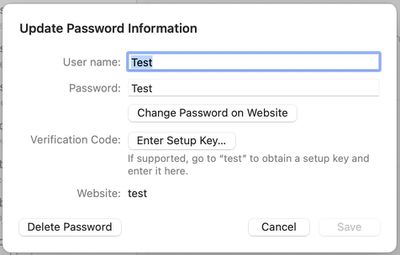
adding password monterey
Direct authenticator support will allow iPhone and Mac users to choose to use Apple's solution over third-party apps and software like Authy and Google Authenticator.
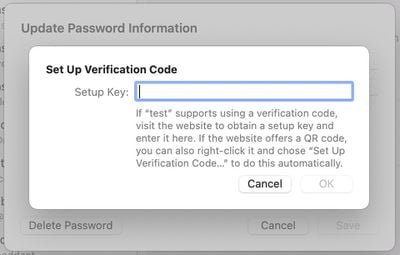
two factor verification monterey
Other smaller changes include an ‌iCloud‌ Passwords extension for autofilling saved ‌iCloud‌ Passwords in the Edge browser, which is handy for Windows users who need cross platform password access in the browser, plus there's a new ‌iCloud‌ Passwords app included with ‌iCloud‌ for Windows.

The macOS Monterey password changes are live now in the developer beta, with Apple planning to release a public beta in July before the software sees a public launch this fall.


Related Forum: macOS Monterey

Popular Stories

Apple Event Logo

Apple Working on All-New Operating System

Wednesday July 29, 2026 11:39 am PDT by
Apple is developing an all-new operating system that is essentially a mix of tvOS, watchOS, and iOS, according to Bloomberg's Mark Gurman. In a report this week, he said the operating system will feature a grid of icons, widgets, and apps, along with customizable clock faces. The new software platform is intended for Apple's long-rumored smart home hub. With built-in facial recognition,...

Four iPhone 18 Pro Colors Mock Feature

iPhone 18 Pro and iPhone Ultra: Pre-Orders and Release Date

Thursday July 30, 2026 6:12 am PDT by
Apple has yet to reveal when the iPhone 18 Pro and iPhone Ultra will be announced and released, but the dates usually follow a familiar pattern. Labor Day is September 7 this year. The last time the holiday fell on that day was in 2020, but the iPhone event that year was delayed until October due to the COVID-19 pandemic. So, the last time Labor Day was on September 7 in a normal year was in ...
Dynamic Island iPhone 18 Pro Feature

iPhone 18 Pro: Twelve Changes Coming to Apple's Next Flagship

Thursday July 30, 2026 3:43 am PDT by
We're less than two months out from the launch of Apple's premium next-generation smartphone lineup, and while we're not expecting a dramatic change in terms of functionality, there are still several enhancements rumored to be coming to the iPhone 18 Pro and iPhone 18 Pro Max. One thing worth noting is that Apple is reportedly planning a major change to its iPhone release cycle this year,...

Top Rated Comments

spawnofbill Avatar
67 months ago
Does... Does no one know about the Keychain Access app in the Utilities folder? It's been there since 10.5! It's synced to iCloud Keychain since day one.
Score: 53 Votes (Like | Disagree)
Amazing Iceman Avatar
67 months ago

What I would really like is for Apple to stop trying to force us to use 2 factor authorization.
If we don't want it, we don't want it. Get that stupid red dot off of System Preferences
2FA can make the difference on a hacking attempt. Some day you will appreciate it.
Score: 44 Votes (Like | Disagree)
sniffies Avatar
67 months ago
Still missing a couple of important things that 1Password has:

- Option to upload attachments that, for example, contain backup codes

- Generate passwords inside the new System Preferences section

Yeah, yeah, I know, you can do it inside Keychain Access app, but this article is not about Keychain Access app, it’s about the new System Preferences section.
Score: 19 Votes (Like | Disagree)
HeavenDynamic Avatar
67 months ago
Much needed addition. Going to Safari preferences to see my passwords always felt like a 2010 experience.
Score: 17 Votes (Like | Disagree)
A MacBook lover Avatar
67 months ago
Does anyone actually use memoji’s? I was cool when it launched but now seems like a graveyard, yet it remains apples major focus….sigh
Score: 13 Votes (Like | Disagree)
67 months ago
I am a 1password fan and share password records with my wife as well as have a lot of secure notes like passports, vax records, and a lot of other stuff. It's more than just passwords we may need in an emergency.
Score: 8 Votes (Like | Disagree)

🔗 Related Apple News & Rumors

Stay updated with the latest Apple ecosystem news and verified rumors











































