

PSA: macOS Big Sur 11.3 Includes Colorful New Wallpapers Designed for M1 iMac - MacRumorsOpen MenuShow RoundupsShow Forums menuVisit ForumsOpen Sidebar
Skip to Content

PSA: macOS Big Sur 11.3 Includes Colorful New Wallpapers Designed for M1 iMac

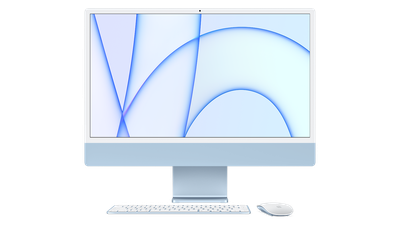
Apple in macOS Big Sur 11.3 introduced a series of colorful wallpapers that are designed specifically for the M1 iMac, but you can unearth them and download them on any Mac with a few quick instructions.
imac m1 blue isolated 16x9 500k
These are the wallpapers that have been used in Apple's marketing materials for the 24-inch ‌iMac‌, with different colored lines and patterns available for each ‌iMac‌ color. To get to these wallpapers, follow these steps:

  1. Open the System Preferences app.
  2. Click on Desktop & Screen Saver.
  3. Double click on "Desktop Pictures" on the left side to open the Desktop Pictures folder.
  4. Click into this folder when it opens up (alternatively, go to System > Library > Desktop Pictures).
  5. Scroll down to find the images labeled "Hello."
  6. Drag the image that you want to use onto your desktop.
  7. Right click on an image and select "Set Desktop Picture" or choose the image from the Desktop & Screensaver interface.

To get these images, you need to be running macOS Big Sur 11.3 or later, and it appears that they may not be available in the macOS Big Sur 11.4 beta. Apple has also released a new "Hello" screensaver for the iMacs, which you can also get from any Mac running macOS Big Sur 11.3.


These new wallpapers will be available by default on new iMacs, which are set to begin arriving to customers in the second half of May, starting on May 21.


Related Forum: macOS Big Sur

Popular Stories

Apple Event Logo

Apple Working on All-New Operating System

Wednesday July 29, 2026 11:39 am PDT by
Apple is developing an all-new operating system that is essentially a mix of tvOS, watchOS, and iOS, according to Bloomberg's Mark Gurman. In a report this week, he said the operating system will feature a grid of icons, widgets, and apps, along with customizable clock faces. The new software platform is intended for Apple's long-rumored smart home hub. With built-in facial recognition,...
imac video apple feature

Apple Made Its Second-Biggest Acquisition Ever This Year

Wednesday July 29, 2026 12:03 pm PDT by
Apple this year acquired Israeli startup Q.ai for close to $2 billion, according to the Financial Times. That would make this Apple's second-biggest acquisition ever, after it paid $3 billion for the popular headphone maker Beats in 2014. This is also the largest known Apple acquisition since the company purchased Intel's smartphone modem business and patents for $1 billion in 2019. Q.ai...
Dynamic Island iPhone 18 Pro Feature

iPhone 18 Pro: Twelve Changes Coming to Apple's Next Flagship

Thursday July 30, 2026 3:43 am PDT by
We're less than two months out from the launch of Apple's premium next-generation smartphone lineup, and while we're not expecting a dramatic change in terms of functionality, there are still several enhancements rumored to be coming to the iPhone 18 Pro and iPhone 18 Pro Max. One thing worth noting is that Apple is reportedly planning a major change to its iPhone release cycle this year,...

Top Rated Comments

thedocbwarren Avatar
68 months ago
These really scream OS 9 Platinum to me. I guess it's intended to revisit the iMac era.
Score: 13 Votes (Like | Disagree)

tomtendo Avatar
68 months ago
These wallpapers are atrocious. So plain and too bright
Score: 8 Votes (Like | Disagree)
Wolframite Avatar
68 months ago

how about the fact that they're square? Why are they no longer wide screen? Is MacOS coming to some device that would need wallpapers in portrait? Perhaps at WWDC? Perhaps a square device running M1? Perhaps that's why the new control center GUI makes so much more sense on a touch device?
My guess is that they're square to accommodate any orientation (portrait or landscape), particularly for the Pro XDR display, to ensure no warping or sacrificing of image quality.
Score: 6 Votes (Like | Disagree)
jwhite9185 Avatar
68 months ago
I'm more interested in the two new dynamic wallpapers in the Tweet above. I don't see those...

Attachment Image
Score: 4 Votes (Like | Disagree)
cmichaelb Avatar
68 months ago

Can someone drag the blue one from system preferences to desktop and upload it?
Would like the blue one on my m1 air (not on 11.3 yet)
https://www.dropbox.com/s/iifq4nvkkojalwd/Blue.png?dl=0
Score: 3 Votes (Like | Disagree)
68 months ago

On 11.3.0 and they are there.

This really feels like a throwback. Definite feels from some of the original OS X 10.0 desktop pictures. And the colors does kinda give me the nostalgia for my old Bondi Blue. I'll have to pull it out of its box. It's been a bit.
It does! From an old Snow Leopard installation I used to have, I pulled all the classic desktops from SL and have kept it to this day, and this folder includes all the Mac OS X 10.0 wallpapers. I even managed to find an archive of Mac OS 8 and 9 desktop wallpapers, so you could say I got the entire library.

Nostalgia, indeed. I particularly liked the ~10.3-era brown/grey wallpaper that had a macro zoom of stones. So soothing. Those new iMac wallpapers definitely screams 2001 all over again (which, ironically, is 20 years ago!).
Score: 3 Votes (Like | Disagree)

🔗 Related Apple News & Rumors

Stay updated with the latest Apple ecosystem news and verified rumors











































