

Apple Explains How Unlocking iPhone With Apple Watch Works - MacRumorsOpen MenuShow RoundupsShow Forums menuVisit ForumsOpen Sidebar
Skip to Content

Apple Explains How Unlocking iPhone With Apple Watch Works

With the launch of iOS 14.5 and watchOS 7.4, Apple introduced a feature that's designed to allow people wearing masks to unlock their iPhones with a paired and authenticated Apple Watch, alleviating the need to continually enter a passcode.
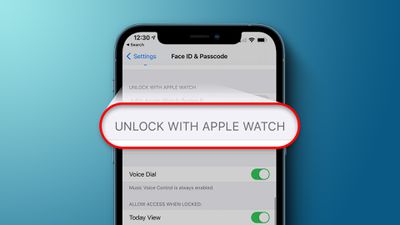
Unlock With Apple Watch Feature
Apple has published a support document outlining how the feature works and the requirements that enable it to function. Apple says that the Apple Watch unlocking process is not using Face ID to recognize and authenticate you, so the same facial scan that allows ‌Face ID‌ to unlock your phone isn't happening here.

There are a specific set of requirements that allow the Apple Watch to authenticate your identity for unlocking an iPhone. You'll need an iPhone X or later with iOS 14.5 or later and an Apple Watch Series 3 or later with watchOS 7.4 or later, which must be paired together.

Both WiFi and Bluetooth need to be activated for communication between the iPhone and the Apple Watch, and the Apple Watch needs to have a passcode and wrist detection must be enabled. Unlock with Apple Watch needs to be expressly turned on for it to function, and you can find the feature in Settings > ‌Face ID‌ & Passcode.

For the Apple Watch to authenticate your identity the watch needs to be on your wrist and unlocked, and you need to be wearing a mask that covers both the mouth and the nose, presumably to signal to the iPhone to use the secondary unlocking method rather than ‌Face ID‌.

To unlock the iPhone with the Apple Watch, you need to wake your iPhone by raising it or tapping the screen, and then glance at it to unlock. The requirement to glance at the iPhone is meant to prevent the feature from working when you're not close by your iPhone, and though not mentioned by Apple, there definitely seems to also be a proximity requirement because it will tell you if you're not close enough to your phone.

This is a feature that can allow someone else that's not you to unlock your iPhone if they're near you, have your iPhone, and are wearing a mask, so enabling it should be done with caution if other people have access to your device and you're worried about security.

It's worth noting that Unlock with Apple Watch only works for unlocking the iPhone. It does not verify identity for use with Apple Pay, passwords in Keychain, or password-protected apps, which will require either ‌Face ID‌ or your passcode.

Though not as secure as ‌Face ID‌, Unlock with Apple Watch is a convenient option for those who are tired of having to enter a passcode on their devices while wearing a mask.


Related Forum: iOS 14

Popular Stories

iOS 27 Next to iPhone

Here's When iOS 27 Rolls Out Today in Every Time Zone [Update: It's Out]

Sunday September 13, 2026 3:00 am PDT by
Update 10:04 a.m.: iOS 27 is rolling out now, though it may take a bit for all users to see it, so keep checking! Apple is about to release iOS 27, which will finally deliver more advanced Siri AI capabilities as well as a variety of other refinements, improvements, and new features to iPhones. It's Apple's biggest software update of the year, and Apple announced at Wednesday's iPhone event...
iOS 27 Icon iPhone

iOS 27 Available Today With These 8 New Features

Monday September 14, 2026 9:00 am PDT by
Update: Apple has released iOS 27. During its iPhone 18 Pro and iPhone Duo event last week, Apple announced that iOS 27 will be released widely on Monday, September 14. iOS 27 should be available around 10 a.m. Pacific Time / 1 p.m. Eastern Time today via the Settings app, under General → Software Update. Below, we have highlighted eight new features and changes coming with iOS...
deep black iphone 18 pro

Apple Says iPhone 18 Pro Max Sold in U.S. Differs in One Way

Saturday September 12, 2026 3:27 pm PDT by
As noted by Nicolas Lellouche, who writes for the French tech website Numerama, Apple has updated its tech specs pages for the iPhone 18 Pro and iPhone 18 Pro Max to clarify which models are equipped with its new C2 cellular modem and where. Apple now says the iPhone 18 Pro has a C2 modem worldwide, while the iPhone 18 Pro Max uses the chip in every country except for the U.S. According...

Top Rated Comments

alexandr Avatar
70 months ago
the watch gives you a haptic when your phone is unlocked this way and gives you the ability to lock it back up, so i don't think security is that much of an issue.
Score: 18 Votes (Like | Disagree)
techfreak23 Avatar
70 months ago

Honestly, the ONLY reason I needed to unlock my phone with a mask on is to use the Face ID on phone for Apple Pay to pay for something when I was in an establishment and had to wear a mask.

this doesn’t even work for that and that’s the main use case during COVID

aside from this it’s kinda useless
If you already have an Apple Watch and it’s with you at the grocery store while wearing a mask, why not just use the Apple Pay on your Watch…? I don’t get what the problem is with all of these people crying that it doesn’t work with Apple Pay. You have Apple Pay setup on your phone, but not your watch? What is the logic behind that? The security risk of authenticating Apple Pay on the phone this way is far greater than whatever “inconvenience” you people might be feeling. Setup Apple Pay on your Watch! That’s what it’s there for! Double clicking the side button is much faster than pulling out the phone anyway.

Score: 16 Votes (Like | Disagree)
LeadingHeat Avatar
70 months ago
It seems to work flawlessly for me so far! Glad that it’s opt-in, that increases the security of it greatly. It seems to recognize anyone wearing a mask, not just you. (If someone tries to unlock your phone it will, if you have this feature enabled.) You get a haptic feedback tap from your watch, and there’s an option to quickly lock your iPhone again if if wasn’t you. (It then requires the iPhone’s passcode to unlock it after that, Apple Watch unlocking is disabled until the phone is unlocked again).

Overall very well thought through! I’m happy with it and it’s a welcome addition to this crazy time we live in.
Score: 7 Votes (Like | Disagree)
70 months ago
I absolutely love this feature already.
Score: 6 Votes (Like | Disagree)
smoking monkey Avatar
70 months ago

If you already have an Apple Watch and it’s with you at the grocery store while wearing a mask, why not just use the Apple Pay on your Watch…? I don’t get what the problem is with all of these people crying that it doesn’t work with Apple Pay. You have Apple Pay setup on your phone, but not your watch? What is the logic behind that? The security risk of authenticating Apple Pay on the phone this way is far greater than whatever “inconvenience” you people might be feeling. Setup Apple Pay on your Watch! That’s what it’s there for! Double clicking the side button is much faster than pulling out the phone anyway.
This should be pinned! Apple Pay on the watch is the most convenient feature.
Score: 5 Votes (Like | Disagree)
Oohara Avatar
70 months ago

I absolutely love this feature already.
Same here. Wish we had it a year ago - and now that we do, boy do I wish we soon won't need it anymore.
Score: 5 Votes (Like | Disagree)

🔗 Related Apple News & Rumors

Stay updated with the latest Apple ecosystem news and verified rumors










































