macOS Big Sur 11.3 Includes Game Controller Emulation for iPhone/iPad Apps on M1 Macs - MacRumorsOpen MenuShow RoundupsShow Forums menuVisit ForumsOpen Sidebar
Skip to Content

macOS Big Sur 11.3 Includes Game Controller Emulation for iPhone/iPad Apps on M1 Macs

Over the course of the macOS Big Sur 11.3 beta, Apple has been refining and improving the way that iPad and iPhone apps run on M1 Macs. In the latest beta, Apple has added game controller emulation for ‌M1‌ devices, allowing a keyboard or a keyboard and mouse combo to function as a game controller.
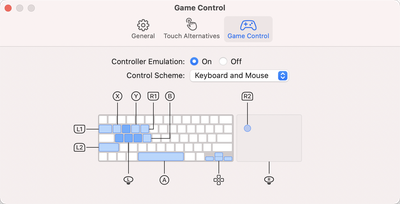
game control emulation
The new game controller feature was discovered by MacRumors contributor Steve Moser. When running an iPhone or ‌iPad‌ app, opening up the preferences brings up a Touch Alternatives and Game Control interface that can be used to make touch-based iPhone and ‌iPad‌ apps run better with Mac controls.

With Controller Emulation toggled on, common game controller buttons are mapped to keyboard keys and mouse buttons. X, for example, is mapped to Q, the direction stick is mapped to WASD, and Y is mapped to E. L1 and L2 can be accessed by pressing Tab and Shift, respectively, and the Space Bar is the A button.

Controller Emulation will allow iPhone and ‌iPad‌ games that have controller support built in to be accurately controlled with a keyboard and/or mouse when those games are played on an ‌M1‌ Mac. This feature is designed for those who don't have a game controller, as those who do can just connect a controller to play.

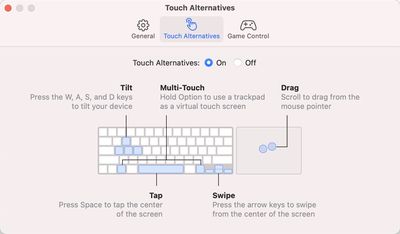
The macOS 11.3 Big Sur beta also includes the aforementioned Touch Alternatives panel for mapping touch-based features like tap, swipe, drag, and tilt to keyboard keys, and it has a feature for making iPhone and ‌iPad‌ app windows larger.

touch alternatives m1 macs
Controller Emulation and Touch Alternatives work independently of one another, and only one of these features can be enabled at a time.

As for game controller support, many current controllers from Sony and Microsoft are compatible with ‌M1‌ Macs, and the beta adds support for the latest PlayStation 5 and Xbox One X controllers.

Related Forum: macOS Big Sur

Popular Stories

Apple Event Logo

Apple Working on All-New Operating System

Wednesday July 29, 2026 11:39 am PDT by
Apple is developing an all-new operating system that is essentially a mix of tvOS, watchOS, and iOS, according to Bloomberg's Mark Gurman. In a report this week, he said the operating system will feature a grid of icons, widgets, and apps, along with customizable clock faces. The new software platform is intended for Apple's long-rumored smart home hub. With built-in facial recognition,...
imac video apple feature

Apple Made Its Second-Biggest Acquisition Ever This Year

Wednesday July 29, 2026 12:03 pm PDT by
Apple this year acquired Israeli startup Q.ai for close to $2 billion, according to the Financial Times. That would make this Apple's second-biggest acquisition ever, after it paid $3 billion for the popular headphone maker Beats in 2014. This is also the largest known Apple acquisition since the company purchased Intel's smartphone modem business and patents for $1 billion in 2019. Q.ai...
Dynamic Island iPhone 18 Pro Feature

iPhone 18 Pro: Twelve Changes Coming to Apple's Next Flagship

Thursday July 30, 2026 3:43 am PDT by
We're less than two months out from the launch of Apple's premium next-generation smartphone lineup, and while we're not expecting a dramatic change in terms of functionality, there are still several enhancements rumored to be coming to the iPhone 18 Pro and iPhone 18 Pro Max. One thing worth noting is that Apple is reportedly planning a major change to its iPhone release cycle this year,...

Top Rated Comments

70 months ago
This is going to be huge in a few years.

Score: 12 Votes (Like | Disagree)
70 months ago

This is going to be huge in a few years.

No, it won't.

Score: 5 Votes (Like | Disagree)
70 months ago
...that no one will be using because there are almost no iOS apps in the Mac App Store, and Apple prevents us from sideloading apps :)
Score: 4 Votes (Like | Disagree)
70 months ago
That's a good first step; I hope it will be configurable for those who don't like the default mappings.

Next should be the ability to allow us to create additional key mappings to correspond to touch and/or gesture controls at specific locations within an app. This would be useful for any app, not just controller-based ones.
Score: 3 Votes (Like | Disagree)
70 months ago
Article needs to be correct to say Xbox Series X controller
Score: 2 Votes (Like | Disagree)
70 months ago

hmm I must not be one of the affected, i’m sideloading practically any app i can think of just fine here with iMazing
Me too. I've sideloaded hundreds so far. It's still working despite what others have said.

However, I did see this note ('https://www.reddit.com/r/mac/comments/m7tdtk/managed_to_get_optedout_ios_apps_running_on_m1/grfri4p/') from an 11.3 beta tester, so be aware, there might be rocky roads ahead:


iMazing stopped working for me on the 11.3 beta, and apps that I’d previously installed using it don’t open.
I'd be very disappointed if this change is forced upon us in the public release of 11.3.
Score: 1 Votes (Like | Disagree)

🔗 Related Apple News & Rumors

Stay updated with the latest Apple ecosystem news and verified rumors