

Apple today seeded the second beta of an upcoming macOS Big Sur 11.3 update to developers for testing purposes, with the new beta coming two weeks after the launch of the first beta and a little over two weeks the release of macOS Big Sur 11.2, a bug fix update.

Developers can download the macOS Big Sur 11.3 beta using the Software Update mechanism in System Preferences after installing the proper profile from the Apple Developer Center.
macOS Big Sur 11.3 introduces more customization options for Safari, adding a way to rearrange the different sections on the Start Page like Favorites, Reading List, Siri Suggestions, Privacy Report, and more. Developers also have access for a new integration to develop features for the Start Page.
The update also includes optimizations for using iOS apps on M1 Macs. When running iPhone and iPad apps on M1 Macs, there's a Touch Alternatives preference pane that allows users to set keyboard commands for touch input alternatives, plus iPadOS apps launch with a larger window if the Mac's display allows it. Touch Alternatives can be enabled for iPhone or iPad apps by clicking on the app's name in the menu bar and then selecting the Preferences option. Touch Alternatives let you customize taps, swipes, and drags.
In the Reminders app, reminder lists can be sorted by Due Date, Creation Date, Priority, or Title, and there is an option to print lists by going to File > Print. Reminders can also be moved manually across lists with drag and drop, something that wasn't possible before.
Apple is adding a new "Made For You" library shortcut in Apple Music for finding personal mixes and Replay playlists, and the Listen Now section has been updated with support for highlighting live events.
There are new sorting options in the Reminders app along with options to print, and Apple Music has been updated with a Made for You shortcut and a live events option in the Listen Now section.
In the Apple News app, there's a redesigned Apple News+ tab with a dedicated "For You" section and a new Browse tab that makes it easier to browse through available content. The new For You section is designed to help Apple News+ users find favorite magazines and newspapers much faster, plus it adds new tools for managing downloaded issues.
macOS Big Sur 11.3 also adds support for the latest PlayStation 5 DualSense and Xbox Series X/S controllers for use with macOS games.
In the Apple Music app, there's a new autoplay feature that allows the streaming service to continue to play music after a playlist or music queue ends. Apple Music sources music similar to what's in a person's Apple Music library, similar to the autoplay feature added in iOS 14.
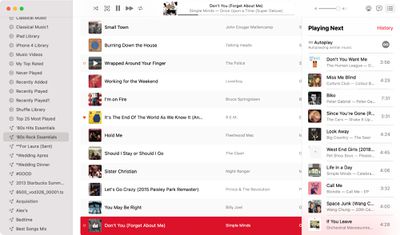
With this feature enabled, Apple Music audio will not end even after a playlist or album is over. To check that it's on, play a playlist or album and then click on the three dot/line menu button in the upper right hand corner. From there, make sure the infinity symbol is toggled on.
There's also an updated "Support" interface when accessing "About This Mac." The new design includes details on your warranty and it allows for starting a repair right from the Mac interface.
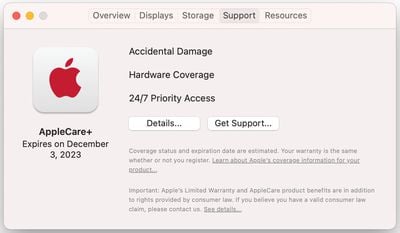
The tab works similarly to the AppleCare coverage menu in the iOS Settings app, which lets users request repairs, buy an AppleCare plan, and check their coverage.
Code in macOS Big Sur 11.3 suggests that the Optimized Battery Charging feature will now make sure the Mac's battery is fully charged before a scheduled calendar event. The Mac will charge to 100 percent three hours before a calendar event's start time.
Optimized Battery Charging is designed to preserve the lifespan of the Mac's battery by limiting the amount of time that a Mac sits at 100 percent battery.
macOS Big Sur 11.3 brings support for HomePod Stereo pairs, allowing a set of paired HomePods to be set as the default sound output option, with the two HomePods showing up as a single selectable speaker rather than separate as in prior versions of macOS.





/https://forums.macrumors.com/attachments/1733190/)
/https://forums.macrumors.com/attachments/1732263/)














































