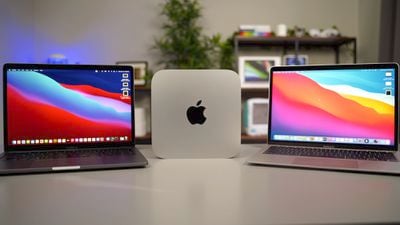
Apple's M1 Macs are out in the wild now, but ahead of the holidays, you might still be trying to figure out which one to pick up, either for yourself or as a gift for someone else. We've got all three of the new Macs available, so we thought we'd give MacRumors readers a hands-on overview of each machine in our latest YouTube video.
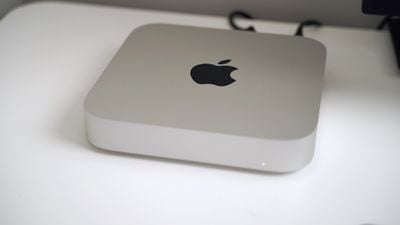
Price wise, the Mac mini is the cheapest of the bunch at $699, while the MacBook Air starts at $999 and the MacBook Pro starts at $1,299. With the Mac mini you do, of course, need to provide all of your own peripherals, including display, mouse, and keyboard at minimum.
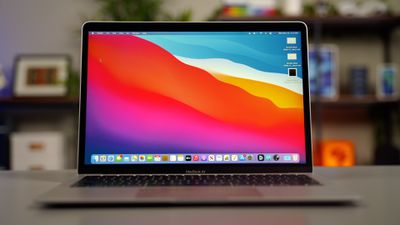
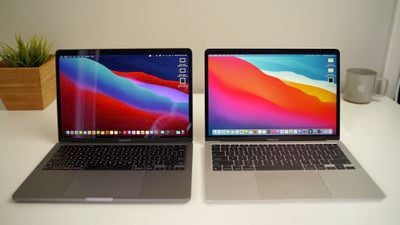
If you already have those on hand, the Mac mini is potentially the way to go. For the notebooks, the MacBook Air is lighter, but there's not a huge amount of difference in size between the Air and the Pro.
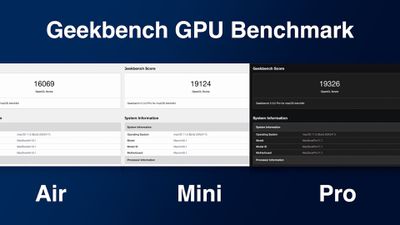
The entry-level MacBook Air has a 7-core GPU while the entry-level MacBook Pro has an 8-core GPU, which is why the price is a bit higher. If you get the 512GB SSD with the MacBook Air, you get upgraded to that 8-core GPU automatically.
There are some thermal differences between the M1 Macs, but most people may not be able to distinguish between them when it comes to performance. The Mac mini has the most space for heat dissipation, while the MacBook Pro has a fan for better thermal management.
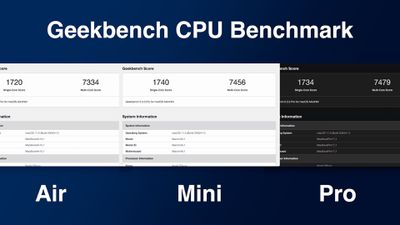
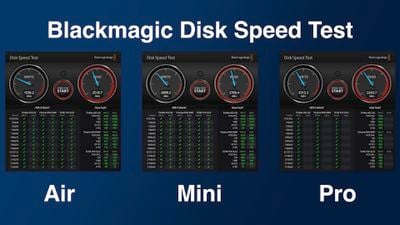
The MacBook Air, meanwhile, has no fan. You may see some slightly better sustained performance when doing system intensive tasks on the Macs with better cooling, but there's not a whole ton of difference between them. In most benchmark tests, they're all just about the same, and they're all huge upgrades over their Intel counterparts. Watch our M1 MacBook Pro vs. 2020 MacBook Pro test below to see.
As for upgrades, there's not a lot available. You can bump up the SSD storage, which is a good idea if you plan to use onboard storage and want a machine that's going to have enough space for years to come, but you can also work with external SSDs if you opt for the 256GB minimum.
You can also upgrade the RAM on each M1 Mac from 8GB to 16GB. If you have the extra $200, it's a good idea to do so for futureproofing and because you're never going to go wrong having extra RAM. This year's Macs have unified memory architecture which basically means all of the chip components can draw from the same memory pool, bringing some speed and efficiency improvements.
Apple is excellent at optimizing RAM usage and there's no exception here. You may not even need 16GB because in our testing, the M1 Macs are super quick even with the built-in 8GB.
All of the M1 Macs offer incredible performance at their price points, and in our testing, they've all outshone their Intel counterparts. macOS Big Sur runs great on the M1 Macs, and apps built for Apple Silicon are fast and efficient. Even apps not built for Apple Silicon and running under the Rosetta 2 translation layer are close to as fast as they are on Intel machines.
If you rely on specific Windows apps and regularly use Boot Camp, the M1 Macs are not for you. There is no way to run Windows on an M1 Mac at this time. CrossOver does allow for some Windows apps to be used, but this solution may not be worth the effort for heavy Windows users.
Touch ID also seems to be quicker on the M1 Macs in comparison to Intel Macs, and even small tasks like waking from sleep or switching resolutions are instantaneous. All of the Macs are close to whisper quiet. The MacBook Air makes no sound at all, while the Mac mini and the MacBook Pro rarely activate their fans even under intensive tasks.
Apple has made some serious battery life promises with the M1 Macs, and the MacBook Pro can last for up to 20 hours. We've seen that impressive battery life in day to day usage. Intel Macs have never been able to hold up to editing a video with a decent amount of battery life to spare, but the M1 Macs have no problem.
The M1 Macs are amazing so far, but it's worth keeping in mind that these are first generation machines. Apple is upgrading the entire Mac lineup to Apple Silicon chips, a process expect to take two years. These are low-end Macs that have been refreshed, and there are some more exciting, higher-end Mac refreshes in the works which could be one reason to hold out on a purchase right now.
One other consideration is design. Apple did not update the design of the new Macs, and there are some design changes rumored to be in the works for the MacBook Pro at a minimum. A fresh design could also be worth the wait.
If you need an affordable Mac for everyday tasks, the M1 Macs are a solid choice. The Mac mini is the one to get if you want a desktop, and if you need a notebook, the MacBook Air is going to work for most people. The MacBook Pro has an extra GPU core in the base model, a brighter display, and better speakers, which is a consideration. We have a full guide on the MacBook Air vs. the MacBook Pro if you're trying to choose between them.
Do you have an M1 Mac or are you going to buy one? Are you holding out for next year's Apple Silicon offerings? Let us know in the comments.
Apple today updated its U.S. trade-in estimates, raising maximum values across the iPad lineup and for most Macs following today's announcement of the new iPad mini.
Every iPad category has gained value, although the increases are relatively modest. The iPad mini and standard iPad both rise by $20, while the iPad Air gains $15 and the iPad Pro increases by $10. The revised maximum estimates...
Apple is testing OLED displays for future MacBook Air and iMac models, though both upgrades remain some way off, according to Bloomberg's Mark Gurman in his latest "Power On" newsletter.
The next refreshes of the devices are expected to retain LCD displays. Gurman anticipates a new iMac to arrive this week and a MacBook Air refresh in early 2027, but offered no time frame for either model's...
Tuesday October 20, 2026 7:00 am PDT by Joe Rossignol
As reported by 9to5Mac, Apple is now selling parts for the iPhone 18 Pro, iPhone 18 Pro Max, new Mac mini with M6 and M5 Pro chips, and new Mac Studio with M5 Max and M5 Ultra chips on its self-service repair store in the U.S., Canada, and Europe.
After ordering parts and tools, customers with the know-how can follow the steps in Apple's repair manuals for each of these devices, allowing them...
There are a few big issues. First the Air is throttled after a short period of time so it isn't as powerful as the MBP due to lack of a fan. The MBP has the dreaded and derided Touchbar for which most people find it horrendous. The Mini isn't portable so you can't use it on the go. All of the laptops have chunky bezels from the 1990s.
So each is neutered in some way or another.
I don’t think you were using computers in the 90’s if you think that’s what the bezels were like, lol. For one, they were like 10x larger and covered in beige plastic.
Also the air throttles after what, 8-10 minutes of 100% load? Big deal. I’m not using it for anything that would generate a load so large and for so long, nor are 99% of laptop users.
I will wait for the 15 inch to come out.. but I have my doubts about the validity of Apple's claims that these are really faster than Intel.. Maybe they are, maybe they arent. I am sure the pricing is a lot lower.
How are you doubting things that have been proved?
There are a few big issues. First the Air is throttled after a short period of time so it isn't as powerful as the MBP due to lack of a fan. The MBP has the dreaded and derided Touchbar for which most people find it horrendous. The Mini isn't portable so you can't use it on the go. All of the laptops have chunky bezels from the 1990s.
So each is neutered in some way or another.
BREAKING NEWS: It is being reported Apple's Mac Mini is not a portable computer. According to unnamed administration sources, the Federal Trade Commission has recently launched an investigation accusing Apple of deceptively marketing its Mac Mini as a portable on the go computer, through product marketing photographs without a visible power cord, thereby confusing consumers thinking it may be a laptop substitute suitable for on the go use.
"If you need an affordable Mac for everyday tasks, the M1 Macs are a solid choice."
Every day tasks! These things kick the crap out of the maxed out MacBook Pro 16" Im working on AND the maxed out iMac 2020 in the corner of this room. Both these machines were purchased to offer as much performance as possible. The Air, quite frankly, is a video editing monster as it is right now in its puny 8gb configuration.