Sony Cameras Can Now Be Used as Webcams for Macs

Sony today made its Imaging Edge Webcam software available for Macs, letting Mac uses transform their Sony cameras into webcams that can be used in lieu of built-in Mac webcams.
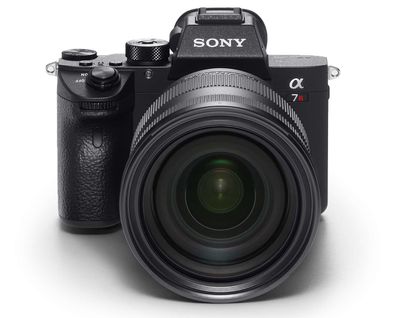
sonycamera
Sony first unveiled its Imaging Edge Webcam software for PCs in August, with the initial software limited to Windows 10 machines. At the time, Sony promised a fall expansion to the Mac, which has now happened.

Imaging Edge Webcam works with a wide range of popular E-mount, A-mount, and DSC cameras, with a full list available on Sony's website.

If you have a compatible Sony camera, the Imaging Edge Webcam software is free to download from the Sony website. macOS 10.13 to macOS 10.15 is required for the software to run.

Tag: Sony

Popular Stories

Aston Martin CarPlay Ultra Screen

Apple's CarPlay Ultra to Expand to These Vehicle Brands Later This Year

Sunday February 1, 2026 10:08 am PST by
Last year, Apple launched CarPlay Ultra, the long-awaited next-generation version of its CarPlay software system for vehicles. Nearly nine months later, CarPlay Ultra is still limited to Aston Martin's latest luxury vehicles, but that should change fairly soon. In May 2025, Apple said many other vehicle brands planned to offer CarPlay Ultra, including Hyundai, Kia, and Genesis. In his Powe...
Apple Logo Black

Apple's Next Launch is 'Imminent'

Sunday February 1, 2026 12:31 pm PST by
The calendar has turned to February, and a new report indicates that Apple's next product launch is "imminent," in the form of new MacBook Pro models. "All signs point to an imminent launch of next-generation MacBook Pros that retain the current form factor but deliver faster chips," Bloomberg's Mark Gurman said on Sunday. "I'm told the new models — code-named J714 and J716 — are slated...
Apple MacBook Pro M4 hero

New MacBook Pros Reportedly Launching Alongside macOS 26.3

Sunday February 1, 2026 5:42 am PST by
Apple is planning to launch new MacBook Pro models with M5 Pro and M5 Max chips alongside macOS 26.3, according to Bloomberg's Mark Gurman. "Apple's faster MacBook Pros are planned for the macOS 26.3 release cycle," wrote Gurman, in his Power On newsletter today. "I'm told the new models — code-named J714 and J716 — are slated for the macOS 26.3 software cycle, which runs from...
iOS 26

iOS 26.3 and iOS 26.4 Will Add These New Features to Your iPhone

Tuesday February 3, 2026 7:47 am PST by
We are still waiting for the iOS 26.3 Release Candidate to come out, so the first iOS 26.4 beta is likely still at least a week or two away. Following beta testing, iOS 26.4 will likely be released to the general public in March or April. Below, we have recapped known or rumored iOS 26.3 and iOS 26.4 features so far. iOS 26.3 iPhone to Android Transfer Tool iOS 26.3 makes it easier...
iOS 26 Home Feature

Apple Gives Final Warning to Home App Users

Tuesday February 3, 2026 8:55 am PST by
In 2022, Apple introduced a new Apple Home architecture that is "more reliable and efficient," and the deadline to upgrade and avoid issues is fast approaching. In an email this week, Apple gave customers a final reminder to upgrade their Home app by February 10, 2026. Apple says users who do not upgrade may experience issues with accessories and automations, or lose access to their smart...


Top Rated Comments

javisan Avatar
69 months ago
All of this would be pointless if Apple would just release a simple driver in Mac OS that allows user to use the iPhone as a webcam.

3rd party apps that aim to do this mainly suck and none supports FaceTime.

This would have been 10000% easier to do and more useful to the public than the 20 second hand wash software on the Apple Watch (SMH).
Score: 17 Votes (Like | Disagree)
SSD-GUY Avatar
69 months ago
Thank you, my OnlyFans subscribers are going to love this.
Score: 12 Votes (Like | Disagree)
sebastienbarre Avatar
69 months ago
Did you guys actually TRY this piece of garbage software before posting this?
I tried to install it *twice*. Not only did I had to fully reboot twice, but this thing managed to turn the voice over accessibility option on its own, and as it rebooted, my Mac started ANNOUNCING every single app being re-launched. I don't know if I should cry or laugh, but this is another fail from Sony poor quality apps.
Score: 9 Votes (Like | Disagree)
UltimateSyn Avatar
69 months ago
Apple should support the ability to use iPhones as Mac webcams, since most Mac webcams are still garbage.
Score: 8 Votes (Like | Disagree)
CD3660 Avatar
69 months ago

Apple should support the ability to use iPhones as Mac webcams, since most Mac webcams are still garbage.
I’d definitely agree with this proposition. It’s really not acceptable to have such poor webcams in a 2020 MacBook Pro that costs £2,000.
Score: 7 Votes (Like | Disagree)
roncron Avatar
69 months ago
Using a good digital camera as a webcam may be excessive for many folks, but for some of us it is extremely helpful.

Sony and the other major camera brands have released this type of software, but it unfortunately doesn't support all the cameras these manufacturers sell.

If you need this functionality and your camera isn't supported, you've got options. The cheapest option (free, actually) is to use your iPhone or Android phone as a webcam using the free Iriun software. You install the software on your computer and install the Iriun app on your phone. The two devices need to be on the same wifi network, and it works pretty well in my experience. iPhone cameras (even on older iPhone models) are leagues better than the webcams built into the latest, priciest Macbook Pros.

Another option is if you have a digital camera with an HDMI or mini HDMI out, you can get a dongle that converts the camera's video signal from HDMI to USB in a format your Mac or Windows machine can use with Zoom, Skype, etc using no additional software.

These dongles range in price from $20 for cheap, no-name ones at Amazon to name-brand ones like the
Elgato Cam Link 4K ($130) and the Pengo HDMI to USB video grabber ($90). I have the Pengo unit and one of the cheap no-name ones and both work great, without any additional software.

This capability is super helpful for anyone who needs more sharpness, better contrast, better colors, or better handling of suboptimal lighting than what you get from cheap webcams or the webcams built in to most computers.

My use-case is I teach at a small college, and some of my classes are online using Zoom. I need to have a webcam aimed at the whiteboard, which I stand in front of and write on as I teach, as if classes were in person on campus. The webcam in my Macbook sucks, and the well-reviewed Logitech webcams have been nearly impossible to find since the pandemic happened (except on eBay, where price gougers miraculously have plenty of new units in sealed boxes which they're happy to sell you for 2x the normal price). I've tried a couple of the inexpensive, no-name webcams on Amazon and I managed to find one of the well-reviewed Logitech ones, but the image they produce isn't good enough for students to clearly see what I'm writing on the whiteboard, plus they do into and out of focus depending on where I'm standing or what else is in the frame. I happen to have a Sony RX100 with an HDMI out, so I bought one of the $20 HDMI to USB dongles from Amazon and it works great.
Score: 4 Votes (Like | Disagree)
















