

What's New in iOS 14 Beta 5: Bigger Apple News Widget, Alarm Clock Wheel, Hidden Photo Album Changes and More - MacRumorsOpen MenuShow RoundupsShow Forums menuVisit ForumsOpen Sidebar
Skip to Content

What's New in iOS 14 Beta 5: Bigger Apple News Widget, Alarm Clock Wheel, Hidden Photo Album Changes and More

Apple today released the fifth developer betas of iOS 14 and iPadOS 14 for testing purposes, updating and refining some of the new features that are included in the new software.

As the beta testing period goes on, changes get smaller and less notable, but we've highlighted the few new features that can be found in iOS 14 beta 5.

- Apple News Widget - The Apple News widget has a new option for a taller widget window that provides more space to display additional news stories. The size of the widget prevents it from being used on the Home Screen.
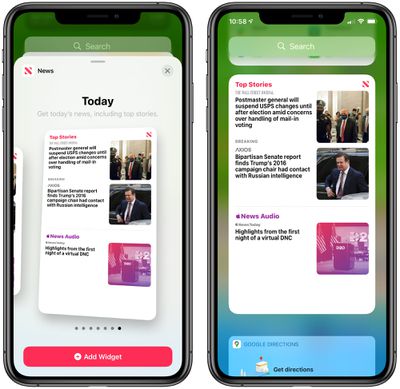
largernewswidget
- Widget Privacy - For apps that use location, there's now a popup that asks if you want to allow widgets for those apps to also use your location data. Widgets can use location data for up to 15 minutes when activated, and the Location Services Privacy settings for apps now mention widgets.
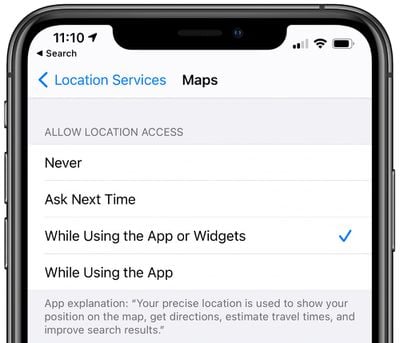
widgetprivacymaps
- Alarm Clock Wheel - When setting an alarm in the Clock app, you can now use a finger to swipe through the clock wheel to set the time rather than having to type it in. It's much smaller than the wheel in iOS 13.6, and there's still an option to type a time.
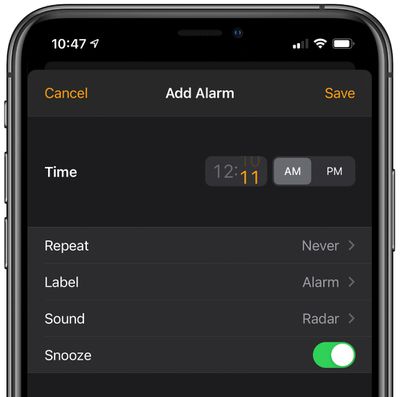
alarmclockscroller
- Exposure Notifications - The interface for Exposure Notifications has changed in iOS 14 beta 5. Tapping on "Turn on Exposure Notifications" brings up an option to choose a country, region, or state, and it will let you know if an Exposure Notification app is available for your area. This interface is different from the iOS 13.6 interface and the interface available in iOS 14 beta 4.
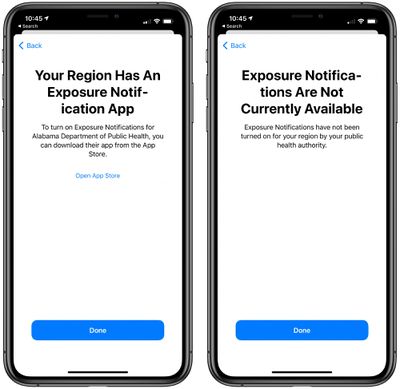
exposurenotificationavailability
- Hidden Photo Albums - There's a new Hidden Album setting in photos that when turned on, causes the Hidden album in Photos to be hidden from the Albums list. The Hidden album remains available in the image picker.
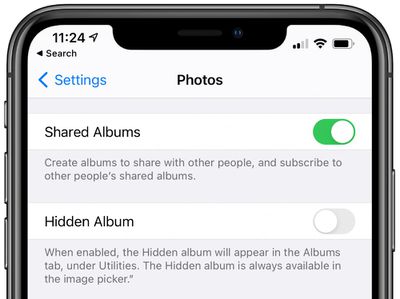
photoshiddenalbum
- HomeKit Control Center - HomeKit favorites in Control Center now feature smaller tiles and smarter organization that provides access to more shortcuts at a tap.
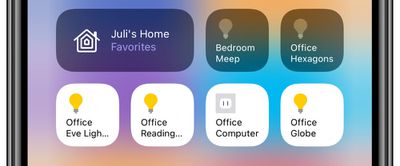
homekitwidgetorganization
- Widget Fixes - The Weather widget is fixed and updates at more appropriate intervals, and widgets are now blocked for Screen Time when a parent app is blocked.

- Battery Charge - In the Settings app under Battery, the Last Charge Level section has been tweaked a bit. Rather than displaying the last charge level over to the right of the interface, it's now displayed with the Last Charged wording to make it easier to see at a glance.
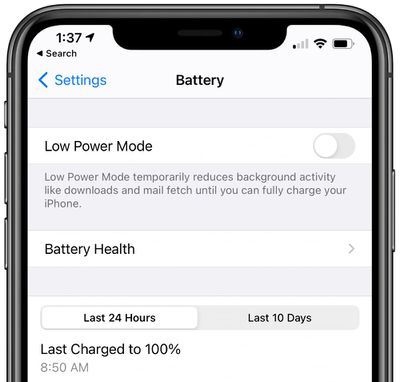
batterylastcharged
- Spatial Audio Video - In the iOS 14 beta 5 code, there's a visualization of how the spatial audio feature for the AirPods Pro works. It's not clear where this video will be shown (perhaps in setup) and though the video is available, spatial audio has not yet been enabled.


Know of any other changes in iOS 14 beta 5 that we didn't list here? Let us know in the comments and we'll add them.


Related Forum: iOS 14

Popular Stories

Apple Event Logo

Apple Working on All-New Operating System

Wednesday July 29, 2026 11:39 am PDT by
Apple is developing an all-new operating system that is essentially a mix of tvOS, watchOS, and iOS, according to Bloomberg's Mark Gurman. In a report this week, he said the operating system will feature a grid of icons, widgets, and apps, along with customizable clock faces. The new software platform is intended for Apple's long-rumored smart home hub. With built-in facial recognition,...

imac video apple feature

Apple Made Its Second-Biggest Acquisition Ever This Year

Wednesday July 29, 2026 12:03 pm PDT by
Apple this year acquired Israeli startup Q.ai for close to $2 billion, according to the Financial Times. That would make this Apple's second-biggest acquisition ever, after it paid $3 billion for the popular headphone maker Beats in 2014. This is also the largest known Apple acquisition since the company purchased Intel's smartphone modem business and patents for $1 billion in 2019. Q.ai...
Dynamic Island iPhone 18 Pro Feature

iPhone 18 Pro: Twelve Changes Coming to Apple's Next Flagship

Thursday July 30, 2026 3:43 am PDT by
We're less than two months out from the launch of Apple's premium next-generation smartphone lineup, and while we're not expecting a dramatic change in terms of functionality, there are still several enhancements rumored to be coming to the iPhone 18 Pro and iPhone 18 Pro Max. One thing worth noting is that Apple is reportedly planning a major change to its iPhone release cycle this year,...

Top Rated Comments

78 months ago
Two small but useful features that I have been waiting for from Apple for years:

1- Pinned Number row on top of the keyboard. (Faster since no need to change back and forth between numbers and letters).

2- Private Photo Album secured by Face-ID/Password to hide most sensitive photos. (Currently millions rely on 3rd party apps for a small feature that could be easily built in the default Photos apps by Apple).

Please Like if you agree.
Score: 72 Votes (Like | Disagree)
cipher29 Avatar
78 months ago

Eeeeesh.....I hope it's not this way on my BMW. I've got a widescreen display so this would look weird. Maybe it's only for square displays I wonder?
How do you know if someone has a BMW? Don't worry - they'll let you know....
Score: 20 Votes (Like | Disagree)
itsmilo Avatar
78 months ago
Its like they listened to my feedback in regards of the silly time picker in the clock app and also that an album called hidden is useless. Now all they need to add is FaceID lock for that hidden folder.
Score: 18 Votes (Like | Disagree)
78 months ago
What they need to do is add a passcode lock option to the hidden album like they do with the Notes app.
Score: 12 Votes (Like | Disagree)
Grigory Avatar
78 months ago

Two small but useful features that I have been waiting for from Apple for years:

1- Pinned Number row on top of the keyboard. (Faster since no need to change back and forth between numbers and letters).

2- Private Photo Album secured by Face-ID/Password to hide most sensitive photos. (Currently millions rely on 3rd party apps for a small feature that could be easily built in the default Photos apps by Apple).

Please Like if you agree.
Man you don’t actually need an extra row of numbers, you can just press numbers icon on the bottom left of the keyboard and without lifting your finger up, move it to the number you want. Very handful feature
Score: 11 Votes (Like | Disagree)
TheYayAreaLiving πŸŽ—οΈ Avatar
78 months ago

Still that ugly red Apple Music icon.
It's a classic. brings back memories from ios 7
Score: 10 Votes (Like | Disagree)

πŸ”— Related Apple News & Rumors

Stay updated with the latest Apple ecosystem news and verified rumors











































