

HYPER Introduces Updated HyperDrive DUO 7-in-2 USB-C Hub for Mac Notebooks - MacRumorsOpen MenuShow RoundupsShow Forums menuVisit ForumsOpen Sidebar
Skip to Content

HYPER Introduces Updated HyperDrive DUO 7-in-2 USB-C Hub for Mac Notebooks

by

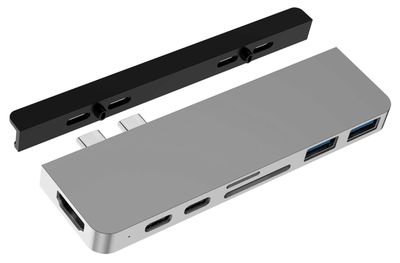
USB-C hubs that attach directly to Apple's notebooks have become quite commonplace in recent years, but Sanho Corporation's HYPER brand is today releasing an updated version of its HyperDrive Duo hub that includes a couple of new twists.
hyperdrive duo 2020
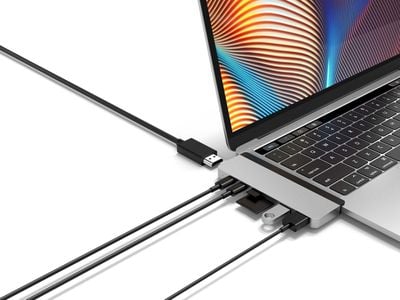
As with most USB-C hubs, the new HyperDrive DUO includes an array of expansion ports for your Mac, including an HDMI port, a pair of USB-C ports (one capable of Thunderbolt 3 with 100W power delivery), a pair of USB-A ports, and slots for both SD and microSD cards. New in this updated Mac version of the HyperDrive hub is support for 4K 60Hz HDMI.

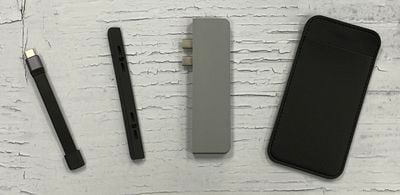
Another new feature of the new HyperDrive DUO is that it comes with a new removable magnetic grip that is inserted between the hub and the notebook that increases the sturdiness of the attachment to help prevent accidental disconnects that can result in loss of data transmission or even data corruption. A similar grip can be found on the company's iPad Pro USB-C hub.
hyperdrive duo 2020 connections
The HyperDrive DUO itself is equipped with longer than normal USB-C connectors that extend through the magnetic grip, but the design also means that the accessory can be used with many MacBook cases by simply removing the magnetic grip, with the MacBook's case serving as the extra spacer for the connectors.

And for those who want to use the HyperDrive DUO hub with non-MacBook USB-C devices like an iPad Pro, it also comes with a short extension cable that gives flexibility for connecting to any single-connector USB-C device. A vegan leather pouch helps keep the hub, grip and extension cable protected and organized for travel.
hyperdrive duo 2020 parts
The HyperDrive DUO is launching today for $99.99 in silver and space gray through HyperShop.com, B&H Photo, and other retailers.

Note: MacRumors is an affiliate partner with some of these vendors. When you click a link and make a purchase, we may receive a small payment, which helps us keep the site running.


Tag: Hyper

Top Rated Comments

baryon Avatar
85 months ago
Wow! For the price of $100 and some awkward bulkiness, you can now add the same, necessary functionality** to your computer that used to be standard several years ago, and is still standard on cheaper computers! What a time to be alive! But it's okay, in 10 years USB-C will be the standard for everything, and while your computer will be way obsolete by then, it will finally be able to function as designed without dongles!

** Minus one USB port. Some USB accessories may simply not work with no explanation. So you will probably need to buy 2-3 of these dongles just in case one only works with one thing, while the other only works with another thing. But you can only use one at a time. So it will really cost you $300-400 to get back the same functionality that Apple removed several years ago. But it's okay, because it's somehow better, now pay up!

Score: 14 Votes (Like | Disagree)
85 months ago
There would be no need for a product like this if Apple would have done the job properly and included more ports with the 2019 MBP when it was redesigned. They increased the thickness and weight, but still dug their heals in over USB-A, HDMI, etc. Now before any of you say 'more ports would have made it much thicker', have a look at the Lenovo X1 Carbon. It is thinner than the MBP, but yet has 2 x USB-A, 2 x USB-C/TB, HDMI and a headphone jack. Okay there is a proprietary ethernet port too, which requires a dongle, but it is an ultrabook. The MBP is sold as a mobile workstation.

There is no plausible excuse for not having sufficient ports on the 16" MBP, other than Apple treating its customer base with contempt as usual.
Score: 10 Votes (Like | Disagree)
otternonsense Avatar
85 months ago
Some ports should have never been omitted from the MBP chassis, like HDMI out. Apple's own dongle has been problematic with some 4K displays at work, and some afterparty dongles are not recognised at all by older screens and projectors (because we kinda have to present our work at clients' locations and OTA is rarely an option). Catalina updates have further broken support for screens that used to work just fine before.

3 years and counting with this USB-C only nuisance of a Mac and the only "improvement" I can think of is that usb-c to lightning cables have become a thing.


There is no plausible excuse for not having sufficient ports on the 16" MBP, other than Apple treating its customer base with contempt as usual.
Just solving problems they created themselves by selling their own adapters and dongles. How do you think the "other" revenue category became so big. Contempt and greed hand in hand.


Score: 7 Votes (Like | Disagree)
akbarali.ch Avatar
85 months ago
Why there's no simple USB-C hub, like with 4 USBC ports or 6 USBC ports. Like we have in regular USB hubs. Every type-C hub is the same as every other shoved with ports I don't want or need. They all are the same. There's pretty much no variations from brand to brand. Are there some underlying technological limitations?
Score: 7 Votes (Like | Disagree)
85 months ago

Why there's no simple USB-C hub, like with 4 USBC ports or 6 USBC ports.
...because implementing advanced USB-C features like DisplayPort and improved power delivery in a hub is complicated and you'd just be left with 4-6 USB-C shaped USB 3.1 ports that offered no advantage over regular USB-A (...and pretty much every USB-C peripheral not made by Apple comes with a USB-A cable or adapter anyway).

Remember, these devices are primarily about restoring the ports that should have been there all along on a pro laptop.

Ah. USB-C: a great solution for a phone or tablet that only has space for a single ultra-thin port - a pointless complication on a proper laptop or desktop that should have space for dedicated ports (that doesn't even make USB 3 any faster).


The product page doesn't mention Thunderbolt at all, so this seems to be an error. It's just USB-Power Delivery; it's a USB-C hub, not a Thunderbolt dock.
If you look at the picture, it connects to both TB3 ports on the side of the MacBook - pretty sure that only one of those is used to drive the extra ports on the dock, the other is wired directly to the first USB-C port on the dock. Hence it claims 40Gbps/100W charging on one port - but it would need to be certified by Intel to be called "Thunderbolt" .
Score: 6 Votes (Like | Disagree)
85 months ago
So now we need dongles for dongles. Let it be noted that these are all solutions to problems that Apple chose to create.

I have a similar dongle for my all USB-C MacBook Pro. It wriggles like crazy. The amount of large file transfers failed due to moving the laptop slightly to one side or reaching out and accidentally touching the cable is annoyingly staggering. If you have an all USB-C Mac, invest in a hub that connects with a wire, not one that sits firmly on one side. You'll have a more reliable setup. However, stable or not, sometimes when connecting a USB/3 drive, my wireless connection will erratically drop until I disconnect the dongle. It's really touch and (no) go. Thank you Apple. I know, "It's your fault for getting a ****** dongle. Serves you right for being stingy on good accessories," some of you might want to say, only that the dongle was actually a rather expensive one, had good reviews and was not advertised as "******," otherwise I'd not buy it in the first place. You only find out when it's too late, usually when it's too late to return the dongle or the Mac. Once upon a time, there was a laptop that you took out of the box, and "it just worked." Alas, many believe nowadays that this was just a myth. Again, thank you Apple.

Luckily for me, I got my old MacBook Retina 13" model with integrated USB-3 ports and HDMI and additional storage expansion though a nifty drive repaired and working again. I'm keeping this baby until one of us drops dead (I still prefer it to be my Mac, for all the love I feel towards it). I just hope I can find a sucker to buy my "New" MacBook Pro 13. Should't be too hard, after all, it's newer, thinner and shinier. After all, I got doped into being it, and I'm not the dumbest kid on the block. It's hardly been used at all (as soon as I got my old Mac repaired, I preferred using it instead). I'll even throw the dongle and the MagSafe workaround cable into the mix for free (yeah, workaround is the name of the game with the new generation). Be my guest.
Score: 5 Votes (Like | Disagree)

Popular Stories

Apple MacBook Pro with PROLED XDR Display family lineup feature

Apple Announces OLED MacBook Pro With Touch Display

Wednesday October 28, 2026 10:11 am PDT by
Apple today announced a new high-end MacBook Pro, which is available in 14-inch and 16-inch sizes. The new device has a PROLED XDR display that supports touch gestures, and a glowing rear Apple logo. Pricing on the MacBook Pro starts at $2,899 for the 14-inch model and $3,399 for the 16-inch model. Apple says the MacBook Pro has the "world's best display in a pro laptop." The PROLED...
iPhone Duo Display Cracking

Apple Alerts Stores to iPhone Duo's Display Cracking Issue

Friday October 30, 2026 3:20 pm PDT by
In a memo shared with Apple Stores and Apple Authorized Service Providers this week, and later obtained by MacRumors, Apple provided technicians with guidance on how to diagnose and address the iPhone Duo's inner display cracking issue. If a customer reports the issue, Apple advised technicians to inspect the iPhone Duo and repair or replace it in accordance with their standard procedures....
iPad mini OLED feature 1

Apple Executive Comments on New iPad Mini Lacking 120Hz Display

Thursday October 29, 2026 1:47 pm PDT by
While the new iPad mini has an OLED display, the device does not support ProMotion, meaning the display's refresh rate is limited to 60Hz instead of 120Hz. ProMotion support would have allowed for the iPad mini's refresh rate to automatically adjust from 10Hz to 120Hz depending on the content being displayed, but evidently Apple has kept the feature exclusive to the iPad Pro among iPad...
Latest Stories
Apple Watch Ultra 4 Hits All-Time Low Price With Amazon's $99 Discount
2 hours ago
Reminder: Apple's Big Discount on Beats 360 Ear Cushions Ends Today
2 hours ago
Here's a New Tour of Apple's HomeView Software
2 hours ago
Apple Reveals New iPad Mini's Battery Capacity
4 hours ago
Top Stories: Apple's Big MacBook Pro, iPad mini and iMac Updates
5 hours ago
'Pluribus' Season 2 Reportedly Starts Production Today
11 hours ago
iPhone 18 Pro Sales Surge in China, Offsetting Decline in U.S. and Japan
12 hours ago
HomeView Software 27.2: Wallpapers, Control Center, and More
19 hours ago
Apple Alerts Stores to iPhone Duo's Display Cracking Issue
20 hours ago
iOS 27.3 Will Enable These Apple Intelligence Features in China
20 hours ago
Apple Says iOS 27.3 Beta Coming Next Week
20 hours ago
Apple's Flash Storage Suppliers Are Finally 'Getting Their Revenge'
22 hours ago
14 New Things Your iPhone Can Do in iOS 27.2
22 hours ago
iPhone Duo Review: One Week Later
23 hours ago
Samsung Mocks iPhone Duo Display Cracks in New Ad Campaign
1 day ago
The MacRumors Show: OLED MacBook Pro, iPad Mini 8, and More
1 day ago
MacBook Pro With Touch Display: 15 More Details Revealed
1 day ago
Russia Places Apple on State Surveillance Registry
1 day ago
Halloween Weekend Brings Discounts on Apple Accessories and Pre-Orders
1 day ago
Apple Has Released More Than 25 New Products in the Past Two Months
1 day ago
Local Code Launches as Free, Private AI Assistant Tool for Mac
1 day ago
Apple Acquires Ascend.io
1 day ago
HomePod Mini 2 Launches Today: All the New Features
1 day ago
AirTag 2 4-Pack Drops to New Low Price of $69.99
1 day ago
Rian Johnson's iPhone Camera App Goes Viral
1 day ago
Where Did All the iPhone Duos Go? Mostly to Apple's Stores
1 day ago
Apple's Touchscreen MacBook Pro Could Ship 1.5M Units in 2027
1 day ago
New Apple TV 4K and iPad Mini: RAM Amounts Revealed
2 days ago
Apple Executive Comments on New iPad Mini Lacking 120Hz Display
2 days ago
Here's a Hands-On Look at HomePod Mini 2's New Two-Tone Colors
2 days ago

🔗 Related Apple News & Rumors

Stay updated with the latest Apple ecosystem news and verified rumors








































