

Hands-On With Logitech's New Keyboard Case With Trackpad for iPad Air [Updated] - MacRumorsOpen MenuShow RoundupsShow Forums menuVisit ForumsOpen Sidebar
Skip to Content

Hands-On With Logitech's New Keyboard Case With Trackpad for iPad Air [Updated]

When Apple debuted the new Magic Keyboard with Trackpad for the iPad Pro, Logitech also announced new keyboards with trackpads that take advantage of the trackpad functionality in iPadOS 13.4 but are designed for older iPads, including the most recent iPad Air, the 10.5-inch ‌iPad Pro‌, and the 7th-generation iPad.


We got our hands on one of the new Logitech Combo Touch Keyboard Cases with Trackpad designed for the ‌iPad Air‌, and we thought we'd check it out to see how it works and whether it's worth the $150 purchase price.

Design wise, this is a high-quality keyboard case that's got a Microsoft Surface look and feel to it thanks to the fabric build, offering full protection for the ‌iPad‌ except for the section where the keyboard connects. With the keyboard attached, though, the ‌iPad‌ is protected when the case is closed up and not in use.

logitechkeyboardtrackpad
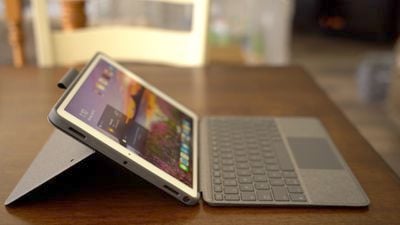
A pop-out kickstand provides 40 degrees of adjustment so it can be set to different angles for typing, watching media content, and browsing the web, and it's a solid kickstand that works well. There's also a handy Apple Pencil holder at the top to keep that accessory tucked away when not in use.
logitechkeyboardkickstand
The trackpad and keyboard combo is fantastic with the iOS 13.4 trackpad integration, and it adds a new level of productivity to cases that just offer keyboards. The trackpad is a bit firm and there's a small zone at the top where it can't be clicked, but that doesn't hinder every day use.

Smooth scrolling, tap to click, and gesture support make it a pleasant usage experience, and it's clear that this was designed from the ground up with iOS 13.4 in mind. It's a solid experience that outperforms the Brydge Pro+ with trackpad that we also recently looked at.
logitechkeyboard
The Logitech Combo Touch Keyboard Case supports the same gestures that you get with a Magic Trackpad 2. A three finger swipe to the left or the right swaps between apps, a three finger swipe down goes to the Home screen, a two finger swipe down brings up Spotlight search, and a three finger swipe up opens up the multitasking interface.

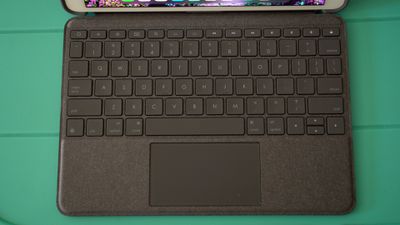
The keyboard is a little bit cramped when typing, but the keys feel great under the fingers with a decent amount of key travel. We did run into an issue where some keys occasionally failed to work, which as cover in the update below, was fixed by changing the settings of the keyboard.

logitechkeyboardtrackpad2
The keys are backlit and brightness can be toggled using function keys, with other options available for accessing the Home screen, adjusting screen brightness, accessing search, and accessing media controls.

logitechkeyboardlapability
When using this keyboard in the lap without a flat surface, it works, but it's not the best experience. It's simple to type, but there is some screen wobble depending on how hard you're typing.

All in all, this is a solid keyboard option for those who don't have an ‌iPad Pro‌ and won't be able to get the Magic Keyboard. For those who want to add more functionality to their iPads and use them for a lot of typing and tasks where a trackpad would come in handy, Logitech's Combo Touch Keyboard Cases with Trackpad are well worth the purchase price and can be picked up from the Apple Store.

Update: As suggested by on the MacRumors forums, the bug where the keys weren't working properly was fixed by opening up Settings, accessing the General setting, and changing the language of the keyboard to U.S. English instead of automatic.


Popular Stories

Apple Event Logo

Apple Working on All-New Operating System

Wednesday July 29, 2026 11:39 am PDT by
Apple is developing an all-new operating system that is essentially a mix of tvOS, watchOS, and iOS, according to Bloomberg's Mark Gurman. In a report this week, he said the operating system will feature a grid of icons, widgets, and apps, along with customizable clock faces. The new software platform is intended for Apple's long-rumored smart home hub. With built-in facial recognition,...

imac video apple feature

Apple Made Its Second-Biggest Acquisition Ever This Year

Wednesday July 29, 2026 12:03 pm PDT by
Apple this year acquired Israeli startup Q.ai for close to $2 billion, according to the Financial Times. That would make this Apple's second-biggest acquisition ever, after it paid $3 billion for the popular headphone maker Beats in 2014. This is also the largest known Apple acquisition since the company purchased Intel's smartphone modem business and patents for $1 billion in 2019. Q.ai...
Dynamic Island iPhone 18 Pro Feature

iPhone 18 Pro: Twelve Changes Coming to Apple's Next Flagship

Thursday July 30, 2026 3:43 am PDT by
We're less than two months out from the launch of Apple's premium next-generation smartphone lineup, and while we're not expecting a dramatic change in terms of functionality, there are still several enhancements rumored to be coming to the iPhone 18 Pro and iPhone 18 Pro Max. One thing worth noting is that Apple is reportedly planning a major change to its iPhone release cycle this year,...

Top Rated Comments

urnotl33t Avatar
82 months ago

Yeah, magic keyboard doesn't have any of those nasty function keys cluttering it up like the Logitech does. Functionality be damned!
Careful what we wish for! Apple is not above “addressing” these complaints about F-keys. They WILL put an EmojiBar on this mofo! Don’t taunt them...
Score: 8 Votes (Like | Disagree)
82 months ago
The occasional some keys not working was addressed in the macrumor forums in a Logitech keyboard thread. The issue is in the settings -> general —> keyboard -> language is set to “automatic” and needs to be changed to us English. This fixes the issue. Please try this and update the review. Thanks.
Score: 7 Votes (Like | Disagree)
82 months ago
I bet the non-working keys can be fixed by setting the keyboard to the language of your choice rather than depending on the "automatic" setting in iPadOS. Settings/General/Keyboard/Hardware Keyboard/English (US) or whatever. This all began with 13.4 for both of my iPad Pros. They both use Logitech keyboards and both had the non-functioning single or double quote, I don't remember which, until I fixed the keyboard language issue.
Score: 6 Votes (Like | Disagree)
abrantes09 Avatar
82 months ago
If they made this for the iPad pro... oh i'd buy it so quick...
Score: 5 Votes (Like | Disagree)
Herrpod Avatar
82 months ago

Looks ugly compared to the magic keyboard
Yeah, magic keyboard doesn't have any of those nasty function keys cluttering it up like the Logitech does. Functionality be damned!
Score: 3 Votes (Like | Disagree)
82 months ago

I hope Logitech is working on a 2018/2020 Pro version.
I would probably buy it depending on price.

Aren't these cases "official" 3rd party products though? I'm guessing Apple/Logitech have an agreement where Apple makes the Pro keyboard case (Magic Keyboard) and Logitech makes the normal iPad keyboard case.

Maybe it's just a timed agreement though and we'll get one sometime soon.
Score: 2 Votes (Like | Disagree)

🔗 Related Apple News & Rumors

Stay updated with the latest Apple ecosystem news and verified rumors











































